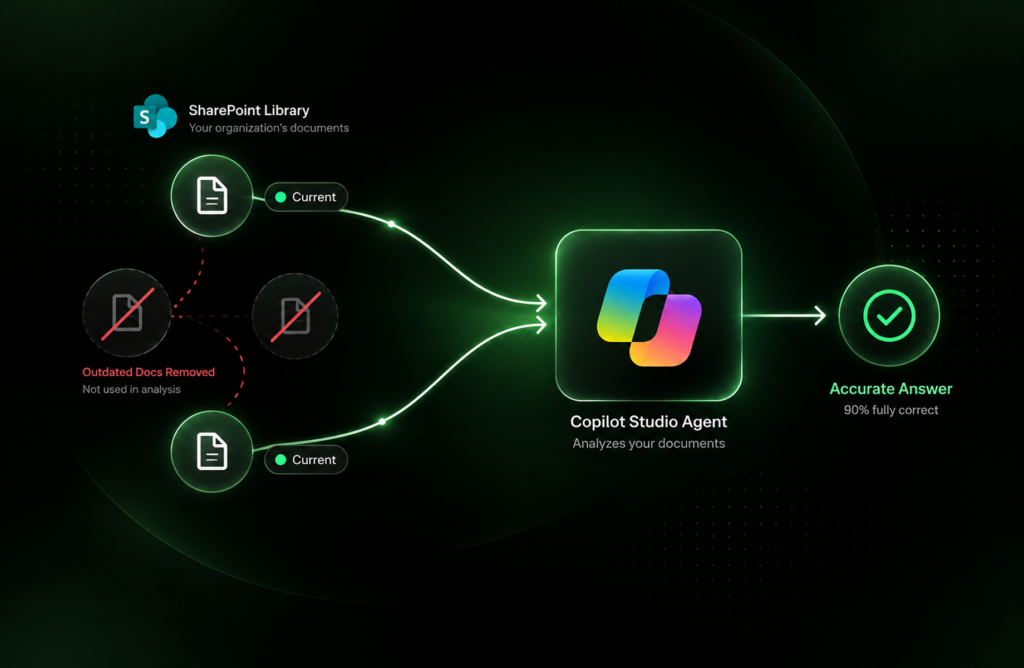
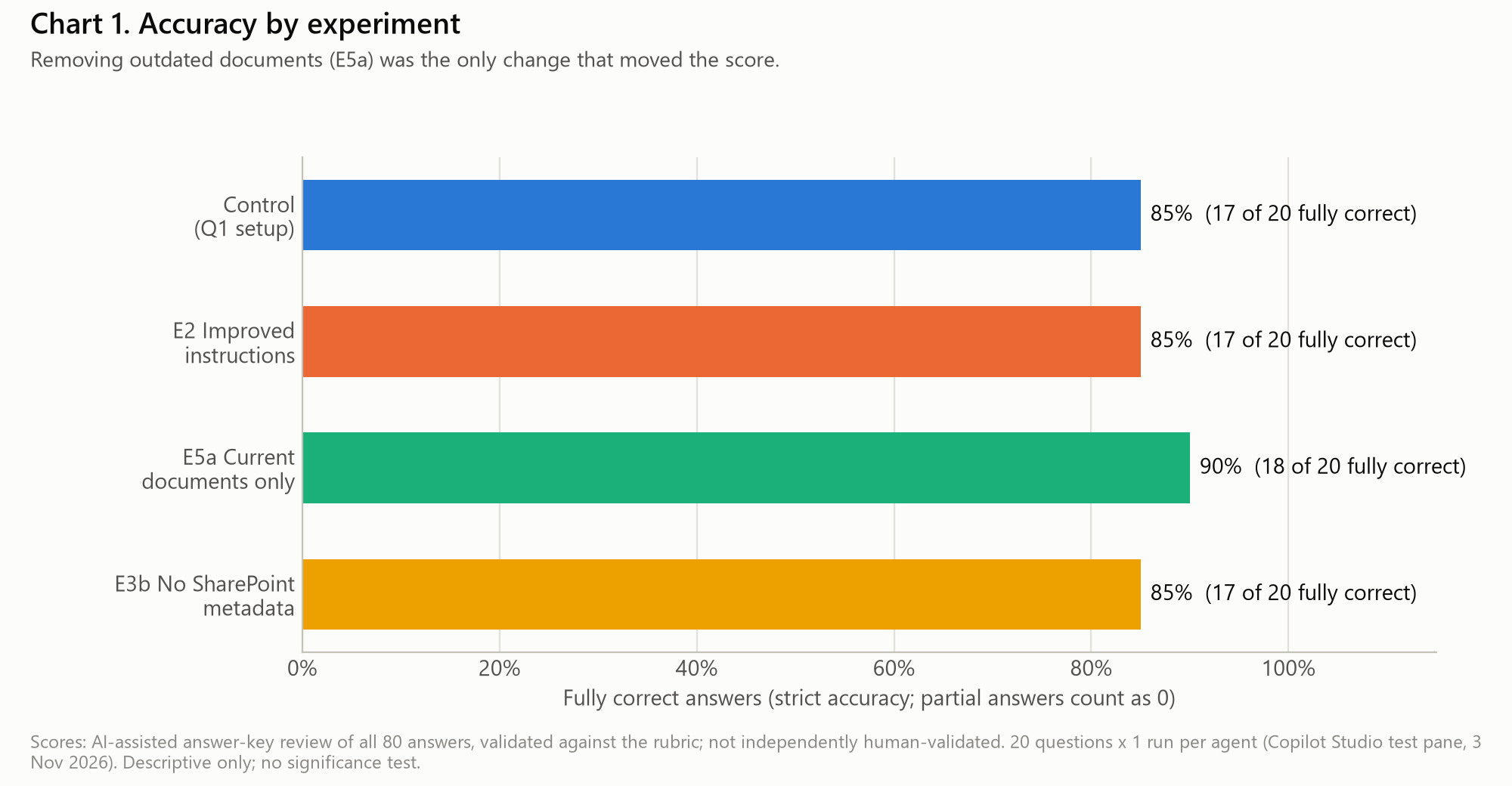
In short. An AI agent that quotes a retired policy with confidence creates compliance and audit risk, so it pays to know what drives answer accuracy before rollout. We tested four Copilot Studio agents on the same 20 questions, changing one thing per agent. Removing outdated documents from the library was the only change that moved the score (90% fully correct against 85%). Stronger instructions and removing SharePoint metadata columns produced exactly the same results as our baseline. The test is small, so these results are best read as early signals, with repeated runs to follow.
Why Answer Accuracy Is the Foundation of Trust in Copilot Agents
When a colleague asks an AI agent “What is our current password policy?”, they expect one answer: the right one. In a real document library that is harder than it sounds. Libraries hold the current policy, the version it replaced, a draft that never went live and an old copy someone saved “just in case”. An agent that blends these can sound confident while quoting a rule that stopped applying two years ago. For compliance, HR and finance content, accurate answers are what make an agent something teams can act on and auditors can trace.
Earlier this year our first study compared Copilot Studio agents with and without SharePoint metadata. When we later audited that study, we found that both conditions had run against the same live library at different times, so any metadata effect was mixed up with changes in the search index and the platform. For this second study we rebuilt the experiment so that each agent differs from a baseline in one thing only, and asked a practical question: which configuration changes actually improve answers?
What we tested
We built four Copilot Studio agents with the same model setting, the same knowledge settings and the same 20 questions. Each experimental agent differed from the Control in exactly one way.
| Agent | What changed | The question it answers |
|---|---|---|
| Control | Baseline: our original instructions | What is the baseline? |
| E2: Improved instructions | Five extra rules on versions and status (prefer current documents, label non-current ones, resolve conflicts, say when nothing answers) | Can better instructions fix version confusion? |
| E5a: Current documents only | The five outdated documents (retired, superseded, draft, “OLD”) removed | Does cleaning the library help? |
| E3b: No SharePoint metadata | Same 15 documents, with metadata columns and embedded SharePoint properties removed | Does SharePoint metadata improve answers? |
The knowledge base is a fictional company’s compliance library of 15 Word documents: policies, a procedure, a training guide, audit reports and a risk assessment. Five are deliberately outdated. The 20 questions come from our first study and cover version and status, compliance frameworks, document types, classification, cross-references and one question the library cannot answer.
Test Design: SharePoint Knowledge Sources and Answer Scoring
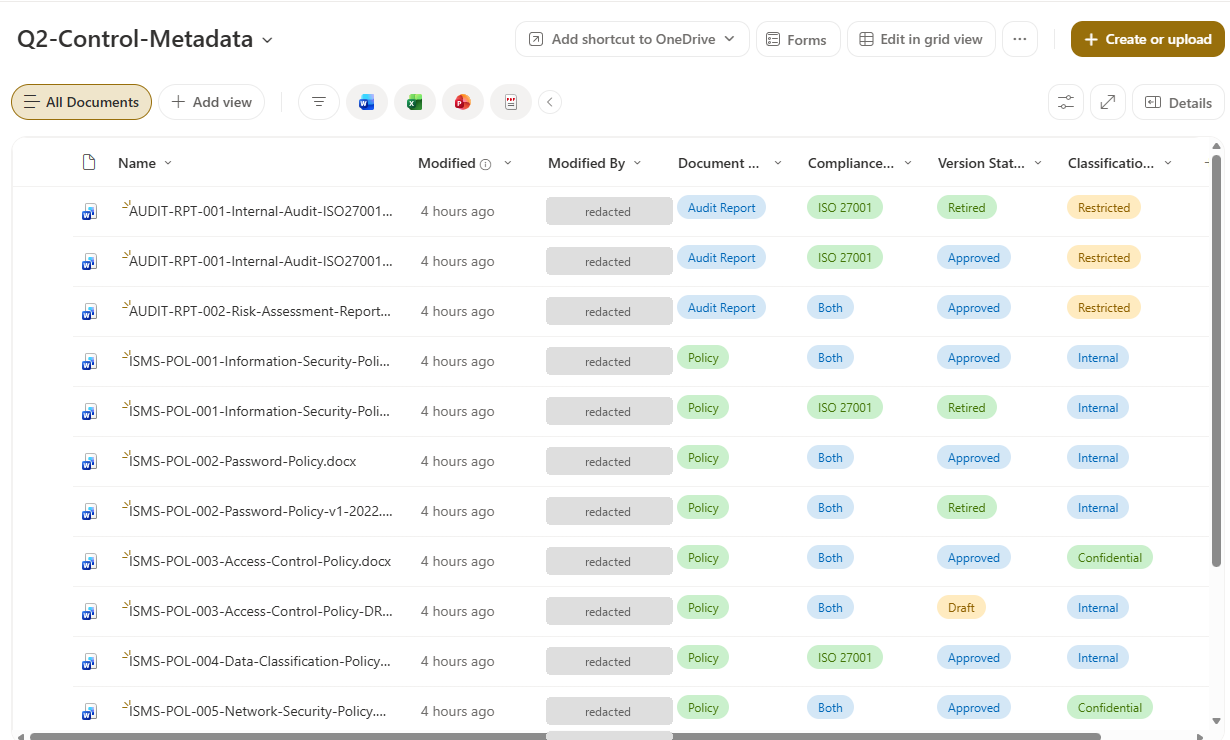
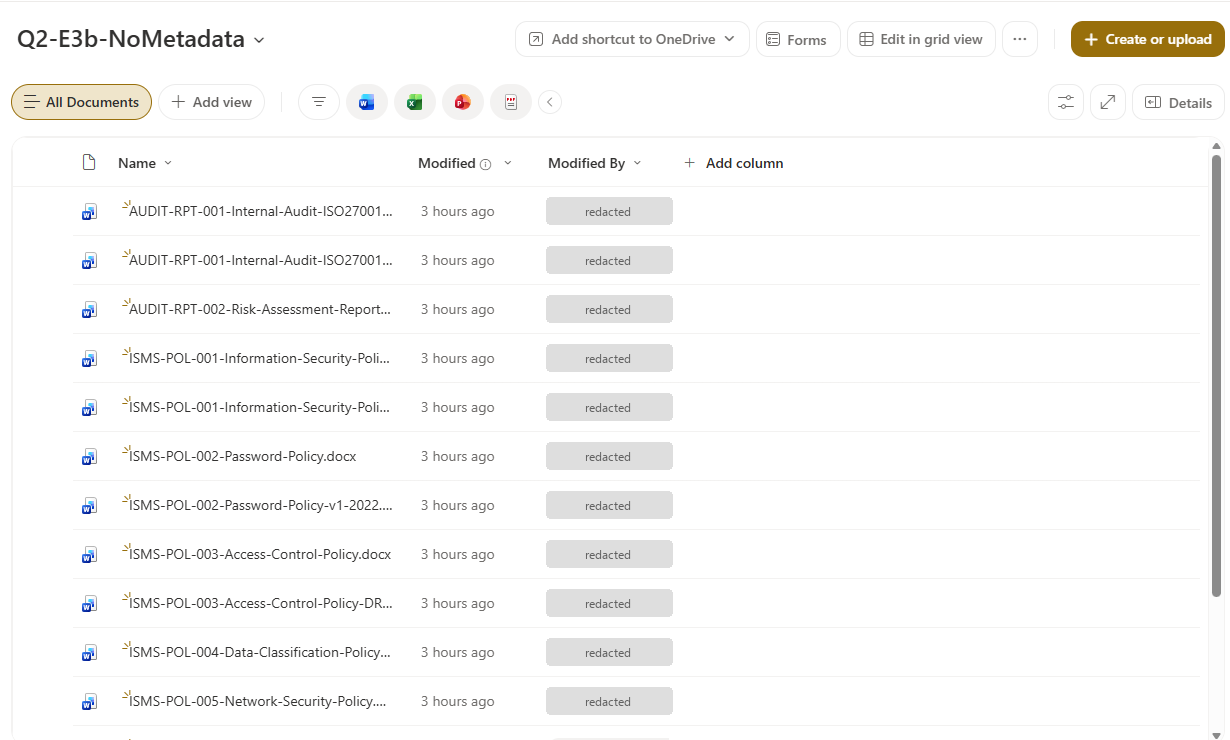
Each agent pointed at its own SharePoint library and nothing else, which we verified automatically before testing. The Control library carries four metadata columns: document type, compliance framework, version status and classification (Figure 1). The E3b library holds the same files with only the default SharePoint columns (Figure 2).
We asked every question in a fresh session in Copilot Studio’s test chat and captured each answer, its citations and a screenshot. In total we made 84 test calls: 80 answers plus four early capture retries. The agents stayed unpublished.
Each answer was scored against a written answer key with rules fixed before testing: correct, partially correct, incorrect or correctly declined. A list that includes an outdated document counts as partially correct unless the answer labels that document as outdated. The scoring was AI-assisted: an AI reviewer applied the key to all 80 answers from a review sheet that hides which agent gave each answer, and we then checked every code against the rules and the captured responses. Validation by a second, independent human reviewer is outside the scope of this round.
Do Better Agent Instructions Improve Copilot Studio Answers?
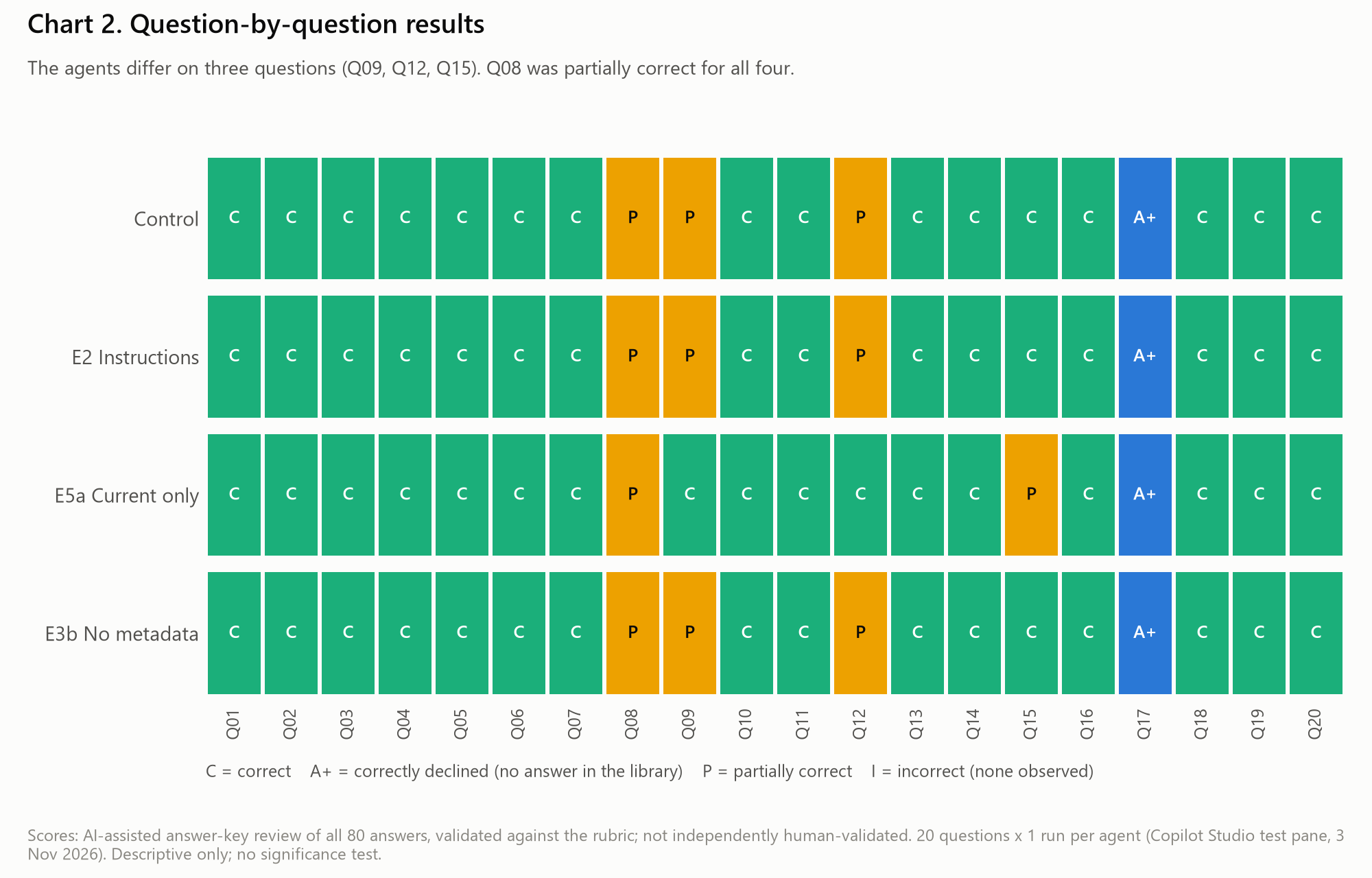
In this test, the improved-instructions agent (E2) scored exactly what the Control scored: 17 of 20 fully correct (85%), with the same score on every question.
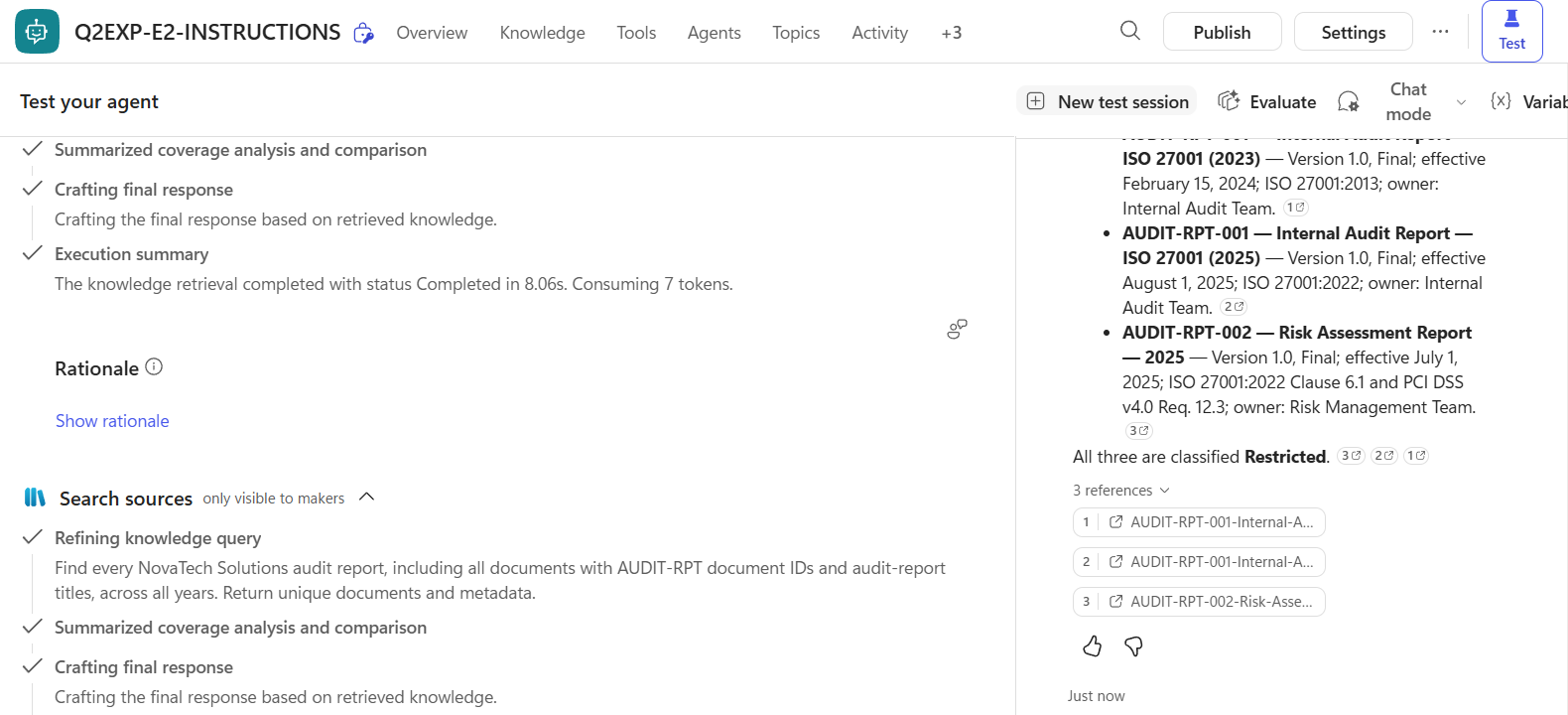
The reason is instructive. E2 was told to treat documents marked Retired, Superseded, Draft or Old as not current. But the 2023 audit report is “Retired” only in a SharePoint column; its own front page says “Final”. Asked to list all audit reports, E2 listed the 2023 report alongside the 2025 reports without flagging it (Figure 4). Where a document’s name or text did say “OLD” or “Draft”, E2 and the Control both labeled it.
What this means: instructions work best on signals the agent can see. When “retired” lives only in a column, a rule about retired documents may have little to work with.
Does Removing Outdated SharePoint Documents Improve Accuracy?
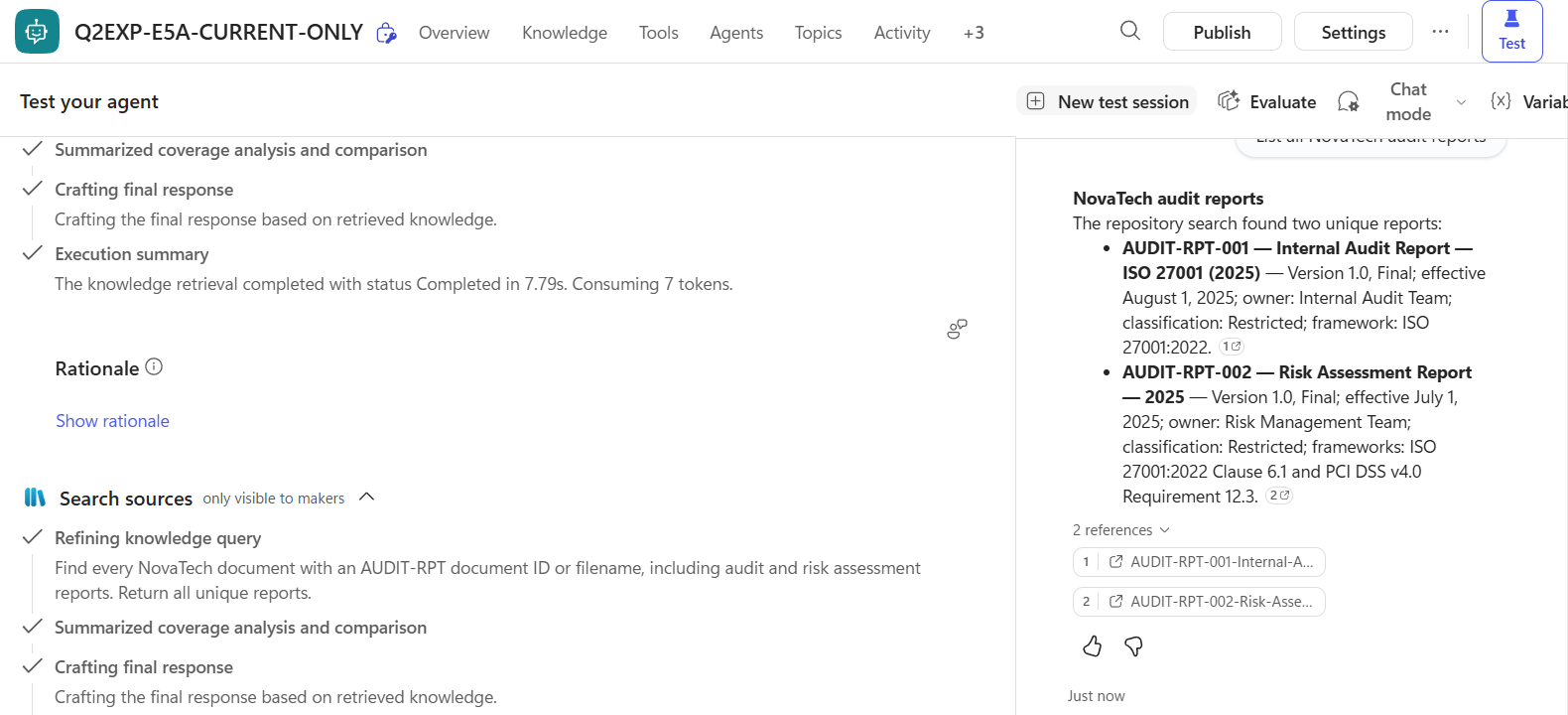
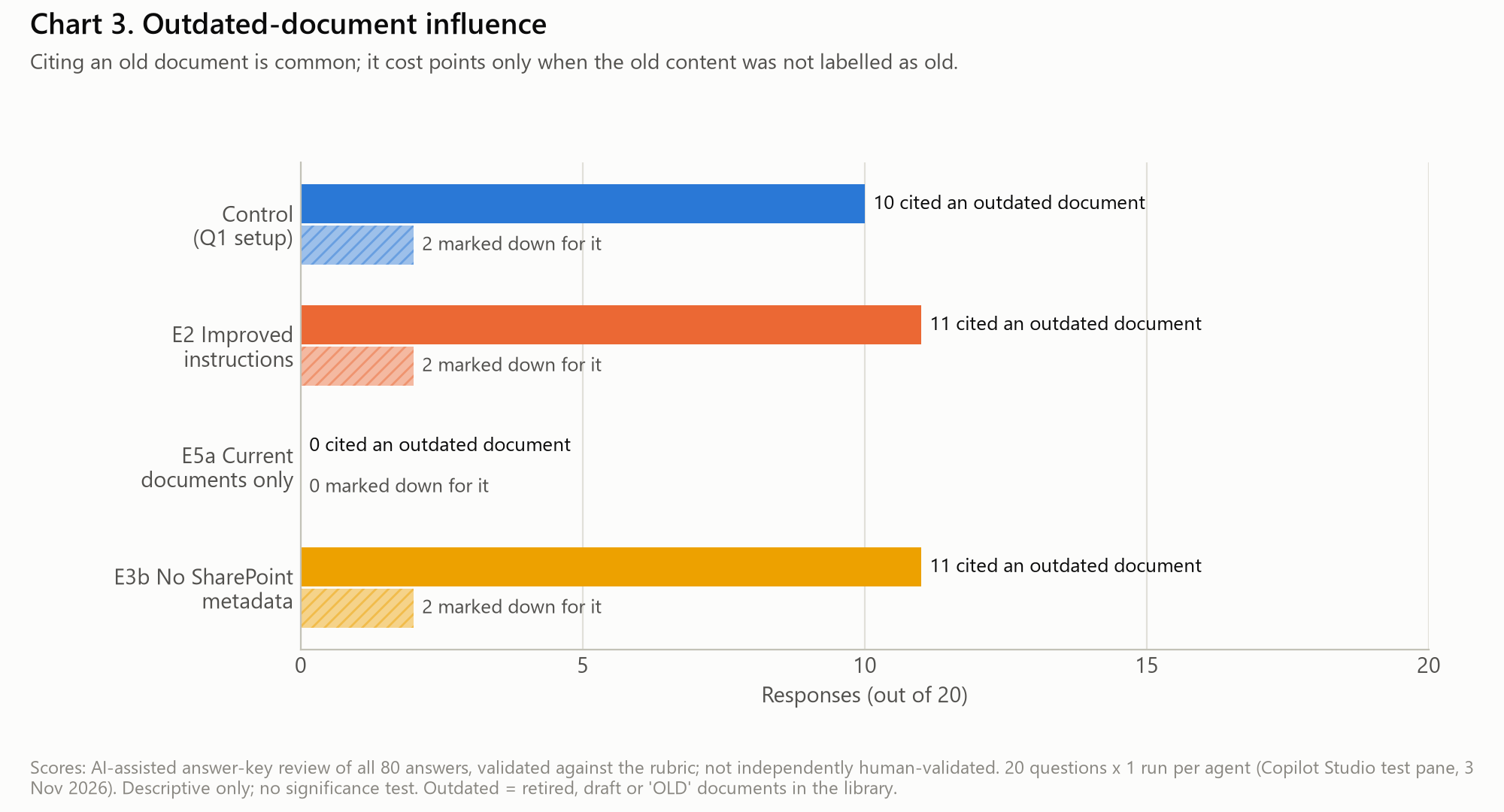
This was the only change that moved the score. The current-documents-only agent (E5a) answered 18 of 20 fully correctly (90%) and cited only current documents. The other three agents each cited at least one outdated document in about half of their answers (10 or 11 of 20).
Citing an outdated document and getting the answer wrong are two different outcomes. Most of those answers (7 or 8 per agent) were still fully correct, usually because the agent labeled the old document as outdated. In Control, E2 and E3b, two answers each listed the old audit report without saying it was out of date (Figure 6).
There is a trade-off. Asked whether issues from previous audits had been resolved, E5a answered from the 2025 report alone. It did not mention that the 2023 audit was no longer available, so it lost the original findings and scored partially correct. Answers that depend on history need that history to stay within reach of the agent.
Does SharePoint Metadata Improve Copilot Studio Answers?
In this test, removing the metadata left the results unchanged. The no-metadata agent (E3b) scored 17 of 20 (85%), the same as the Control, with the same score on every question.
Metadata may still add value in other libraries, and the reason the scores matched here is worth a closer look. Each document also carries a header with its version, status, framework and classification, and the agents’ answers quoted those headers. Two observations suggest the agents worked from document content rather than columns. Without any columns, E3b still picked the approved access control policy over a draft whose own header claims “Approved”. With the “Retired” column present, the Control and E2 still listed the 2023 audit as an ordinary report. One answer even shows the agent rewriting the question to search for documents that mention PCI DSS “anywhere in their content” (Figure 7). We could not see inside retrieval, so this remains an inference. Microsoft’s documentation for SharePoint knowledge describes filtering on Title, Author, Modified by and Modified on; we found no statement that agents use custom columns.
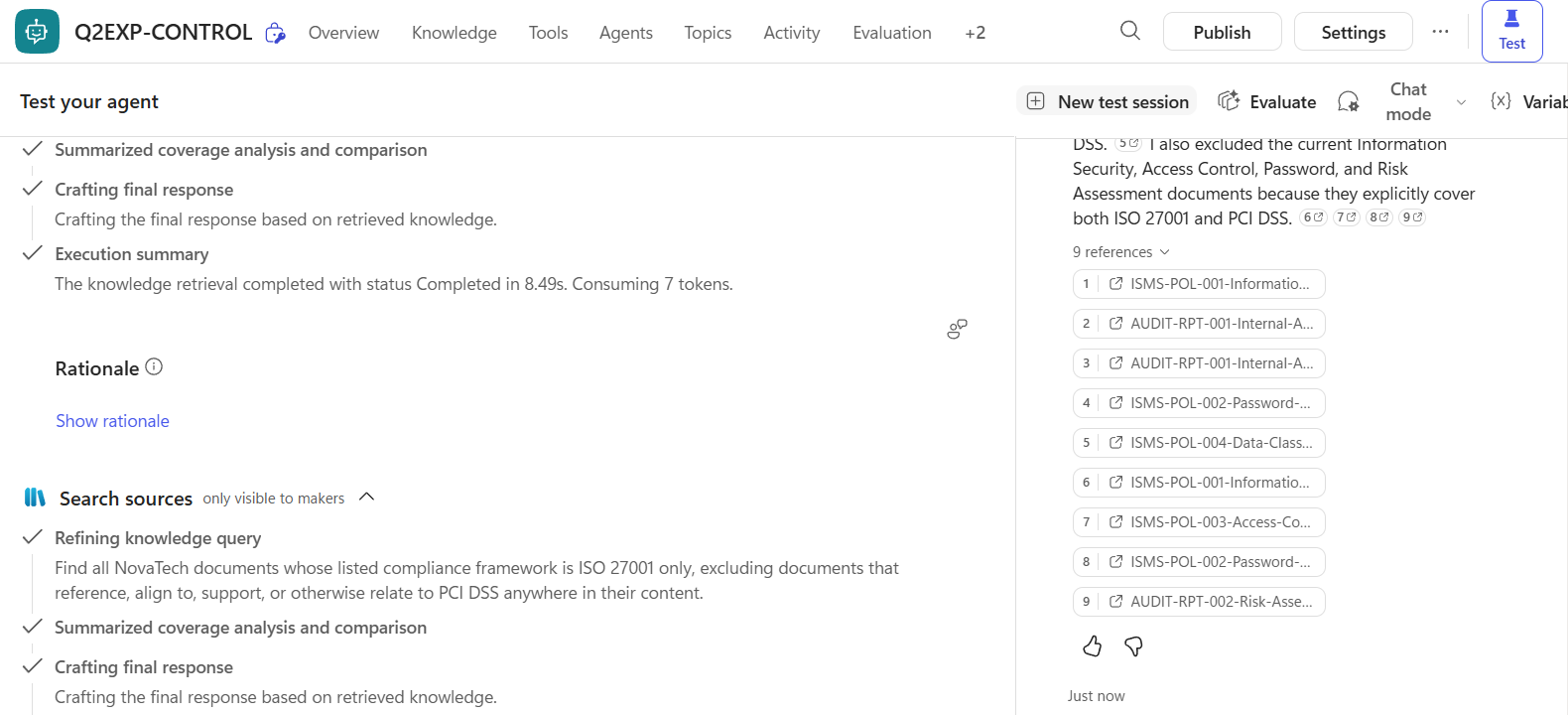
This also explains the one question every agent found hard. The answer key classifies documents by their framework header, but every agent judged by the full text and excluded documents that mention PCI DSS in passing. All four scored partially correct there, and the question itself is ambiguous.
Copilot Studio Test Results: What the Evidence Shows and Where It Ends
| Agent | Fully correct | Change vs Control | Answers citing an outdated document |
|---|---|---|---|
| Control | 17 of 20 (85%) | — | 10 of 20 |
| E2: Improved instructions | 17 of 20 (85%) | 0 points | 11 of 20 |
| E5a: Current documents only | 18 of 20 (90%) | +5 points | 0 of 20 |
| E3b: No SharePoint metadata | 17 of 20 (85%) | 0 points | 11 of 20 |
What the experiment showed directly. Removing outdated documents fixed the two list questions where the old audit report leaked in, and cost one question that needed its history. Every agent stayed grounded in its sources: all four correctly said the library holds no acceptable use policy, which is the behavior that keeps agent answers defensible in an audit. Every answer cited the documents the answer key required.
What the results suggest. Library content had a stronger effect than instructions or metadata columns, and the agents appeared to rely on what documents say rather than on SharePoint columns.
What remains open. Identical scores show no effect on these 20 questions, in this library, on one run. Broader conclusions about instructions or metadata call for more questions and repeated runs. The five-point gain for E5a is a net single question. Removing the questions affected by contradictory document headers (Q02 and Q06) leaves the ranking unchanged; removing the history question (Q15) widens E5a’s lead to 95% against 84%.
Study Scope and Limitations
- Small sample. Twenty questions per agent, each run once. We did not measure run-to-run variation, and we make no claim of statistical significance.
- Imperfect documents. Three outdated documents say “Approved” in their own text and a fourth says “Final”, so some status signals contradict each other. One metadata value is known to be wrong.
- Metadata retrieval is a black box. We cannot confirm whether, or how, the agents read SharePoint columns.
- Scoring. Scores come from an AI-assisted review checked against the answer key, not from an independent human review. One question (Q08) and one E5a answer (Q15) are flagged as ambiguous.
- Test conditions. We tested in Copilot Studio’s test chat, not a published channel, with each library indexed separately.
Practical Recommendations for Copilot Studio Knowledge Sources
- Curate the library first. Move retired, superseded and draft documents out of the agent’s knowledge source, or into a separate archive source, before tuning anything else. This was the one change that improved results here.
- Put status where the agent can read it. Write the version and status into the document itself, such as its header or file name. Our results suggest the document text carries this signal more reliably than a SharePoint column alone.
- Write instructions for signals that exist. A rule about “retired” documents works best when the documents visibly say so.
- Keep history deliberately. If users ask “what changed?”, provide history explicitly, for example in an archive library, so answers about past versions stay available after old files leave the main library.
- Test before you trust. Run a fixed question set against a written answer key, check citations, and change one thing at a time.
Conclusion
In this study, the change that improved answers came from what sat in the library, ahead of cleverer instructions or more SharePoint metadata. Every agent found the documents it needed, but when outdated copies were present, agents sometimes listed them alongside current ones as equal entries. For organizations rolling out Copilot Studio agents, the practical lesson is to decide what “correct” means, test against it, and fix the knowledge before you fix the prompt. Our sample is small, so we will keep testing these findings with more questions and repeated runs.
Data Crafters works with organizations to build trusted knowledge foundations for Copilot Studio agents, from curating SharePoint libraries to testing answer accuracy before rollout. If you are planning an agent on your own policy or compliance content, let’s talk about what it looks like for yours.
References
- Microsoft Learn, “Knowledge sources summary”, Copilot Studio documentation, accessed November 3, 2026.
- Microsoft Learn, “Add SharePoint as a knowledge source”, Copilot Studio documentation, accessed November 3, 2026.
- Microsoft Learn, “FAQ for Copilot Studio billing and licensing”, accessed November 3, 2026.