Executive Summary
Non Conformance Reporting (NCR) is a core quality and compliance process across industries such as manufacturing, aerospace, oil and gas, construction, and healthcare. Many organizations still rely on manual NCR workflows built on paper forms, email chains, siloed repositories such as OnBase, and ad hoc approvals. The result is slower resolution, higher risk of missing documentation, limited auditability, and poor visibility across stakeholders.
This article outlines a modern NCR solution built on Microsoft Power Platform using Power Apps, Dataverse, and Power Automate. The goal is to replace fragmented NCR execution with structured workflows, automation, mobile accessibility, and seamless integration with business systems such as Dynamics 365
| Key Outcome Faster resolution, stronger compliance, improved traceability, lower operational risk, and measurable return on investment delivered through a governed, end to end NCR platform. |
Introduction
In regulated industries governed by ISO 9001, AS9100, API Q1/Q2, ISO 13485, HACCP, and other standards, the ability to consistently identify, document, investigate, and resolve non-conformances determines not only certification status but also product reliability and customer trust.
An NCR captures what happened, why it happened, what actions were taken, and how it was closed. However, organizations that depend on manual or disconnected systems often experience delays, missing data, inconsistent investigations, and ineffective corrective actions.
This article highlights the key issues with industry-standard NCR processes and demonstrates how the Microsoft Power Platform solves these challenges through an integrated, end to end digital solution.
Purpose of NCR
- Ensure compliance with standards (ISO 9001, AS9100, API, GMP, HACCP)
- Prevent defective products from reaching customers
- Identify and eliminate root causes
- Provide traceability for audits
- Support continuous improvement with trend analysis
Users of the NCR Process
| Stakeholder | Role in NCR Process |
| QA / QC Teams | Process owners responsible for managing the NCR lifecycle end to end |
| Production & Operations | Detect and contain non-conformances at the source |
| Engineering & Design | Analyze technical causes and recommend solutions |
| Suppliers & Vendors | Engaged when issues arise from purchased goods |
| Project Managers and Management | Review NCRs, approve dispositions, and track KPIs |
| Customers | May be notified or required to approve concessions |
Industries Using NCR
NCR processes are used across a wide range of regulated industries, each governed by distinct compliance standards:
| Industry | Applicable Standards |
| Manufacturing | ISO 9001, IATF 16949 |
| Aerospace & Defense | AS9100, AS9110 |
| Oil & Gas / Energy | API Q1/Q2, ISO 14001, ISO 45001 |
| Construction & Engineering | ISO 9001, ISO 45001 |
| Healthcare & Pharmaceuticals | ISO 13485, GMP, FDA |
| Food & Beverage | ISO 22000, HACCP |
| Utilities & Power Generation | ISO 55001, IEC 61511 |
| IT & Software (regulated) | ISO 27001, IEC 62443 |
Regulatory requirements vary by industry, but the operational pattern is consistent: documentation, approvals, traceability, and reporting must be reliable under audit.
Industry-Standard NCR Workflow (As-Is Process)
Before examining the problems, it is important to understand the standard NCR workflow that organizations typically follow. The process generally consists of ten sequential stages:
- Detection and Identification: Non-conformance is detected through inspection, testing, customer complaint, or operational monitoring.
- Containment: Affected items are immediately segregated and held to prevent unintended use or delivery.
- Initiation and Documentation: An NCR is formally recorded with a unique identifier.
- Notification: Relevant stakeholders are informed of the NCR.
- Investigation and Root Cause Analysis: A thorough investigation is conducted to understand why the non-conformance occurred.
- Disposition: A decision is made regarding the affected material (rework, scrap, return, use as is).
- Corrective Actions: CARs are initiated to address root causes and prevent recurrence.
- Implementation and Verification: Corrective measures are implemented and verified.
- Closure: Quality assurance provides final sign-off and the record is closed.
- Reporting and Analysis: NCR data is aggregated for trend analysis and continuous improvement.
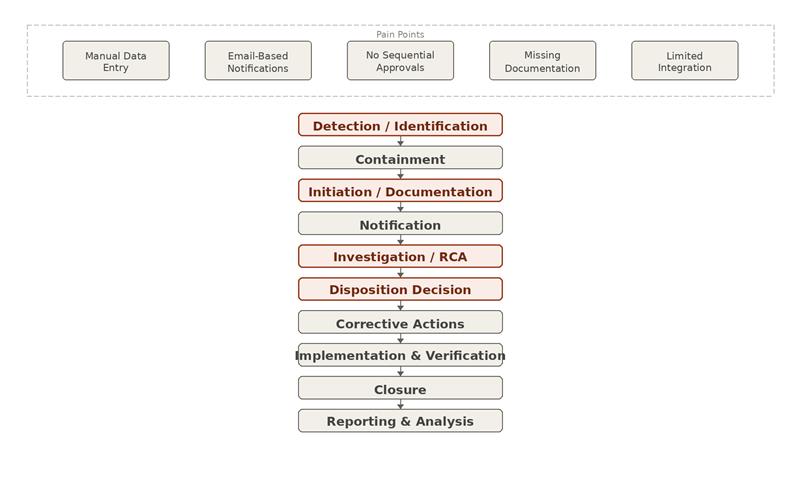
| As-Is Pain Points Manual data entry, email based notifications, lack of sequential approvals, missing documentation, and limited system integration. |
Key Problems in the Existing NCR Process
Despite having documented procedures, many organizations experience significant challenges in their NCR workflows:
| Problem Area | Description |
| Limited System Integration | Legacy systems such as OnBase do not integrate with modern ERP platforms like Dynamics 365, creating fragmented data management where quality information exists in silos, separate from operational and financial data. |
| Manual Data Linking | Connections between NCRs, corrective actions, and related documentation are managed manually with no automated linkage between a reported non-conformance, its root cause investigation, and resulting corrective actions. |
| Manual Notifications | Notifications sent via manual email entry are prone to human error. Wrong stakeholders may be notified, notifications may be delayed, or key personnel may be overlooked entirely. |
| No Sequential Approvals | The approval process does not follow a structured sequential flow. Requests may be routed improperly, approvals may be bypassed, and there is limited visibility into where an NCR sits in the process. |
| Unrecorded NCRs | Some defects fail to trigger the NCR process due to system issues or human error, leaving non-conformances untracked. |
| Missing Root Cause Analysis | RCA is frequently incomplete or fails to uncover the true cause, resulting in recurring non-conformances. |
| Poor Reporting Capability | Generating meaningful reports on NCR trends is difficult without a centralized, structured data repository. |
| No Central Repository | Documents scattered across email, file shares, and various systems make audit preparation time consuming and error prone. |
Reimagined NCR Solution: Microsoft Power Platform
The modern NCR system replaces legacy processes with a fully integrated, automated, and mobile-accessible solution built on the Microsoft Power Platform ecosystem. The architecture leverages four core components working in concert:
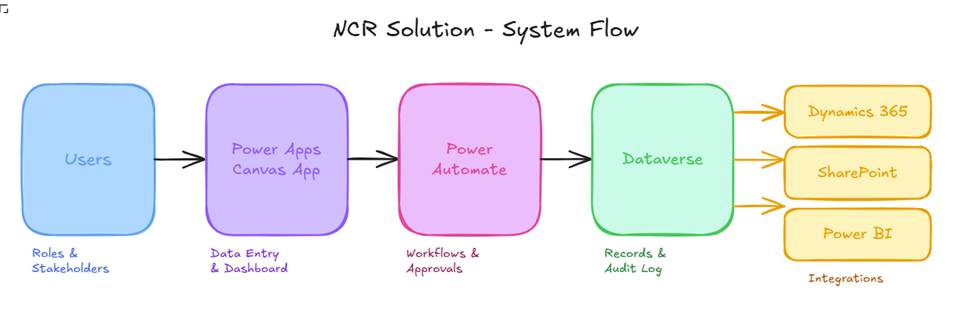
| Power Apps Frontend | User-friendly canvas applications serve as the primary interface for all NCR activities. Provides a centralized dashboard, form-based data entry with validation, and direct integration with Dynamics 365 master data. |
| Dataverse Data Layer | Secure database backbone storing all NCR records, investigation details, disposition decisions, corrective actions, and approval history in structured tables with defined relationships. Provides comprehensive audit logging capabilities that, once configured, track all changes and approvals with full user attribution and timestamps. |
| Power Automate Workflow Engine | Cloud flows orchestrate the NCR lifecycle by assigning unique identifiers, notifying approvers via Outlook, tracking approval status, routing NCRs to the next stakeholder, and sending overdue reminders. This supports sequential routing with conditional branching. |
Model-Driven App: Document Management
A Model-Driven App component provides comprehensive document management capabilities alongside the canvas app. Users can upload files, create Word templates, view document history, and maintain version control. All linked directly to the relevant NCR record and backed by SharePoint document storage integrated with Dataverse.
| Part 2 Preview Part 2 covers the full solution workflow in detail, including all eight states with screenshots, approval mechanics, security role design, ROI analysis, and implementation guidance. |
If your NCR process still relies on email, spreadsheets, or disconnected repositories, a governed Power Platform design can reduce operational risk while improving audit readiness.
References
Microsoft Corporation. (n.d.). What is Microsoft Dataverse?
Microsoft Learn. https://learn.microsoft.com/en-us/power-apps/maker/data-platform/data-platform-intro
Microsoft Corporation. (n.d.). Create and test an approval workflow with Power Automate.
Microsoft Learn.
https://learn.microsoft.com/en-us/power-automate/modern-approvals
Microsoft Corporation. (n.d.). Manage sequential approvals with Power Automate.
Microsoft Learn. https://learn.microsoft.com/en-us/power-automate/sequential-modern-approvals
Microsoft Corporation. (n.d.). Microsoft Power Platform integration with finance and operations apps. Microsoft Learn.
https://learn.microsoft.com/en-us/dynamics365/fin-ops-core/dev-itpro/power-platform/overview
International Organization for Standardization. (2015). ISO 9001:2015 Quality management systems — Requirements. ISO.
This article presents Part 1 of a two-part technical solution overview. Implementation details may vary based on specific organizational requirements, existing system architecture, and regulatory environment.