


As Power BI adoption scales across organizations, the challenge shifts from building reports to controlling how insights are distributed, governed, and trusted. This is where Org Apps, introduced in Microsoft Fabric, changes how analytics content is presented across an organization.
Unlike traditional Workspace Apps, which are closely tied to individual workspaces, Org Apps provide a centralized consumption experience designed for organization-wide discoverability and consistency. They allow approved contents such as reports, paginated reports, dashboards, real-time dashboards, maps, and view-only notebooks, to be curated and exposed through a single-entry point.
Org Apps focus on consumption and governance, not development or automation. All content creation and lifecycle management continue to happen at the workspace and artifact level, while Org Apps organize and surface only production-ready content. For authorized users, these apps automatically appear in the Power BI home experience, reducing the need for manual installation and making trusted insights easier to find.
In this post, we’ll compare Org Apps and Workspace Apps and explore why this shift matters as organizations scale analytics across teams and business units.
How Power BI Content Distribution Has Evolved
Power BI has evolved from a tool for creating individual reports into a platform for sharing insights across teams and organizations. Workspace Apps were the traditional method for packaging and sharing curated dashboards and reports within specific teams, offering structure and security. However, as organizations grew and analytics adoption expanded, the need for more scalable and consistent content distribution became evident.
Today, organizations increasingly require centralized ways to manage analytics consumption across departments and regions. They need to handle a wide range of content types, including reports, paginated reports, semantic models, and notebooks, while ensuring that users can easily find and access approved content without navigating multiple workspaces or manually installing apps.
To address these needs, Microsoft introduced Org Apps in Microsoft Fabric. Org Apps provide an organization-wide consumption model that allows multiple apps to be created and managed from workspaces, improving discoverability and consistency in how analytics content is presented. For authorized users, Org Apps automatically appear in the Power BI home experience, making trusted insights easier to find at scale.
Rather than changing how content is developed, Org Apps focus on how content is curated and consumed. All development, version control, and environment promotion continue to take place at the workspace and artifact level. Org Apps sit on top of this process, exposing only production-ready content in a controlled and user-friendly way.
In summary, Workspace Apps remain well suited for departmental or team-level sharing, while Org Apps are designed to support organization-wide distribution by improving discoverability, consistency, and governance at the point of consumption.
Balancing Report Sharing and Governance in Power BI
As Power BI adoption grows, organizations need to share insights efficiently while maintaining consistency and control. Choosing the right app model helps balance team flexibility with governance as reporting scales.
In a manufacturing enterprise, multiple regional Workspace Apps contained similar reports, leading to duplication and inconsistent KPIs. By adopting Org Apps, the organization centralized how content was curated and exposed, allowing region-specific experiences while maintaining a single, consistent source of truth.
In a finance department, overlapping Workspace Apps caused confusion around report ownership and increased maintenance effort. Moving to an Org App enabled the team to consolidate reporting into a single, curated experience, apply audience-based access, and improve clarity for end users.
These examples highlight how Workspace Apps remain useful for team-level sharing, while Org Apps support broader consistency and governance by centralizing how approved content is discovered and consumed across the organization.
What Are Power BI Workspace Apps
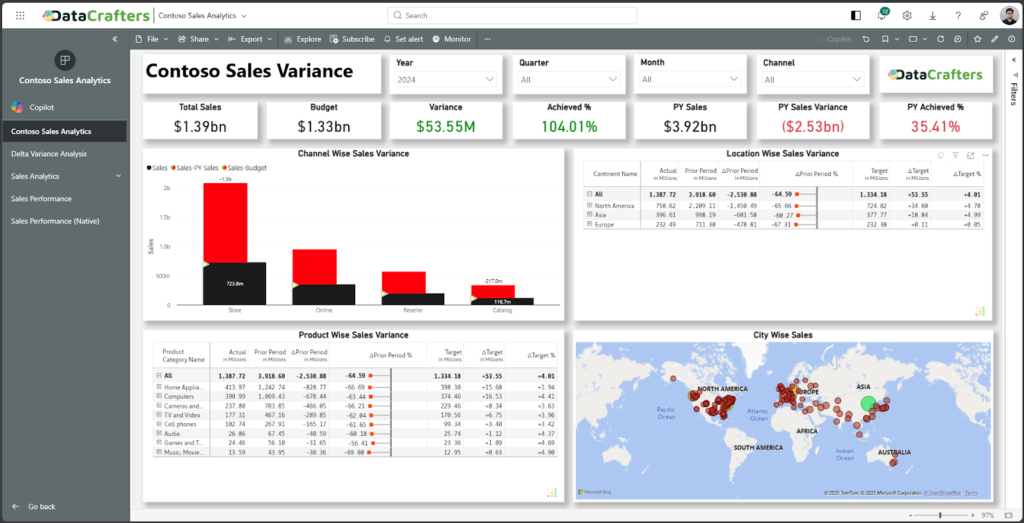
Workspace Apps are the traditional method for sharing content in Power BI. These apps bundle reports, dashboards, and datasets from a single workspace into a unified package that can be shared with specific users or groups. They’ve been a reliable choice for departmental reporting, providing governance and security within a specific workspace.
Key Features
- One App per Workspace: Each workspace can publish only one app, which includes selected content like reports, dashboards, and datasets.
- Access Methods: Users can manually install the app or access it through a shared link.
- Audience & Permissions: Access is managed within the workspace, with permissions set for user groups, controlling who can view specific content.
However, Workspace Apps do not yet integrate with Git or deployment pipelines, meaning updates require manual republishing.
Ideal Use Cases
Workspace Apps are best suited for departmental or project-specific reporting. They are most effective when:
- Content is managed by a single team.
- Audiences are well-defined and limited.
- Frequent manual updates or testing are needed before wider release.
While Workspace Apps are ideal for departmental use, their limitations in scalability and automation make them less suited for organization-wide distribution compared to Org Apps.
What Are Org Apps in Microsoft Fabric (Preview)
Org Apps are a newer app experience introduced in Microsoft Fabric, designed to improve how analytics content is distributed and consumed across an organization. Unlike traditional Workspace Apps, Org Apps are not limited to a single consumption pattern and are intended to support broader, organization-wide discoverability and consistency. They represent Microsoft’s evolving approach to enterprise BI content distribution within the unified Fabric experience.
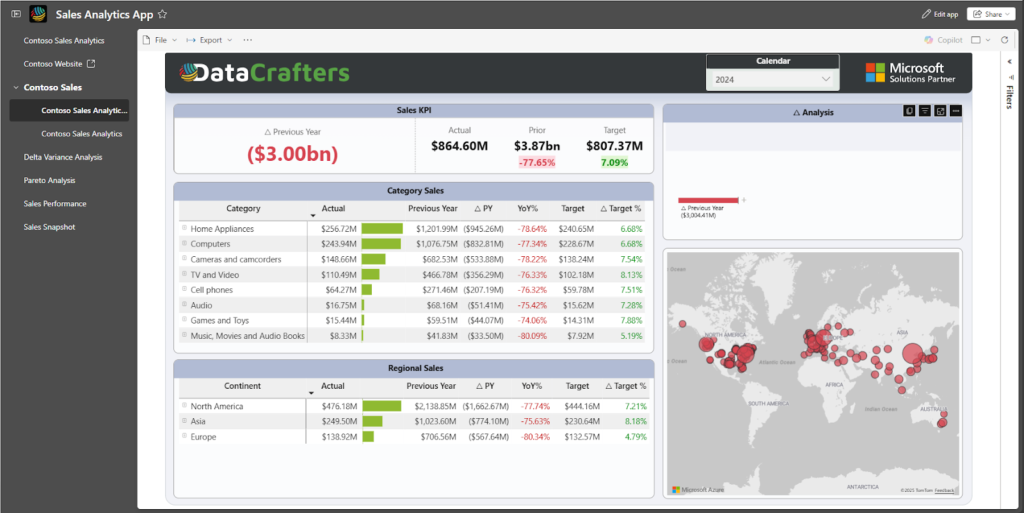
Note on Public Preview: Org Apps are currently in public preview. Preview features are intended for evaluation and early adoption, may change before general availability, and are not recommended for production-critical workloads.
Key Features
- Multiple Apps per Workspace: A single workspace can host multiple Org Apps, each curated for different departments or audiences. This provides greater flexibility compared to Workspace Apps, which are limited to one app per workspace.
- Organization-Wide Discoverability: Org Apps automatically appear in the Power BI home experience for authorized users, reducing the need for manual installation and making approved content easier to find at scale.
- Integrated Access Control: Access to Org Apps is typically managed using Microsoft Entra ID security groups, allowing consistent audience management across apps as group membership changes.
- Branding and Structured Navigation: Org Apps support basic branding and navigation configuration, enabling organizations to present content in a clear and recognizable structure.
Requirements to Enable Org Apps
To enable Org Apps (Preview), a Microsoft Fabric admin must turn on the relevant setting in the Admin portal under Tenant settings. The workspace must run on Fabric capacity (including trial or Premium), and users must have appropriate permissions (Admin or Contributor) to create and manage Org Apps.
These requirements ensure that Org Apps are created and managed within a governed Fabric environment.
Strengths and Ideal Use Cases
Org Apps are well suited for scalable, organization-wide content distribution, especially when:
- Multiple audiences across departments or regions need governed access to shared analytics content.
- Organizations want to improve discoverability and present trusted, production-ready insights through a single entry point.
- Teams need a consistent, branded consumption experience without changing existing development or deployment workflows.
Current Limitations & Missing Features (as of Preview)
While Org Apps (Preview) provide a more scalable and governed consumption experience, several capabilities are still evolving as Microsoft works toward General Availability (GA).
At a high level, current limitations fall into a few key areas. Personalization is limited, with features such as bookmarks and persistent filter states not yet supported, causing filters to reset when the app is closed. Content interaction and sharing are also more constrained than in Workspace Apps, with limited export options and certain items, such as notebooks, opening outside the Org App experience. Mobile usage continues to mature, with some content opening in the browser and no current option to share Org Apps directly from mobile devices. In addition, usage insights and analytics are still limited, reducing visibility into how content is consumed across audiences.
From a lifecycle perspective, Org Apps remain a manually managed consumption layer. They do not support automated CI/CD workflows or service-principal–based deployment, and all automation continues to apply only to underlying workspace artifacts.
These gaps are expected for a preview feature and are likely to be addressed incrementally as Org Apps evolve toward GA.
Upcoming Updates for Org Apps (Preview)
As Org Apps progress toward General Availability (GA), Microsoft continues to refine the experience with a focus on improving adoption, usability, and organization-wide consumption within Microsoft Fabric. These updates are centered on strengthening how Org Apps are discovered, accessed, and experienced, while keeping development and deployment workflows unchanged.
At a high level, the evolution of Org Apps is focused on four main areas.
First, broader accessibility, including expanded support across workspace and licensing models, aimed at reducing adoption barriers for organizations not fully operating on Fabric or Premium capacity. Second, content visibility and audience management, with ongoing improvements to how content is presented to different user groups and how additional report types, such as paginated reports, surface within Org Apps. Third, user experience enhancements, covering mobile usage, navigation flexibility, branding options, and incremental personalization improvements such as better handling of filters and saved views.
Finally, management and extensibility remain an area of exploration, though Org Apps today continue to be managed manually as a consumption layer, with no confirmed automation or CI/CD capabilities announced for GA.
Together, these updates reflect Microsoft’s direction toward making Org Apps the primary, governed entry point for organization-wide analytics consumption, focused on discoverability, consistency, and user experience, while relying on established workspace and artifact-level processes for development and lifecycle management.
How to Build and Share Org Apps in Power BI
Creating and sharing Org Apps in Power BI is designed to be intuitive, with powerful features for managing large-scale content distribution. Below is an overview of the steps involved, reflecting the latest features and updates for Org Apps.
Step 1: Create an Org App
To get started with building an Org App, follow these steps:
- Navigate to your workspace in Microsoft Fabric where your reports are stored.
- In the workspace, select + New item from the menu.
- Search for and choose Org App (Preview) from the list of available item types.
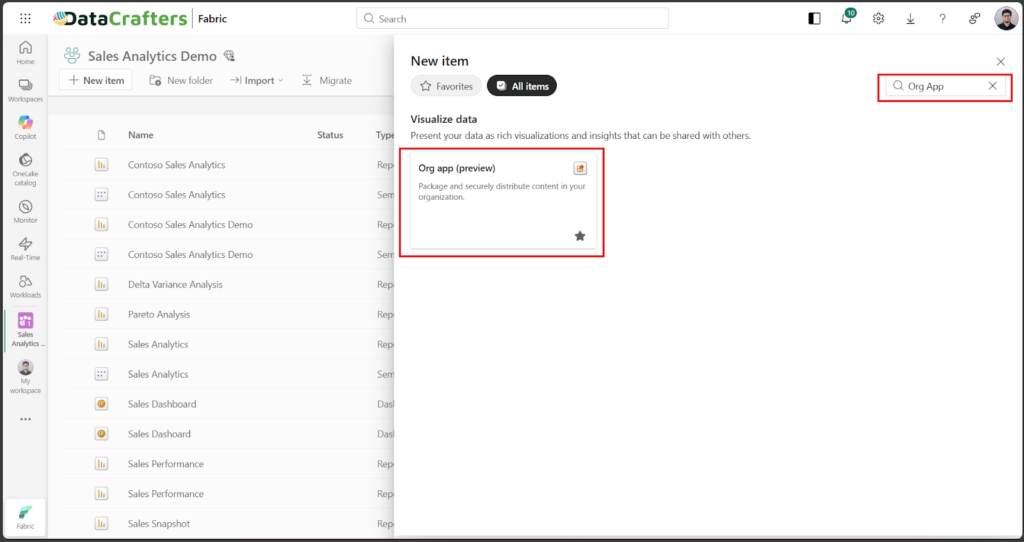
- Enter a name for your Org App to identify it within your organization.
- Select Create to initialize your new Org App workspace.
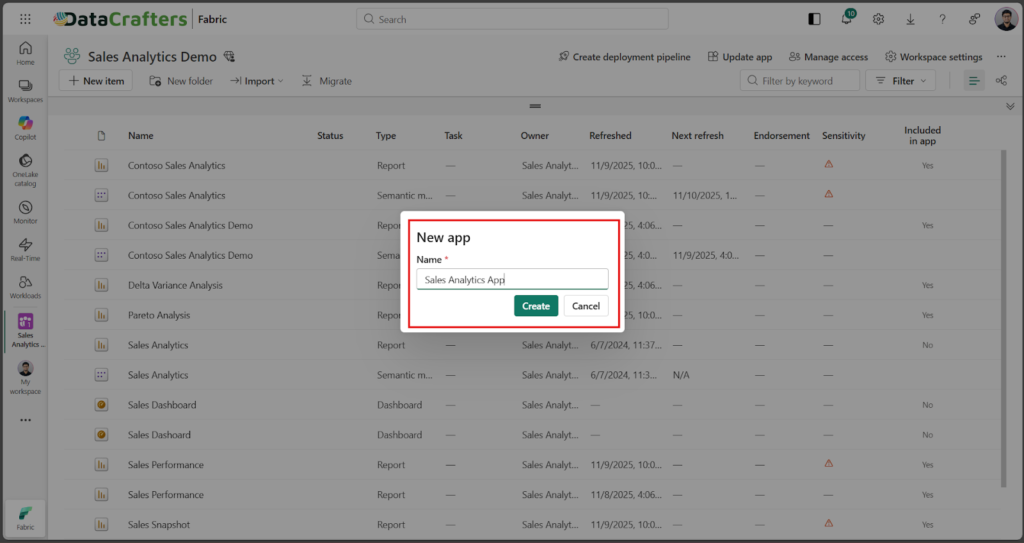
Once created, you’ll be taken to the setup interface where you can begin configuring content, branding, and access settings.
Step 2: Select Content to Include
- Open your newly created Org App to access its configuration panel.
- Under the Content section, click Add content to start selecting items.
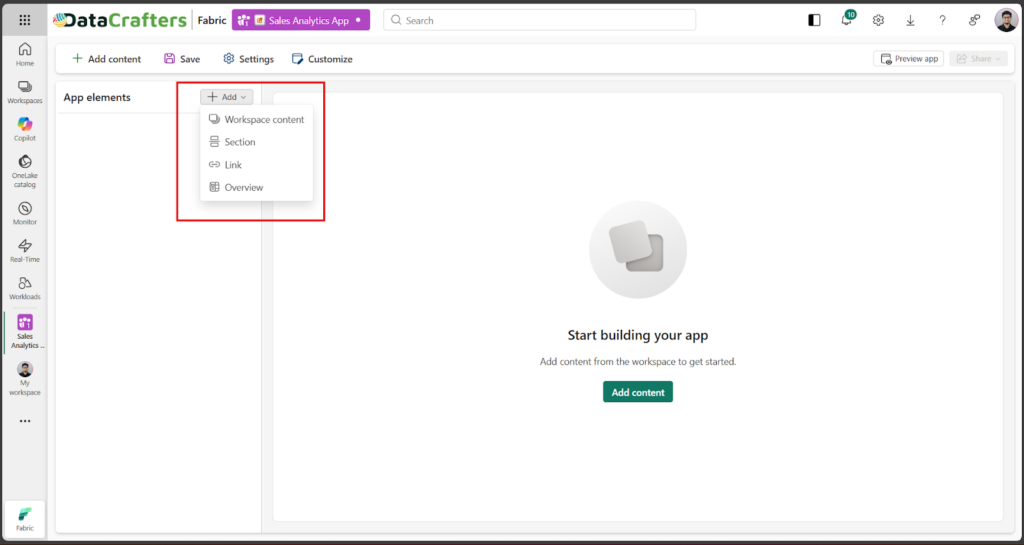
- Choose from available content types such as Overview, Link, Section, and Workspace Content from your workspace.
- Consider creating an overview or landing page as the entry point for users. From the + Add menu, select Overview and provide a title and description.

- Add Reports from your workspace to include in the Org App.
- Organize your content by creating Sections to group related reports.
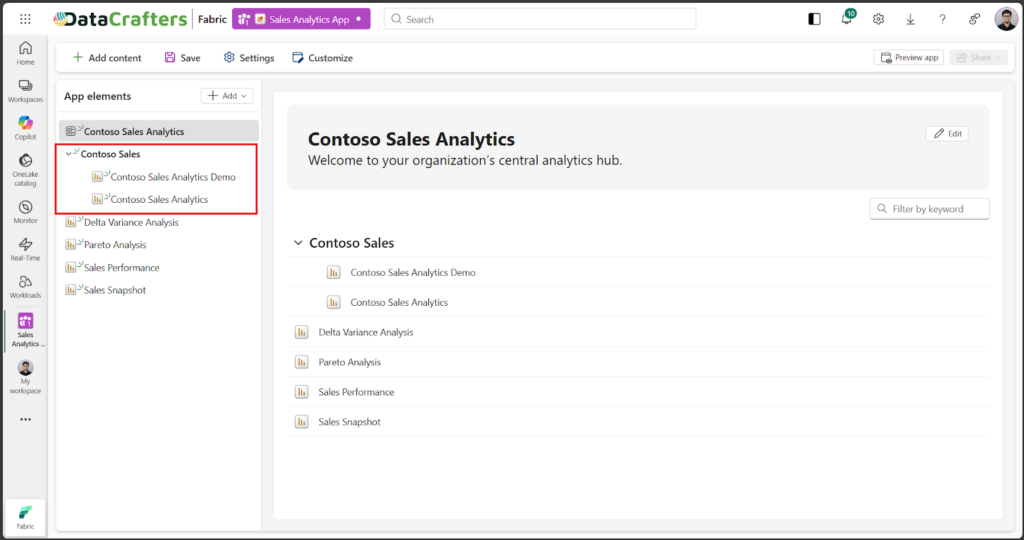
- Optionally, embed necessary links within the app.
- Review your selected content to ensure everything is included before proceeding.
This step defines what users will see within the app, allowing you to curate and control which content is shared with specific audiences.
Step 3: Customize Branding and Navigation
- Open the Customize Panel.
- Under Branding:
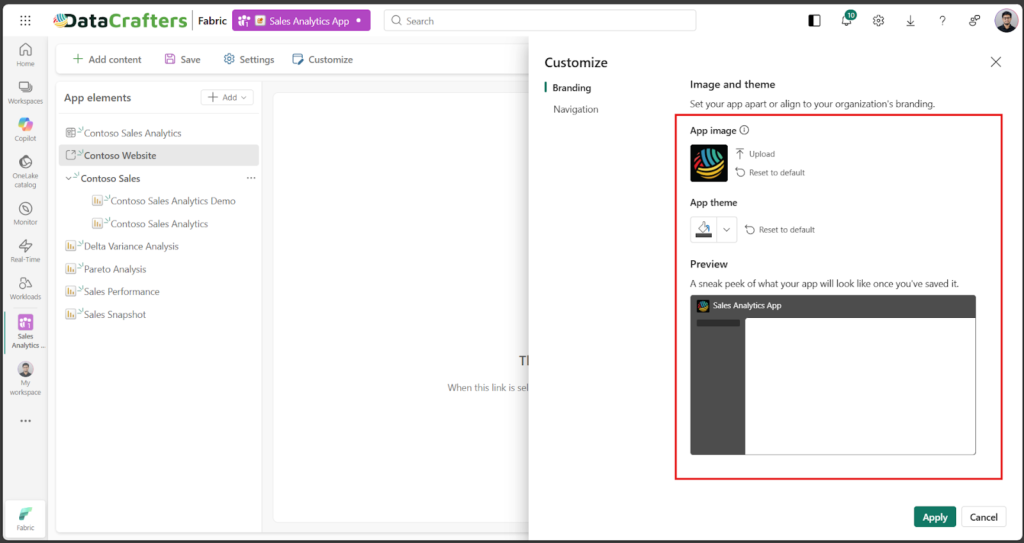
- Upload your organization’s logo for the app header.
- Confirm that the logo appears correctly in both light and dark themes.
- Choose a primary color that matches your company’s palette.
- Under Navigation:
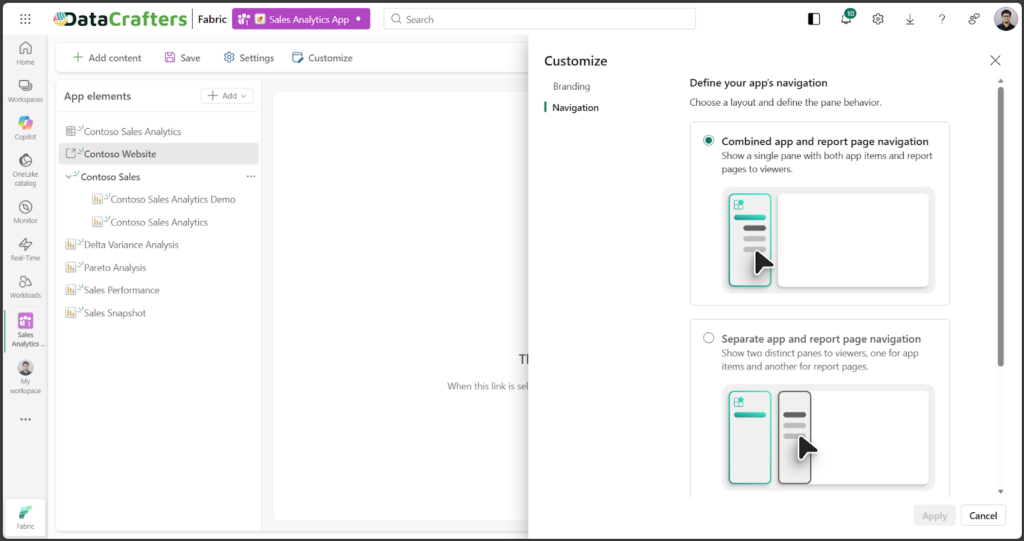
- Define the desired navigation type for the app.
- Enable or disable the “Show App Pane” option.
- Select the default behavior for navigation: Expanded or Collapsed.
- Preview Before Publishing:
- Use the Preview App button to test layout, color consistency, and navigation flow.
- Make any adjustments necessary before finalizing the design.
Customizing branding and navigation enhances the visual appeal and provides users with an intuitive experience that reflects your organization’s identity.
Step 4: Save and Share the Org App
- Save the App Configuration:

- Share the Org App with Users:
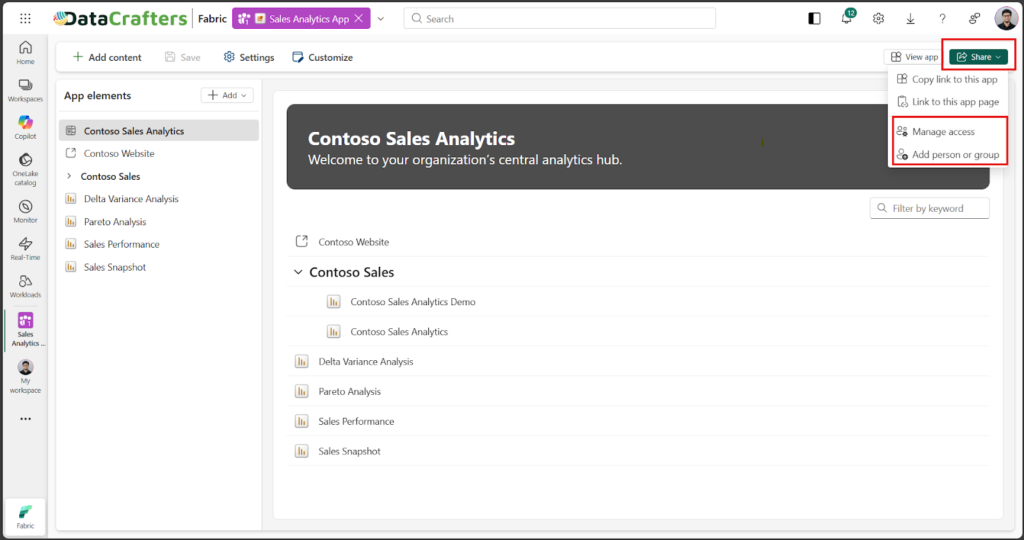
- After saving, navigate to the Manage Access or Add person or group section from the Org App’s settings panel.
- Add users or assign Microsoft Entra ID security groups for scalable access management.
- Access changes take effect immediately, and users do not need to manually install the app, it will automatically appear in their App Hub.
Saving and sharing your Org App ensures that all authorized users instantly have access to the latest governed reports, dashboards, and datasets, all in one centralized location.
Workspace App Flow vs Org App Flow: From Creation to Consumption
The visual diagram below illustrates the key differences between Workspace Apps and Org Apps in terms of their flow from content creation to user access.
Workspace App Flow:
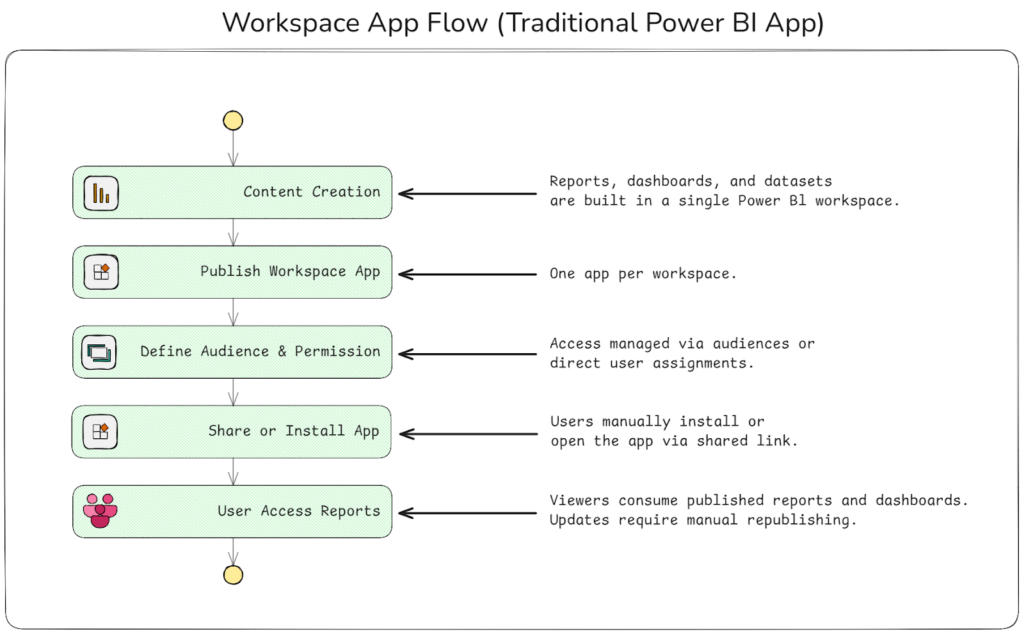
With Workspace Apps, content is created and managed within a single workspace, and only one app can be published from that workspace. The app bundles selected reports and dashboards and is shared with specific audiences. Users typically access the app through a shared link or by manually installing it, and permissions are controlled at the workspace level.
This flow works well for smaller teams or departmental scenarios where content ownership is centralized. However, updates require manual republishing of the app, and users must individually install or access it, which can become harder to manage as adoption grows.
Org App Flow:
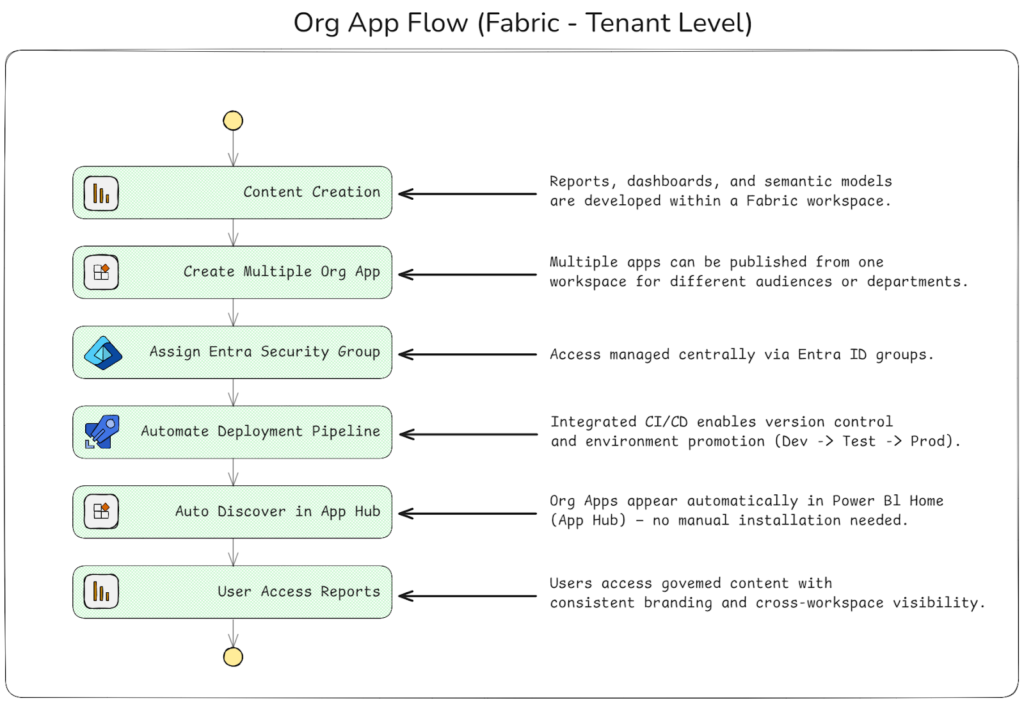
Org Apps follow a different consumption-focused model. While content is still created and managed within workspaces, multiple Org Apps can be created from the same workspace, each tailored to different audiences. Instead of requiring manual installation, Org Apps automatically appear in the Power BI home experience for authorized users, improving discoverability at scale.
Access is typically managed using Microsoft Entra ID security groups, allowing consistent audience control across departments. Org Apps do not participate in Git-based CI/CD or automated deployment. All development, version control, and environment promotion continue to occur at the workspace and artifact level, while Org Apps focus on curating and presenting production-ready content.
This flow is well suited for larger organizations that need to scale report distribution across teams while maintaining consistency, governance, and a clear consumption experience.
Security Management in Org App
With Workspace Apps, access is typically managed at the workspace level, where admins assign users or audiences directly. This approach works well for smaller teams, but as the number of workspaces and audiences grows, managing access consistently can become harder to scale.
Org Apps simplify the consumption-side access experience by commonly using Microsoft Entra ID security groups to control who can see each app. As group membership changes, user access updates automatically, helping organizations maintain consistency across multiple apps without managing individual user assignments. While access is still enforced through underlying workspace permissions, Org Apps make it easier to present the right content to the right audiences at scale.
From a data security perspective, Microsoft Fabric introduces OneLake security, which provides centralized role-based access control (RBAC) across Fabric assets. This allows organizations to apply fine-grained security, such as table-, folder-, row-, or column-level restrictions, consistently across supported Fabric services, including Power BI.
Within Power BI specifically, Row-Level Security (RLS) continues to control how data is filtered for users at the dataset level. OneLake security complements this model by extending security concepts beyond individual datasets, helping organizations move toward a more unified and platform-wide approach to data protection.
Discoverability and User Experience
Workspace Apps require users to install the app manually or access it through a shared link. As analytics adoption grows, this approach can create friction, with users relying on external links and multiple app installations to find the content they need.
Org Apps improve discoverability by appearing automatically in the Power BI home experience for authorized users. This removes the need for manual installation and shared links, allowing users to access approved, up-to-date content more easily. By simplifying how content is discovered and accessed, Org Apps provide a more streamlined and consistent user experience at scale.
Lifecycle and Governance
As analytics solutions scale beyond a single team or workspace, lifecycle management and governance become increasingly important. In earlier Power BI experiences, Workspace Apps were often used to share content more broadly, but updates required manual republishing and careful coordination. While this approach worked in smaller setups, it could lead to inconsistencies, unclear ownership, and governance challenges as the number of contributors and consumers grew.
Fabric Org Apps approach this problem from a different angle. Rather than focusing on deployment or automation, Org Apps are designed as a centralized consumption layer that sits on top of production-ready analytics content. All development activities, such as building reports, refining semantic models, or evolving data pipelines, take place within Fabric workspaces and are managed using Git integration and deployment pipelines. This ensures that changes are version-controlled, reviewed, tested, and promoted across environments before they ever reach business users.
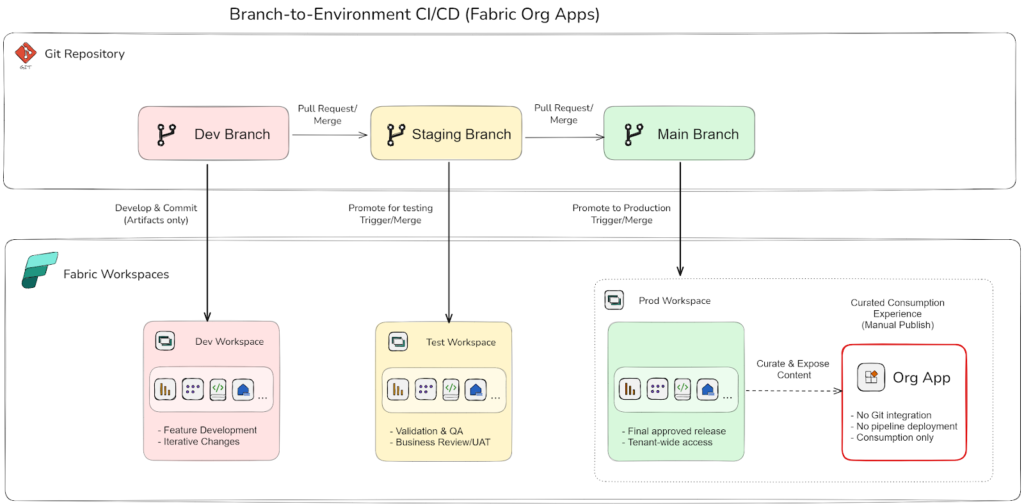
Once content is validated and deployed to the Production workspace, Org Apps are used to curate and expose that content in a controlled and consistent way. The app becomes the single entry point for users, organizing reports, dashboards, maps, and other supported artifacts into a structured experience. Navigation, audience access, and discoverability are managed deliberately, ensuring that only approved and stable content is visible across the organization.
Unlike development artifacts, Org Apps do not participate directly in CI/CD workflows. They are not version-controlled in Git, nor are they promoted automatically between environments. This separation is intentional. By keeping automation focused on engineering assets and governance focused on consumption, Fabric allows teams to move fast during development while maintaining clarity, stability, and trust at the point of consumption.
In this model, Workspace Apps remain suitable for workspace-level sharing, while Org Apps extend governance organization-wide. They provide consistent access, clearer ownership, and a polished experience for business users without adding unnecessary complexity to the deployment process. Org Apps complete the analytics lifecycle by turning production-ready assets into a discoverable, secure, and enterprise-ready experience.
What Copilot Offers in Power BI
Within the Power BI and Microsoft Fabric ecosystem, Copilot provides generative AI assistance to make analytics more intuitive and productive. It enables users to interact with data using natural language, whether they are exploring insights, summarizing reports, or understanding trends. The Copilot experience varies depending on how content is accessed and what item is currently in focus.
In Workspace Apps
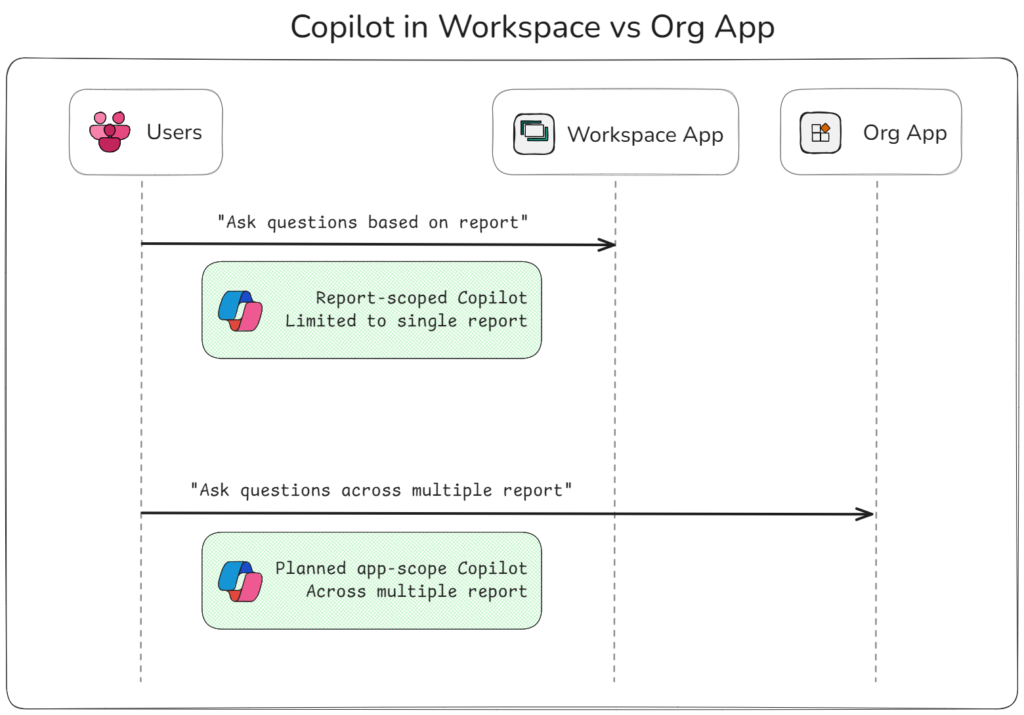
When users view a report through a Workspace App, Copilot operates in a report-scoped mode. In this context, users can ask questions such as “What is the trend for product X?” or request summaries, and Copilot responds based on the report’s semantic model and visuals currently in view.
To use Copilot, the feature must be enabled at the tenant or capacity level, and users must have access to the underlying report. Because Copilot is scoped to the item being viewed, it does not automatically reference other reports or artifacts outside the current report context.
In Org Apps (Preview)
Org Apps currently offer the same report-scoped Copilot experience. When a user opens a report from an Org App, Copilot can assist with questions and summaries based on that report’s data model and visuals.
Microsoft is exploring broader, app-level Copilot experiences that allow users to ask questions across multiple items within an app. However, this capability is still evolving and is not yet fully supported for Org Apps (Preview). In practice, this means Copilot in Org Apps today remains focused on the report a user is actively viewing, rather than the entire app’s content.
As Org Apps mature toward General Availability, deeper Copilot integration across curated app content is an expected area of enhancement, but for now, Copilot behavior remains consistent with its item-scoped design.
How Copilot Respects Governance
Copilot operates within the security and governance boundaries already defined in Power BI and Microsoft Fabric. It respects Row-Level Security (RLS), sensitivity labels, and item-level access permissions applied to the underlying semantic models and Fabric artifacts. Users only receive responses based on the data they are authorized to access, and Copilot does not expose restricted information.
What This Means for Users
In practical terms, Copilot enhances analytics consumption while remaining fully aligned with existing governance controls:
- In Workspace Apps, users receive report-scoped AI assistance that helps them explore insights and generate summaries based on the report they are viewing.
- In Org Apps, Copilot currently operates in the same report-scoped manner, assisting users as they interact with individual reports opened from the app.
- Looking ahead, Microsoft is exploring broader app-level Copilot experiences that could enable richer context across curated content. These capabilities are still evolving and are not yet fully supported for Org Apps (Preview).
As Copilot experiences continue to mature, the focus remains on providing context-aware assistance without compromising security, ensuring AI-driven analytics in Microsoft Fabric stays grounded in enterprise governance standards.
Detailed Comparison: Workspace Apps vs Org Apps in Power BI
The table below highlights the key differences between Workspace Apps and Org Apps (Preview), showcasing how each approach handles various aspects of content delivery, governance, and user experience within Power BI. Understanding these differences is crucial for selecting the right approach based on your organization’s needs.
| Area of Comparison | Workspace Apps | Org Apps (Preview) |
| Scope and Purpose | Workspace-level content sharing for defined audiences. | Organization-wide consumption experience focused on discoverability and consistency. |
| App Creation Model | One app per workspace. | Multiple apps can be created from a workspace, each curated for different audiences. |
| Access & Permissions Management | Users or audiences managed within the workspace. | Access commonly managed via Microsoft Entra ID security groups; enforcement still depends on underlying workspace permissions. |
| Governance & Controls | Governance enforced at workspace and dataset level. | Governance remains at workspace and artifact level; Org Apps organize how approved content is consumed. |
| Content Types Supported | Reports, dashboards, semantic models, paginated reports. | Reports, dashboards, paginated reports, maps, real-time dashboards, and view-only notebooks. |
| Audience Configuration | Audiences defined in app settings. | Security-group-based audiences; more dynamic visibility features are evolving. |
| Discoverability & User Access | Users install apps manually or access via shared links. | Automatically appears in the Power BI home experience for authorized users. |
| Branding & Customization | Basic theme and navigation configuration. | Enhanced branding and navigation options compared to Workspace Apps. |
| Deployment Workflow | Manual publishing and republishing. | Manual publishing; Org Apps are not deployed via pipelines. |
| CI/CD & Version Control | Not supported at app level. | Not supported at app level; CI/CD applies only to underlying artifacts. |
| Lifecycle & Release Management | Manual updates required. | Manual updates; Org Apps act as the final consumption layer. |
| Security & Data Governance | Workspace permissions and RLS applied at dataset level. | Honors the same workspace permissions and RLS; OneLake security applies at the data platform level, not the app layer. |
| Filter & Bookmark Behavior | Filters persist; bookmarks supported. | Session-based filters; bookmarks not yet supported (Preview). |
| Export, Share & Collaboration | Full export and sharing capabilities. | Export and sharing options are more limited in Preview. |
| Analytics & Usage Metrics | App usage metrics available via workspace analytics. | Usage insights currently tied to underlying items; org-level app analytics are evolving. |
| Copilot & AI Integration | Report-scoped Copilot; limited app-level experiences emerging. | Report-scoped Copilot supported; broader app-level Copilot still evolving. |
| Mobile & Device Experience | Fully supported in Power BI mobile apps. | Supported; some content may open externally in the browser. |
| Administrative Setup & Licensing | Available in Pro or Premium capacity. | Requires Fabric or Premium capacity; Pro workspace support is emerging in preview. |
| Use Case Alignment | Best for departmental or team-level reporting. | Best for organization-wide, governed content consumption. |
| Current Limitations | Mature and stable model. | Preview limitations include reduced personalization, limited export, and evolving analytics. |
| Roadmap Direction | Continues as a supported sharing model. | Evolving toward GA with focus on discoverability, usability, and governance. |
| Coexistence Strategy | Strong choice for localized reporting needs. | Complements Workspace Apps for broader organizational distribution. |
When to Use Which: Choosing the Right App Model
Choosing between Workspace Apps and Org Apps depends on your organization’s reporting scale, governance expectations, and how analytics content is consumed. Both models coexist in Power BI, serving different purposes rather than replacing one another.
Workspace Apps are well suited for departmental or project-level reporting, where content distribution is workspace-specific and teams manage their own reports and dashboards. They offer a simple and reliable sharing model, making them effective for smaller teams, well-defined audiences, or scenarios where content changes frequently and needs to be republished manually.
Org Apps, by contrast, are designed for organization-wide content consumption. They are most valuable when multiple audiences or regions need access to a curated set of production-ready reports, with improved discoverability and consistent presentation. Org Apps do not change how content is developed or deployed; instead, they organize and expose approved content in a governed way, often using Microsoft Entra ID security groups to manage access at scale.
In larger enterprises, both models often coexist. Workspace Apps provide agility and autonomy for individual teams, while Org Apps serve as a centralized entry point for trusted, organization-wide analytics. Together, they allow organizations to balance flexibility in development with consistency and governance in consumption.
Conclusion: Designing a Scalable Power BI App Strategy
For finance and data leaders, the discussion around Org Apps versus Workspace Apps goes beyond functionality and focuses on control, governance, and scalability. Org Apps in Microsoft Fabric mark an important step forward in how Power BI content is consumed across organizations. Rather than replacing Workspace Apps, they complement them by offering a more structured and discoverable way to present production-ready analytics at scale. Workspace Apps continue to serve team-level and departmental needs, while Org Apps focus on organization-wide consumption, consistency, and governance at the point of access.
As Org Apps evolve out of preview, enhancements around user experience, personalization, and Copilot integration are expected to further strengthen their role in enterprise analytics. For BI teams and architects, adopting a hybrid approach that balances team autonomy with curated, governed consumption provides a practical and scalable foundation for analytics in Microsoft Fabric.
References & Sources
- Microsoft Learn – Get started with org apps (Preview)
- Microsoft Power BI Blog – Introducing org apps, now in public preview
- Microsoft Learn – Publish an app in Power BI (Workspace Apps)
- Microsoft Learn – Microsoft Fabric tenant settings
- Microsoft Learn – Overview of Copilot for Power BI apps
- Microsoft Power BI Blog – Power BI app Copilot: AI scoped to the curated content in an app
- Microsoft Learn – Copilot in Power BI: Integration and enablement
- Microsoft Learn – OneLake security overview

































