What Is OneLake Security, and How Does It Unify Access Control in Fabric?
Let’s start with a question that sounds easy. In your Fabric workspace, who can see the North region’s sales?
If answering that means checking a semantic model, then the SQL endpoint, then wondering what a notebook user could pull, you are in good company. OneLake security was built to answer exactly this question. First, a clear look at what it is.
What OneLake Security Is
OneLake is the single storage layer underneath every Fabric workspace. Your lakehouse tables and files all live there.
OneLake security lets you put access rules directly on that data. You create a role, and the role answers four simple questions:
| A role answers | Example |
| Which data? | The Sales table |
| What can they do? | Read (or ReadWrite) |
| Who is in the role? | The “North managers” group |
| Any limits inside the data? | Only rows where Region = ‘North’, and hide the Margin column |
Those “limits inside the data” have names you’ll see a lot. Row-level security (RLS) filters which rows someone sees. Column-level security (CLS) hides columns they shouldn’t see.
The important part is where the role lives. It sits on the data in OneLake, not inside any one tool. So every Fabric engine that reads the data checks the same role.
Before OneLake Security: One Rule, Three Rulebooks
Picture that “North managers only see North” rule before OneLake security. You’d have built it three times:
| Where | How the rule was built | Who it protected | The gap |
| Semantic model | A DAX role | Viewers of that one model | Anyone reading the data another way skipped it |
| SQL analytics endpoint | GRANT plus a security policy | SQL queries only | Notebooks and other tools skipped it |
| Spark notebooks | Nothing at row level | Nobody | Anyone with ReadAll could read the whole table |
Each rule only guarded its own door. A rule set on the SQL analytics endpoint protects SQL queries, but read the same data through Spark or another tool and that rule simply isn’t there.
Now imagine the business splits North into North and North-East. Someone updates the DAX role. The SQL policy gets forgotten. The notebook gap was never closed. Nothing flags the mismatch. It tends to surface during an audit.
That’s the real cost of security living inside each engine:
- You rebuild the rule every time a new tool reads the data.
- The copies drift apart, quietly.
- Answering “who can see what?” means checking every engine.
What OneLake Security Changes
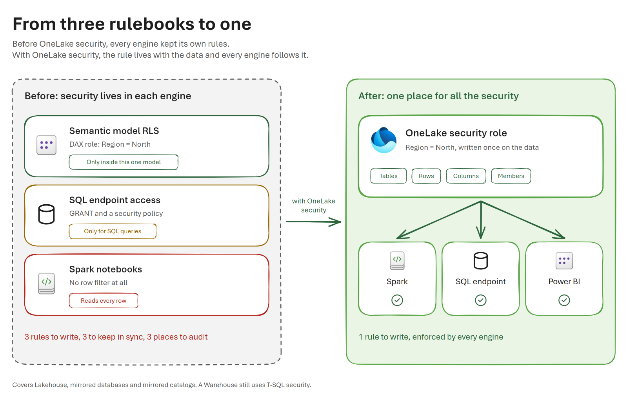
From three rulebooks to one: before OneLake security each engine has its own rule; after, one role on the data is enforced by Spark, the SQL endpoint and Power BI
With OneLake security you write the rule once, on the data. Spark, the SQL endpoint and Power BI all read that same role and enforce it when someone queries.
Remember the North and North-East split? Now it’s one change, in one role, and every engine picks it up.
You might be wondering what happens if a tool can’t enforce the rule. It gets blocked instead of trusted. The rule is defined in one central place, and each engine is responsible for enforcing it when it reads the data.
Where Can You Use It Today?
| Fabric item | Supported permissions |
| Lakehouse | Read and ReadWrite |
| Mirrored database | Read |
| Azure Databricks mirrored catalog | Read |
| Warehouse | Uses its own T-SQL security model |
The One Condition: Which Identity Reaches the Data
Largely, with one condition. A role on the data filters the identity that reaches the data. When that identity is your report viewer, the viewer’s rules apply. When it is the item owner or a service account, OneLake checks that account instead of the viewer.
So the real question becomes: whose identity actually reaches your data? Fabric decides that in three different places, and that’s where we’re going next.
Whose Identity Actually Reaches Your Data?
Try this small thought experiment. You open a report, and the report asks OneLake for data. Who does OneLake think is asking?
It isn’t always you.
Between your report viewer and the data, there can be up to three steps. At each one, Fabric either keeps the real user or swaps in someone else. Each step has its own setting, and two of those settings share the same name: “delegated”. They mean different things, so it helps to look at them one at a time.
Whose identity reaches your data: the report viewer passes through the model connection, the SQL endpoint and the shortcut, and each step either keeps the real user or swaps in someone else
Here are the three steps side by side:
| Step | Keeps the real user | Swaps in someone else |
| 1. The Semantic Model Connection (SSO vs. Fixed Identity) | SSO | Fixed identity |
| 2. The SQL Analytics Endpoint (User Identity vs. Delegated Mode) | User identity mode | Delegated identity mode |
| 3. The Shortcut (Passthrough vs. Delegated Authentication) | Passthrough | Delegated |
If you remember one thing from this section, make it this: OneLake security only checks the identity that arrives at the data. If any step swaps the identity, your viewer’s own rules never get checked.
Let’s walk through each step.
Step 1: The Semantic Model’s Connection
When someone opens a Direct Lake report, the semantic model has to read the data as somebody. You choose who.
- SSO (single sign-on) is the default. The model reads the data as the person viewing the report, so their own OneLake rules apply.
- Fixed identity means the model always reads as one account, such as a service principal. Every viewer sees what that one account can see.
Why would anyone choose a fixed identity? It’s useful when report users should never touch the lakehouse directly. They get the report, and nothing else. We’ll come back to what that means for row-level security in the next section.
One more case: an Import model reads the data once, at refresh time, using a stored credential. When someone opens the report later, they’re looking at the imported copy, so their identity never reaches the data at all.
Step 2: The SQL Analytics Endpoint
The SQL analytics endpoint is the SQL view of your lakehouse. Every endpoint runs in one of two access modes, and that mode decides whether OneLake security applies to SQL queries at all.
In user identity mode, the endpoint passes the signed-in user straight through to OneLake, and OneLake’s rules decide what they can read.
User identity mode: the SQL analytics endpoint passes the signed-in user’s identity to OneLake, and OneLake security decides what that user can read
In delegated identity mode, the endpoint reads OneLake as the workspace or item owner. OneLake’s roles step aside, and SQL permissions inside the database decide what each user sees.
Delegated identity mode: the SQL analytics endpoint reads OneLake as the item owner, and SQL permissions inside the database decide what each user can see
Which one do you have right now? Check before you assume. New endpoints can start in delegated identity mode, and an Admin or Member has to switch them to user identity mode before OneLake roles apply to SQL queries. Until that switch happens, notebooks follow your OneLake rules while SQL queries follow SQL permissions.
And if you do switch, plan it. Switching briefly takes every SQL endpoint in the workspace offline, cancels running queries, and removes existing SQL roles for good.
Step 3: The Shortcut
A shortcut points to data that lives somewhere else, without copying it. When a query goes through a shortcut, the shortcut has to decide whose identity to use at the other end.
- Passthrough forwards the real user’s identity to where the data physically lives. The source lakehouse then checks that user against its own roles. You can’t add roles on the shortcut itself, because the security lives at the source.
- Delegated reads the source with a stored credential instead, such as a service principal. Here you can add roles on the shortcut. The user gets the overlap of their own role on the shortcut and what the stored credential can see at the source.
Which one do you get? It depends on where the shortcut points:
| Shortcut points to | Authentication |
| Another OneLake location, same tenant | Passthrough by default. You can choose delegated when you create the shortcut |
| OneLake in another tenant | Delegated only |
| External storage such as ADLS or S3 | Delegated only |
Can the Steps Affect Each Other?
Yes, and these interactions deserve close attention.
A passthrough shortcut can still lose your identity. If the query comes in through Direct Lake on SQL, or through an endpoint in delegated mode, the source is read as the item owner, even on a passthrough shortcut. What the viewer sees then depends on the endpoint’s mode. In user identity mode, OneLake roles still filter them. In delegated identity mode, SQL permissions decide instead.
It works the other way too. If the source table has OneLake row or column security, an endpoint in delegated mode blocks the shortcut completely. OneLake won’t hand filtered data to the owner’s identity on someone else’s behalf.
So if you want the real user to reach the data from start to finish, keep every step green: SSO on the model (or Direct Lake on OneLake, which skips the SQL endpoint entirely), user identity mode on the endpoint, and passthrough on the shortcut.
Now you know the identity can change along the way. That raises the question Power BI developers ask first: should your row-level security live in the semantic model, or in OneLake?
Where Should Row-Level Security Live: Semantic Model RLS or OneLake RLS?
If you build Power BI models, you’ve probably written RLS in DAX many times. Now OneLake offers RLS on the data itself. So do you need both? Do they clash? And which one should you trust?
Let’s settle it in three steps: what each one does, which one actually filters your viewer, and where we’d put the rule.
What Each One Solves
They sound alike, but they guard different things.
| Semantic model RLS | OneLake RLS | |
| What it protects | What viewers see inside one model | The data itself, for every engine that reads it |
| Who it applies to | Viewers only. Workspace Admins, Members, Contributors and anyone with Write on the model skip it | Viewers and users with Read permission. Admins, Members and Contributors skip it in most engines |
| What rules it can express | Anything DAX can do, including per-user rules with USERPRINCIPALNAME() | A simple filter on one table. No per-user lookups and no rules that span tables |
| How someone gets around it | By reading the data outside the model: the lakehouse, the SQL endpoint or a notebook | By reaching the data with a different identity (see the previous section) |
Think of it this way. Model RLS guards one door into the data. OneLake RLS guards the data behind every door.
Which One Filters Your Viewer?
Here’s the short answer first. If you want in-memory speed and OneLake security for each viewer, use Direct Lake on OneLake with SSO. Every other setup trades one for the other.
The longer answer depends on two things: how your model reads the data, and which access mode the SQL endpoint is in.
Matrix of semantic model storage mode against SQL endpoint access mode, showing which security filters the report viewer
Three things are worth taking from this:
- Direct Lake on OneLake doesn’t care about the endpoint’s mode. It reads OneLake directly, so the endpoint is never involved.
- Direct Lake on SQL pays a speed price. In user identity mode, OneLake roles become SQL rules, and every query falls back to the slower DirectQuery path.
- Import always needs model RLS. The source only sees the account that runs the refresh, so viewers can only be filtered inside the model.
One last thing the matrix assumes: SSO on the model. Switch to a fixed identity, and every row of the matrix filters only that one account. Your viewers all see the same data unless model RLS separates them.
Can They Work Together?
Yes, in one setup, and it’s a supported combination: Direct Lake on OneLake with SSO. There, both layers filter the same viewer, in a fixed order:
- OneLake looks at all the viewer’s OneLake roles together and decides the most they’re allowed to see.
- Model RLS then narrows that down further.
So model RLS can only take rows away. It can never give back a row that OneLake has hidden.
What does it take for both to work? Five things, and all five need to be in place for both layers to filter:
| You need | Why |
| A Direct Lake on OneLake model | It’s the only storage mode where OneLake checks the viewer directly |
| SSO on the model’s connection | So the viewer’s own identity reaches OneLake, not a fixed account |
| The viewer has Read on the lakehouse and sits in a OneLake role | So OneLake knows which rows to give them |
| The viewer has Read on the model, but not Write (Viewer role or no workspace role) | Anyone who can edit the model skips model RLS |
| The viewer is a member of a model RLS role | So the model knows how to narrow the rows further |
We tested it: We put a OneLake RLS role on the lakehouse and a model RLS role on a Direct Lake model with SSO, then opened the report as a Viewer with Read access. Both filters applied: OneLake trimmed the rows first, and model RLS narrowed them further. When the same user had Write on the model, as its owner or through a Contributor-or-above role in the model’s workspace (the lakehouse sat in a different workspace), only the OneLake filter applied. If your model RLS seems to do nothing, check who can edit the model first.
In other setups, only one layer gets a say:
- Import, or any fixed identity: OneLake only sees the refresh or fixed account, so model RLS is the only filter between viewers and the data.
- Anyone with Write on the model: model RLS doesn’t apply to them at all. If they’re also Admin, Member or Contributor in the lakehouse’s workspace, OneLake roles don’t restrict them either, so neither layer gets a say.
- Users who can reach the lakehouse directly: they can read the data outside the model, where model RLS doesn’t follow them. With SSO, that’s a real way around model-only security.
So, Should You Use Both?
Our advice: pick one place for each rule. Microsoft’s guidance points the same way: consolidate rules at one layer to reduce complexity.
Two layers that can both filter means two places to keep in sync, two places to audit, and two places to check when someone asks “why can’t I see this row?” That’s the same problem we started this post with, just with fewer engines.
Here’s where we’d put the rule:
| Your situation | Put RLS in |
| Direct Lake on OneLake, and viewers can also reach the lakehouse | OneLake security |
| The same data is read by Spark, SQL and Power BI | OneLake security |
| The rule is per user, such as “managers see their own team” | The semantic model, with a fixed identity and no viewer access to the lakehouse |
| An Import model | The semantic model |
| Report-only users who should never touch the lakehouse | The semantic model, with a fixed identity |
That per-user row is worth a second look. OneLake RLS works with simple table filters today, so a “managers see their own team” rule still belongs in the model. This works well as long as viewers reach the data only through the model.
You now know where the rule should live. Next, let’s follow a single report request from start to finish and watch exactly where the identity holds, and where it changes.
How OneLake Security Flows Through Shortcuts to a Direct Lake Semantic Model
Let’s put it all together with one real request. A sales manager in the North team opens a report on Monday morning. They should see North sales, and nothing else.
Between that click and the data, there are five stops. Let’s walk through them.
The Setup
This is a common pattern, and close to the one we built in our own tests:
- Data from Dataverse lands in a landing lakehouse.
- A Bronze lakehouse reads those tables through a shortcut, without copying them.
- A Direct Lake on OneLake semantic model sits on Bronze, with SSO on its connection.
- The North rule is a OneLake role on the landing lakehouse: Region = ‘North’.
Follow one report request: the viewer’s identity travels from the report through the semantic model and a passthrough shortcut in Bronze to the landing lakehouse, where the North role filters the rows
The Walk, Stop by Stop
Stop 1: The viewer opens the report. Who are they to Fabric? A workspace Viewer with Read on the semantic model. That matters, because a Viewer is exactly the kind of user that both OneLake security and model RLS apply to.
Stop 2: The semantic model reads the data. As whom? With SSO, as the viewer. And because it’s Direct Lake on OneLake, it goes straight to OneLake and skips the SQL endpoint, so the endpoint’s access mode plays no part.
Stop 3: Bronze hands over to the shortcut. Whose rules apply here? Bronze’s roles only decide whether the viewer can open the shortcut at all. The shortcut is passthrough, so it forwards the viewer’s identity to the landing lakehouse, and the row rule comes from there. You can’t put a role on the shortcut itself.
Stop 4: The landing lakehouse checks the role. This is where the North rule finally runs. OneLake sees the real viewer, finds them in the North role, and filters the rows.
Stop 5: The report shows the result. North rows only. If the model also has RLS, it narrows things down from there, just as we saw in the last section.
We tested it: We built this chain in our tests. First we tried to add a OneLake role on the shortcut tables in Bronze, and Fabric didn’t allow it, whether the two lakehouses sat in the same workspace or in different ones. The rule had to live in the landing lakehouse. Once it did, it followed the user through the shortcut: the lakehouse explorer, a notebook and a Direct Lake report all showed the same filtered rows.
Before You Try It
Two details to plan for in this setup:
- The viewer needs access on both sides. In Bronze, a OneLake role that covers the shortcut (or ReadAll, which the default reader role picks up). In the landing lakehouse, a seat in the North role. The shortcut passes their identity along, and access to the source comes from the source lakehouse’s own roles.
- Changed a role at the source? Refresh the model. A Direct Lake on OneLake model doesn’t pick up OneLake security changes on its own, so refresh it after you change the rules.
What If One Setting Changes?
The chain above works because every stop keeps the viewer. Change one setting, and the result changes with it:
| If you change this | Who reaches the landing lakehouse | What the viewer gets |
| The model uses a fixed identity | The fixed account | The same rows as every other viewer. Only model RLS can tell them apart |
| The model is Direct Lake on SQL, so it reads through Bronze’s SQL endpoint | The item owner reads the files. The viewer is checked at the endpoint | It depends on the endpoint’s mode. In delegated identity mode, the default for new endpoints, the shortcut is blocked because the landing table has OneLake RLS. In user identity mode, the North role still filters the viewer, but every query falls back to DirectQuery |
| The shortcut is delegated | The shortcut’s stored account | Only what both their role on the shortcut and the stored account allow. Row filters can only be set at the source |
| The viewer is Contributor or above in the lakehouse’s workspace | The viewer | Everything. OneLake roles don’t restrict them |
That last row deserves the closest watch. A single workspace role can override an otherwise well-designed chain.
Wrapping Up
For the business, one rule on the data means fewer governed copies to maintain, consistent numbers whether a team works in a notebook, SQL or Power BI, and a single, defensible answer when an auditor asks who can see what.
If you are designing access control for your Fabric estate, Data Crafters has built this in production. Let’s talk about what it looks like for yours.