Introduction: Why Data Access Breaks at Scale in the Age of AI
The use of AI has enabled many to scale and drive innovation, but it has also introduced a paradox when it comes to security. Organizations want to move fast while keeping access controls consistent, auditable, and enforceable across every workload.
Traditionally, organizations have approached this by securing each tool individually. However, at the current pace of change, this approach creates complexity and gaps. With OneLake Security, data access control shifts from tool-specific lockdown to a secure once, enables many methodologies.
As of January 2026, OneLake Security went into public preview with general availability expected in Q1 2026. Here’s why forward-thinking organizations are preparing now.
The Challenge: Why Traditional Security Models Fall Short in AI
Data and workloads are multiplying faster than security policies can keep up. Each new object, whether it’s a Power BI model, notebook, or Lakehouse, requires separate access control configuration.
Consider when a data analyst spins up a new notebook, do they automatically inherit the same security controls as your Power BI report? In most cases, the answer is no.
This happens because security rules are applied downstream at the model level and don’t propagate upstream to other Fabric artifacts.
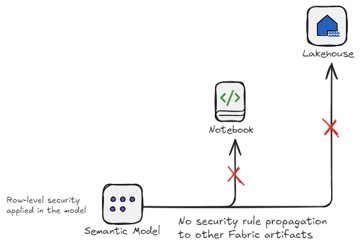
The results of this is:
- Duplication of effort: configuring the same security rules across multiple objects
- Inconsistent controls: different methodologies required to administer security
- Increased risk exposure: the complexity introduces gaps where platforms may go unsecured
In this case, access management becomes reactive rather than strategic.
The Shift: Securing at the Data Layer with OneLake Security
OneLake Security flips the paradigm. Access controls get enforced where the data lives, not at the model or each individual engine. This methodology means you have one security layer with multiple consumption paths.
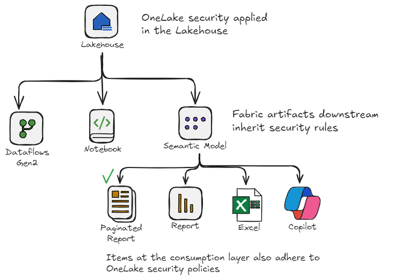
Here’s what this looks like in practice: A finance analyst has permissions defined once at the Lakehouse level. Whether they query data via the SQL endpoint, view a Power BI report, or ask Copilot a question about revenue trends, those same access controls apply automatically. No duplicate configuration. No gaps.
How OneLake Security Works with Existing RLS
If you already have Row-Level Security (RLS) configured in your Power BI semantic models, how OneLake Security interacts with it depends on which mode your SQL analytics endpoint is running in.
User Identity Mode: OneLake Security becomes the single source of truth for table access, RLS, and column-level security. SQL-level RLS defined at the endpoint on tables is ignored and OneLake Security takes over. Any RLS defined in your Power BI semantic model still applies on top, but you should expect to recreate table-level RLS logic inside OneLake Security roles for universal enforcement across all engines.
Delegated Identity Mode: Your existing SQL-level RLS continues to work exactly as before. OneLake Security roles you define won’t be enforced through the SQL endpoint in this mode. This is the safer migration path if you have complex existing RLS and aren’t ready to cut over.
When both layers are active, the effective access follows an intersection model. A user must be granted access by both OneLake Security and the semantic model RLS to see the data. OneLake Security provides the universal baseline and semantic model, RLS adds model-specific restrictions on top. The key nuance is that this intersection only behaves predictably when you understand which mode your endpoint is running in.
Direct Lake Models: Where the Intersection Gets Nuanced
For organizations using Direct Lake semantic models, Power BI’s high-performance mode that reads Delta tables directly from OneLake, the interaction between OneLake Security and semantic model RLS deserves special attention. This is where the details matter most, and where misconfigurations are most likely to create unintended access gaps.
The Intersection Model in Practice
When OneLake Security is active alongside RLS defined in a Direct Lake semantic model, the two layers don’t simply add on top of each other, they intersect. A user must satisfy both sets of rules to see any given row of data.
Think of it as two checks. A user must satisfy both layers to access any data. OneLake Security acts as the first guard, enforcing a consistent baseline across every tool that touches the data: Spark notebooks, SQL queries, Power BI reports, and AI workloads. Semantic model RLS acts as the second guard, applying report-specific filters on top of that baseline when users access data through Power BI.
This design is intentional. It gives data teams the ability to define a universal access floor at the Lakehouse level, while still allowing Power BI model owners to layer in additional restrictions for reporting purposes, without those restrictions needing to be duplicated across every other compute engine.
The practical implication: if a user is permitted to see a region’s data by OneLake Security but restricted by semantic model RLS, they won’t see it in the report. Conversely, if OneLake Security restricts their access at the source, semantic model RLS cannot grant it back. The most restrictive layer determines effective access.
The DirectQuery Fallback Problem
Here is where performance and security intersect in a way that surprises many teams. Direct Lake is designed to read data from OneLake at speed with no traditional refresh and no import latency. But when SQL-level RLS is defined directly on a table at the SQL analytics endpoint, Direct Lake cannot evaluate those rules in its high-performance path. The engine detects the SQL-level restriction and automatically falls back to DirectQuery mode for that query.
DirectQuery still returns correct, secured results, but it queries the SQL analytics endpoint live on each user interaction rather than reading from the in-memory cache. For large datasets or complex reports, this means noticeably slower performance and increased pressure on your Fabric capacity. What was designed to be a fast, scalable reporting experience quietly degrades into something that behaves more like a traditional live connection.
The business implication is real: if your Direct Lake model delivers fast reports to a large user base, a single table with SQL-level RLS can drag the entire experience down without anyone immediately understanding why. This often shows up as higher capacity consumption and a slower experience for large user populations.
The fix is to keep RLS out of the SQL analytics endpoint for tables used by Direct Lake models. Define your row-level filtering either in the semantic model using DAX expressions, or, as OneLake Security matures, at the OneLake layer. OneLake Security enforces row filtering natively without triggering any fallback, preserving full Direct Lake performance.
What This Means for Your Security Architecture
These two behaviors, the intersection model and the fallback risk, point to the same architectural conclusion: security for Direct Lake models should be defined as close to the data as possible, not distributed across multiple layers.
The target state is a Lakehouse secured by OneLake Security roles, with semantic model RLS used only for report-specific filtering that goes beyond the universal baseline. This eliminates the fallback risk, reduces duplicated configuration, and ensures that users querying data through any engine, not just Power BI, operate under consistent access controls.
Until OneLake Security reaches general availability and adds support for dynamic identity functions, a transitional approach works well. Use OneLake Security for static, role-based access control at the data layer, and maintain semantic model RLS for dynamic, user-identity-based filtering within Power BI. Treat them as complementary rather than competing controls, and document clearly which layer owns which rule.
Important: OneLake Security does not currently support dynamic row filtering using functions like USERPRINCIPALNAME(). For any filtering logic that depends on who is logged in, semantic model RLS remains the right tool for now.
What OneLake Security Does Not Solve
Before we go further, I want to highlight what OneLake Security doesn’t solve, so you have a clear picture of what it can and cannot do.
- Prompt-level guardrails: OneLake Security controls data access, but organizations still need controls on AI outputs (hallucinations, inappropriate responses)
- Workspace-level permissions: Who can access which Fabric workspaces remains a separate configuration
- External data sources: Data accessed via shortcuts to external systems may have different access control models
- Data cataloging and discovery: OneLake Security focuses on access control, not metadata management or data discovery
Understanding these boundaries clearly helps you understand exactly where OneLake Security fits in your security architecture.
Why This Matters for AI Readiness
As organizations deploy AI workloads such as Copilot integrations, custom models, and data agents, the security perimeter expands exponentially. Each new AI tool that touches your data traditionally requires its own access control configuration.
OneLake Security changes this equation. When your access controls are defined at the data layer, new AI workloads automatically inherit those policies. A user restricted from seeing customer personally identifiable information (PII) in Power BI reports is also restricted when querying that same data through a notebook or when an AI model accesses it for training.
Compliance is part of the story. The other impact is velocity. Centralized policies reduce the time it takes to onboard new AI workloads safely. Security teams can say “yes” to AI experimentation because guardrails are baked into the data layer itself. Data engineers can build new analytics experiences, knowing security will be consistent. Business leaders can confidently adopt AI tools without creating new governance bottlenecks.
The alternative, managing separate security policies for every new AI integration, doesn’t scale. OneLake Security positions your data infrastructure to support responsible AI adoption at the pace innovation demands.
Self-Assessment
How can OneLake Security help you? Anytime I learn about a feature, I like to go through an internal checklist to see how I can benefit from it. Asking yourself the following questions can help you identify where you can achieve real gains by implementing it:
- How many separate access control lists do you maintain across your analytics tools today?
- If a new AI tool is added tomorrow, how long would it take to apply consistent access policies?
- Do your access controls follow your data from source to insight?
- Is your security team proactive or constantly catching up?
- Do you have users who need workspace build access but should be restricted from certain data?
A good next step is to start by auditing how many separate access control policies you maintain across your analytics stack. If the number exceeds your comfort level, OneLake Security may be the consolidation point you need.
Since OneLake Security is in preview, I recommend piloting in non-production environments first. Design your Lakehouse architecture with centralized security in mind but plan your production rollout for when GA brings the stability that enterprise deployments require.
If you are planning Copilot, data agents, or broader AI adoption, centralizing access control at the data layer is one of the safest foundational steps to take early.