Read Part 1 – Reinventing Non Conformance Reporting: A Modern NCR Workflow with Microsoft Power Platform
Solution Workflow Detail
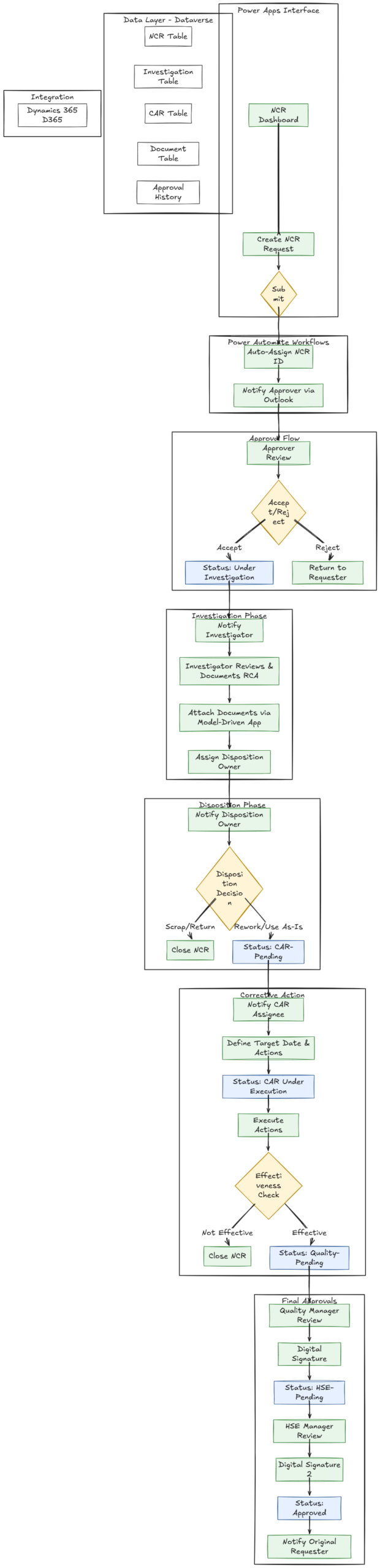
The reimagined NCR process follows a structured flow across eight defined stages, each with automated notifications, role-based access, and a clear status progression. The following describes each stage in detail along with the automated actions triggered at each step.
| Workflow Status Progression Submitted → Under Investigation → CAR-Pending → CAR Under Execution → Quality-Pending → HSE-Pending → Approved / Closed |
Stage 1: NCR Creation
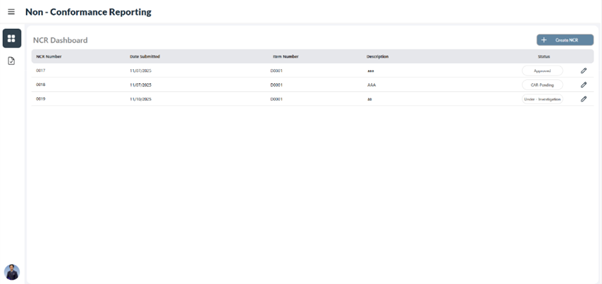
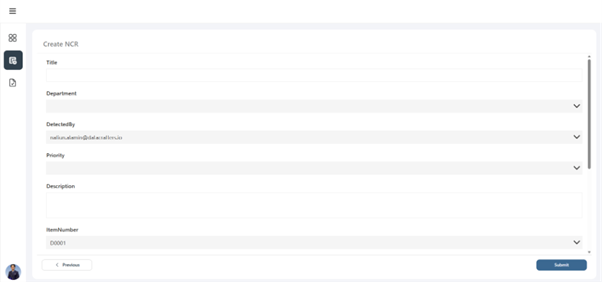
| NCR Creation & Submission Users access the centralized dashboard and initiate a new NCR request. The multi-screen canvas form collects Title, Department, Detected By, Priority, Description, Item Number, Category, NCR Date, Site, Quantity Affected, and Warehouse. Item Number, Site, and Warehouse auto-populate via live Dynamics 365 integration. Upon submission, Power Automate automatically assigns a unique sequential NCR ID and triggers immediate notification to the designated approver. Status Change: Submitted |
Centralized NCR Dashboard
Create NCR Request Form
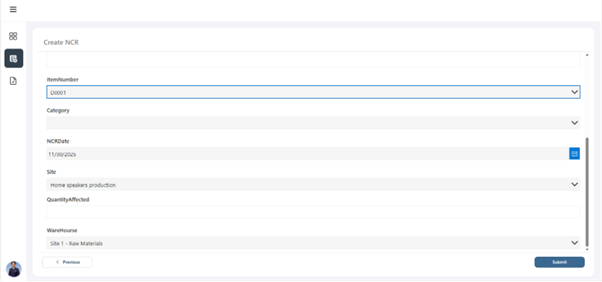
Dynamics 365 Integration Fields
Stage 2: Initial Approval
| Approver Review & Decision The approver receives an Outlook email notification containing full NCR details and a deep-link directly opening the record in Power Apps. The approver reviews all submitted information through a read-only interface and selects Accept or Reject. On rejection, the record is returned to the requestor with comments. On acceptance, the status advances and the investigator is automatically notified. Status Change: Accepted: Under Investigation | Rejected: Returned to Requestor |
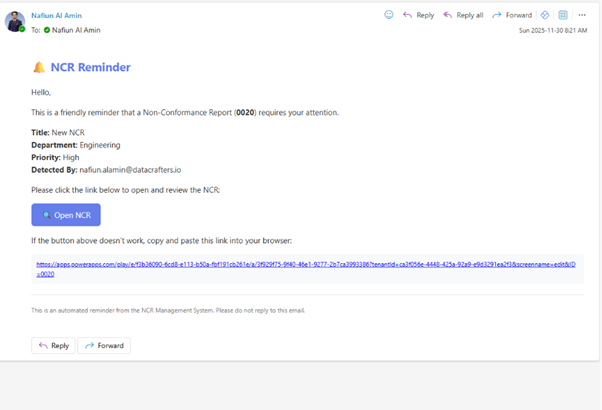
Outlook Email Notification to Approver
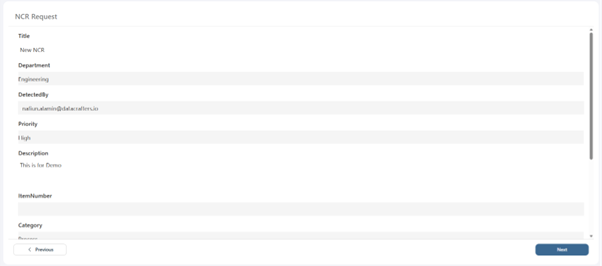
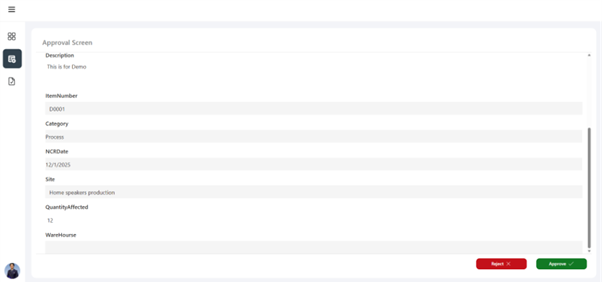
Approver Review Screen
Stage 3: Investigation & Root Cause Analysis
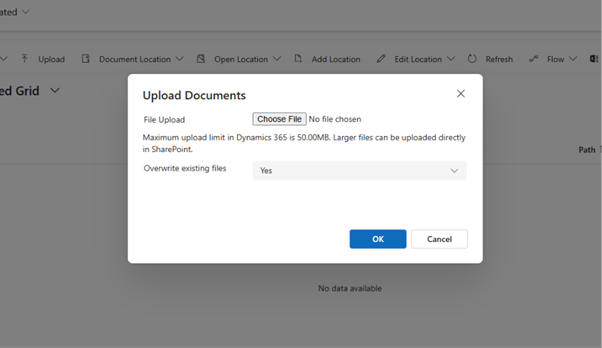
| Investigation & Document Attachment The assigned investigator receives an Outlook notification with a direct link to the investigation screen. They review all submitted NCR information, document containment actions, conduct root cause analysis, set the investigation status, and assign a Disposition Owner. Supporting evidence — photos, test reports, inspection records — can be uploaded directly through the integrated Model-Driven App document management interface, which stores files in SharePoint linked to the NCR record with full version history. Status Change: Investigation Completed |
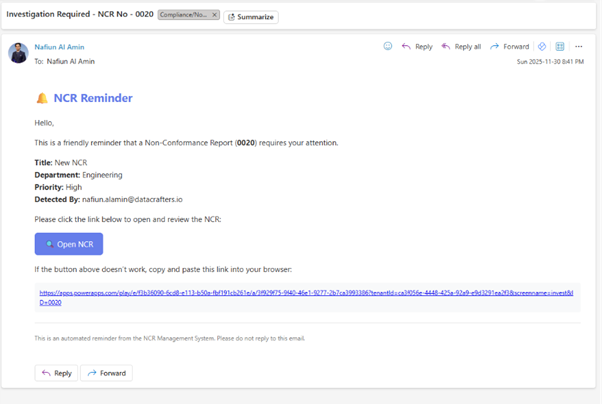
Investigator Notification Email
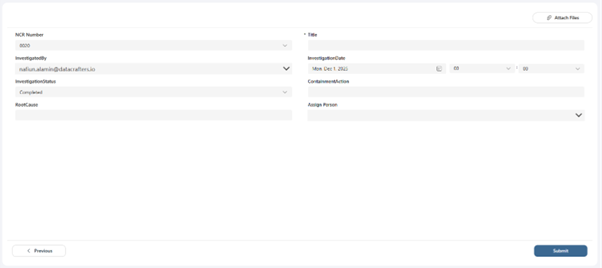
Investigator Review Screen
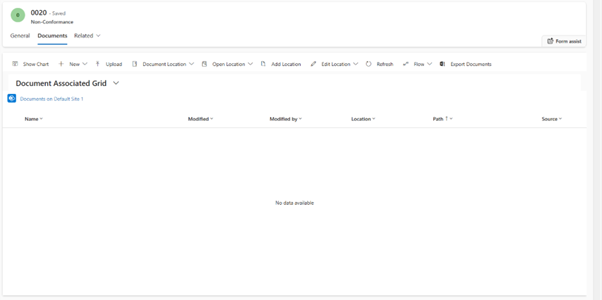
Document Management Interface
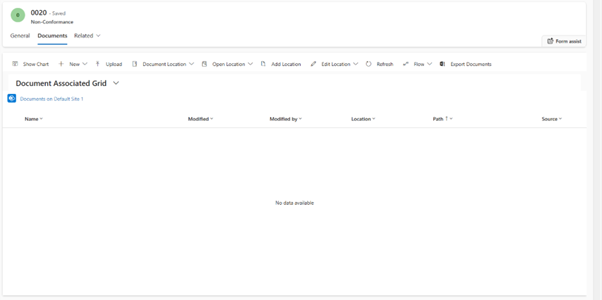
Document Upload
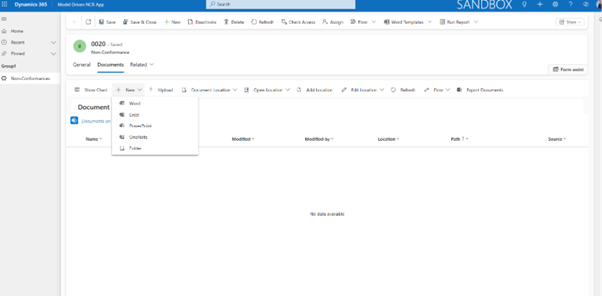
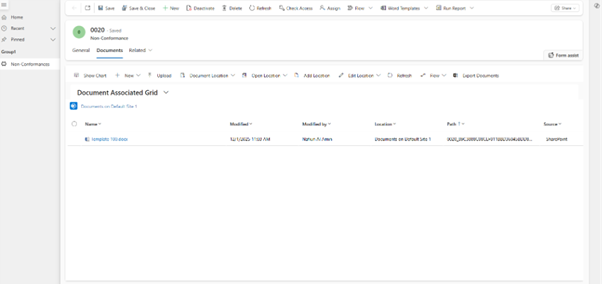
Document Template Upload
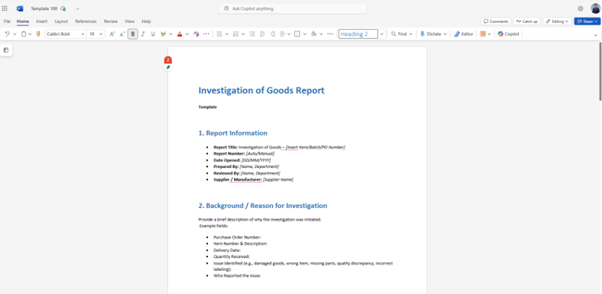
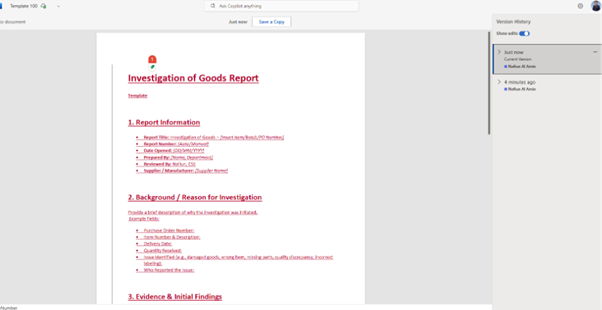
Version History View
Stage 4: Disposition Decision
| Disposition Owner Decision The Disposition Owner receives an Outlook notification and reviews all previous investigation data. They select one of two disposition paths: Scrap/Return, which immediately closes the NCR with no further action required; or Rework/Use As-Is, which triggers the Corrective Action Request (CAR) workflow. This branching logic is handled automatically by Power Automate conditional routing. Status Change: Scrap/Return: NCR Closed | Rework/Use As-Is: CAR-Pending |
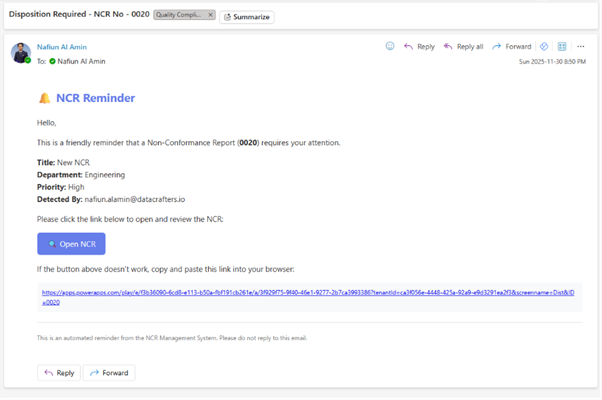
Disposition Notification Email
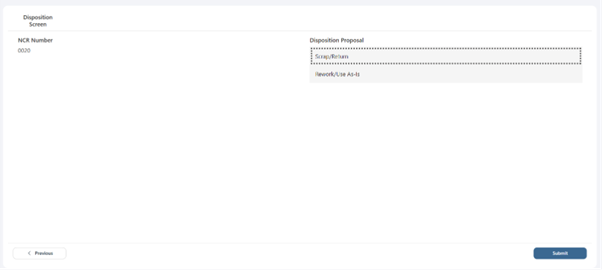
Disposition Decision Options
Stages 5–6: Corrective Action Request (CAR)
| CAR Assignment, Execution & Effectiveness Check The CAR Assignee receives notification and accesses the CAR screen, where they review the full NCR history, set a target completion date, document the corrective action description, and identify the responsible person. Once corrective actions are executed, the responsible party records the completion date and assesses effectiveness: Effective (advances to final approval), Not Effective (NCR can be closed without full approval), or To Be Verified (holds for further review). Status Change: CAR Under Execution → Effective: Quality-Pending | Not Effective: Closed |
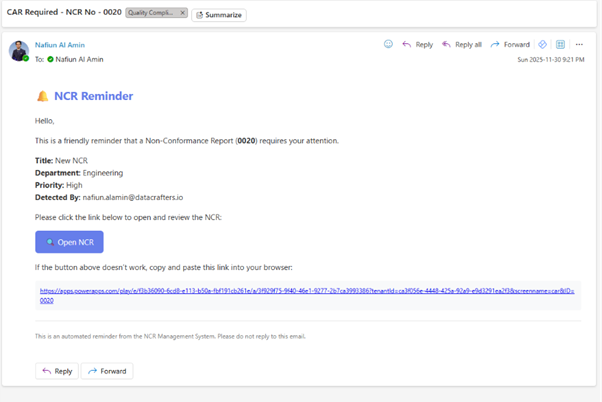
CAR Notification Email
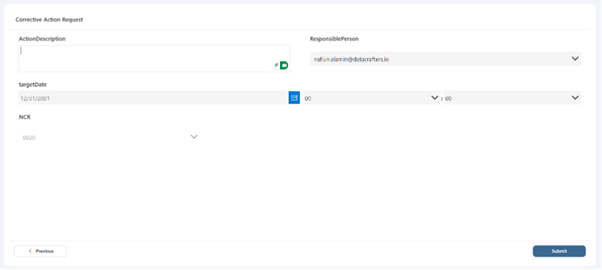
CAR Target Date and Action Entry
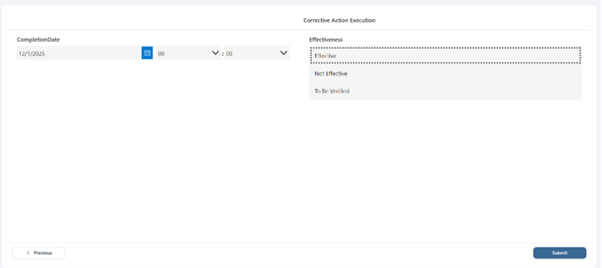
Effectiveness Assessment Screen
Stages 7–8: Final Management Approvals
| Quality Manager & HSE Manager Digital Sign-Off Sequential final approvals are required from both the Quality Manager and the HSE Manager. Each receives an Outlook notification when their review is due. The Final Verification screen presents a confirmation dialog with a manual digital signature capture control — the approver draws their signature directly in the Power App before confirming. The Quality Manager signs first; upon confirmation, the HSE Manager is notified. Upon HSE Manager sign-off, the NCR status changes to Approved and the original requestor receives a completion notification. Status Change: Quality-Pending → HSE-Pending → Approved |
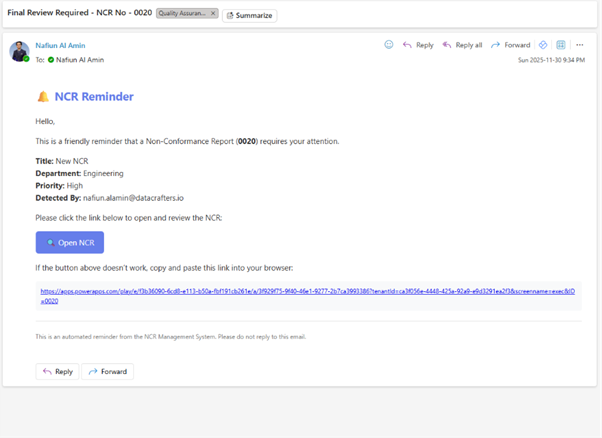
Quality Manager Notification
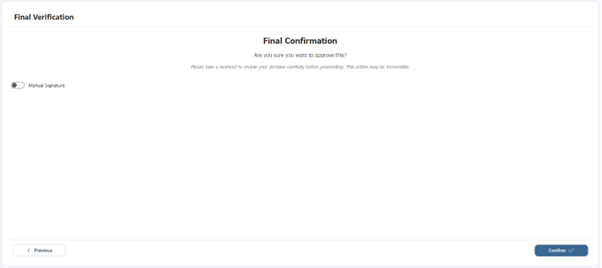
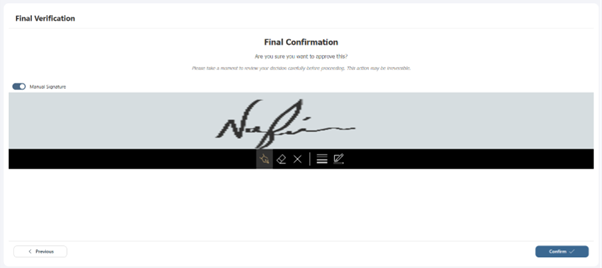
Digital Signature Capture
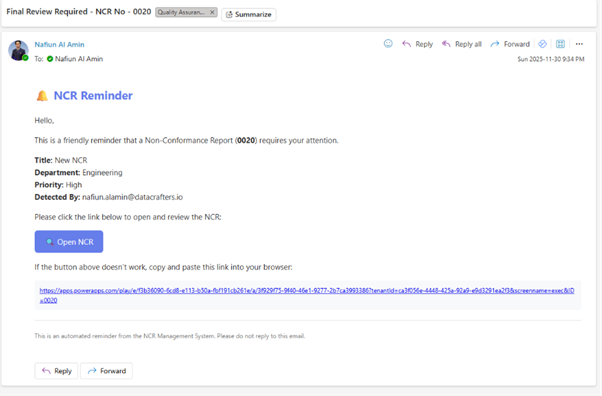
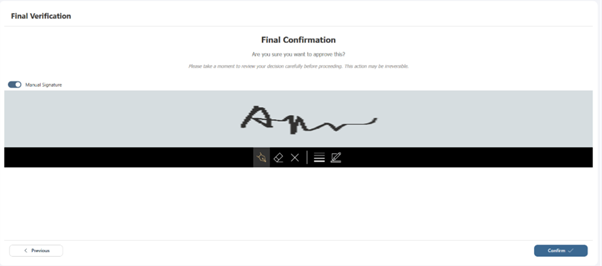
HSE Manager Notification & Final Approval & Signature
Approval Flow Architecture
The Power Automate approval flow implements a sophisticated sequential routing mechanism that ensures every NCR follows a consistent, auditable path with no steps skippable. The flow architecture consists of six logical phases:
| # | Phase | Action |
| 1 | Trigger | NCR form submission initiates the cloud flow and auto-assigns a unique NCR ID to the Dataverse record. |
| 2 | Initial Routing | Flow identifies the designated approver from configuration and sends a formatted Outlook notification with deep-link. |
| 3 | Decision Capture | Approver response (Accept/Reject with optional comments) is stored in Dataverse with timestamp and user attribution. |
| 4 | Conditional Branch | Flow evaluates the approval decision: accepted routes to Investigation notification; rejected routes back to requestor. |
| 5 | Sequential Stages | Investigation, Disposition, CAR, Quality Manager, and HSE Manager approvals each follow the same notify-capture-branch pattern. |
| 6 | Closure | Final approval triggers a completion notification to the original NCR requestor with the full resolution summary. |
Security Role Design
The solution implements role-based access control through Dataverse security, ensuring each user can only access the screens and data relevant to their function. Eight distinct roles are defined:
| Security Role | Permissions & Access Scope |
| NCR Initiator | Create and submit new NCR records; read own submissions; no edit access after submission. |
| Approver | Read-only access to submitted NCRs; write access to approval decision fields only. |
| Investigator | Read full NCR record; write access to investigation table fields; upload documents. |
| Disposition Owner | Read NCR and investigation data; write access to disposition decision fields only. |
| CAR Responsible | Read full NCR history; write access to CAR table fields and effectiveness assessment. |
| Quality Manager | Read all records; write access to Quality Manager approval and digital signature fields. |
| HSE Manager | Read all records; write access to HSE Manager approval and digital signature fields. |
| System Administrator | Full read/write access to all tables, configuration, and security role assignments. |
Benefits of the Power Platform NCR Solution
The reimagined NCR solution delivers measurable operational improvements across all stages of the quality management process:
| Benefit | How the Platform Delivers It |
| Reduced Cycle Time | Automated notifications and sequential routing eliminate the manual follow-up delays common in email-based processes. |
| Real-Time Traceability | Centralized dashboard with live status provides immediate visibility into all active and historical NCR records. |
| Standardized Workflow | Every NCR follows the same structured process regardless of department, site, or user — eliminating process variation. |
| Automated Audit Trail | Dataverse comprehensive audit logging, once configured, captures all changes, approvals, and timestamps with full user attribution — enabling instant audit readiness. |
| Mobile Accessibility | Power Apps canvas application is fully accessible from any device including mobile and tablet without additional licensing. |
| Digital Signatures | Built-in signature capture within the Power App eliminates paper-based sign-off and provides legally defensible electronic approval records. |
| Version-Controlled Docs | SharePoint-backed document management maintains complete version history linked directly to each NCR record. |
| D365 Data Consistency | Direct ERP integration eliminates dual data entry and ensures quality records reference the same master data as operations. |
| Advanced Analytics | Structured Dataverse data enables Power BI dashboards for NCR trend analysis, root cause frequency, and resolution time KPIs. |
Customer Value & Estimated ROI
Based on comparable Power Platform implementations across manufacturing, oil & gas, and regulated industries, organizations adopting structured digital NCR workflows have reported the following estimated improvements. These figures represent potential outcomes and will vary based on organizational baseline, adoption quality, and process complexity.
| Value Driver | Estimated Improvement |
| NCR cycle time reduction (from submission to closure) | 40–60% reduction (estimated, typical for comparable implementations) |
| Compliance scores during internal / external audits | Significant improvement through consistent process adherence and instant audit trail access |
| Rework and scrap cost reduction | Reduced through faster containment, structured RCA, and effective corrective action tracking |
| NCR closure rates | Higher rates achieved through automated reminders preventing items from falling through the cracks |
| Operational overhead | Lower cost by eliminating paper forms, email routing, and manual data re-entry across systems |
| Note on ROI Figures Improvement percentages are estimated ranges based on typical outcomes from comparable Power Platform quality management implementations. Actual results depend on organizational baseline, adoption completeness, and process maturity. A formal ROI assessment should be conducted as part of the implementation discovery phase. |
Conclusion
NCR management is too important to depend on manual workflows, disparate systems, or email-based approvals. As quality expectations rise across global supply chains, organizations must upgrade to scalable, traceable, and integrated digital processes [SM1] .
The Microsoft Power Platform provides everything needed to modernize NCR workflows: user-friendly canvas applications, automated sequential approvals, enterprise-grade data storage with configurable audit logging, mobile access, document version control, digital signatures, and seamless integration with Dynamics 365.
By adopting a Power Platform approach, organizations turn NCR from a compliance burden into a driver of operational excellence, cost reduction, and customer trust — all within the Microsoft ecosystem they already rely on.
| Built on Microsoft Power Platform Power Apps | Dataverse | Power Automate | Dynamics 365 Integration | SharePoint Document Management | Power BI Analytics |
References
Microsoft Corporation. (n.d.). What is Microsoft Dataverse?
Microsoft Learn. https://learn.microsoft.com/en-us/power-apps/maker/data-platform/data-platform-intro
Microsoft Corporation. (n.d.). Create and test an approval workflow with Power Automate.
Microsoft Learn. https://learn.microsoft.com/en-us/power-automate/modern-approvals
Microsoft Corporation. (n.d.). Manage sequential approvals with Power Automate.
Microsoft Learn. https://learn.microsoft.com/en-us/power-automate/sequential-modern-approvals
Microsoft Corporation. (n.d.). Overview of building a model-driven app with Power Apps.
Microsoft Learn. https://learn.microsoft.com/en-us/power-apps/maker/model-driven-apps/model-driven-app-overview
Microsoft Corporation. (n.d.). Microsoft Power Platform integration with finance and operations apps. Microsoft Learn. https://learn.microsoft.com/en-us/dynamics365/fin-ops-core/dev-itpro/power-platform/overview
International Organization for Standardization. (2015). ISO 9001:2015 Quality management systems — Requirements. ISO.