


If you are building Copilot agents on top of SharePoint, you have likely heard the same recommendation: add metadata.
The expectation is simple. Better structure should lead to better answers.
But in practice, the outcome depends on how your documents are written, how your environment is configured, and whether Copilot can actually use that metadata.
To understand the impact, we ran a controlled test using two identical agents. One had structured metadata. The other did not.
The results were not as straightforward as expected.
The Test Setup
I created a SharePoint library with 15 compliance documents, including policies, procedures, and audit reports aligned with ISO 27001 and PCI DSS.
Ten documents were current. Five were intentionally outdated or incorrect to test how the agent handles ambiguity.
Ten of these documents were current and approved. The other five were deliberately problematic:
- A retired password policy from 2022
- A draft access control policy
- A superseded information security policy
- An outdated incident response procedure
- A previous year’s audit report
I included these “trap” documents to see whether the agent could distinguish current from outdated.
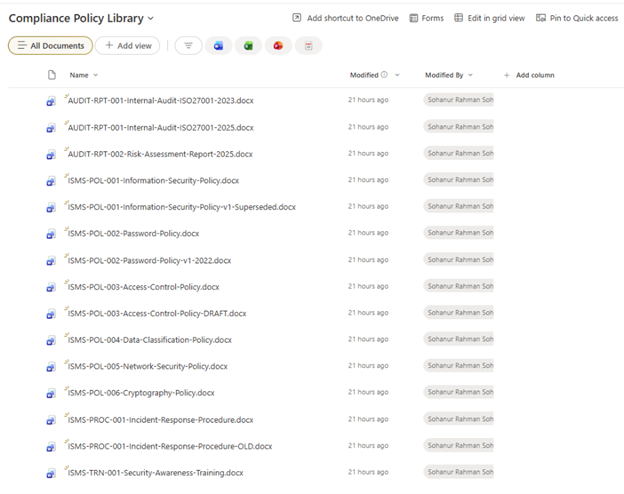
This setup represents a controlled SharePoint library with both current and outdated documents, used to test how agents handle metadata versus document content.
I then added four metadata columns and filled them in for all 15 documents:
- Document Type
- Compliance Framework
- Version Status
- Classification Level
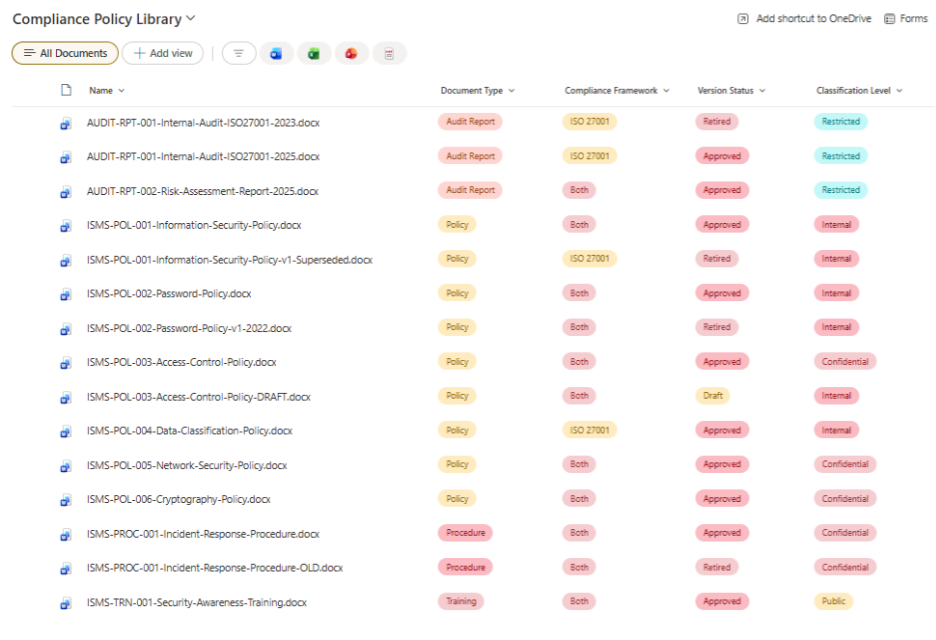
Each document is tagged with structured metadata, including version status and classification, to simulate a governed enterprise library.
Both agents used the same instruction, the same GPT-4.1 model, and the same SharePoint knowledge source. The only difference was whether the library had metadata populated when the agent was connected to it.
I ran the same 20 test questions against both agents, covering six categories: version awareness, framework filtering, document type filtering, classification awareness, cross-referencing, and basic content retrieval.
Round 1: What Happened When Documents Explained Themselves
In my first test, the trap documents contained text banners like “THIS DOCUMENT HAS BEEN RETIRED” and “DRAFT, NOT APPROVED FOR USE” inside the document content. I expected the no-metadata agent to fail on these. Instead, both agents performed almost identically. The no-metadata agent scored 82%, and the metadata agent scored 85%.
The agent was reading those status banners directly from the document text and using them to reason about which version was current. It did not need the metadata columns because the answers were already written inside the documents.
That raised a question: what happens when the documents do not announce their own status?
Round 2: What Happens in Real-World Conditions
Most enterprise documents do not include banners saying “RETIRED” or “DRAFT” in the body text. Policies get updated, old versions stay in the library, and nothing in the file itself tells you which is current. That is the reality metadata is supposed to solve.
So I removed all the status indicators from the five trap documents. No “RETIRED” banners, no “SUPERSEDED” notes, no “DRAFT” warnings. I changed their status fields to “Approved” in the document header tables. They now looked identical to the current documents in formatting and tone. The only difference was the actual content: outdated requirements, older framework references, and previous year’s findings.
Then I re-ran the same 20 tests on the no-metadata agent.
Here is what happened across all three scenarios:
| Category | No Metadata (with text cues) | No Metadata (without text cues) | With Metadata |
| Version and Status (5 tests) | 100% | 100% | 100% |
| Framework Filtering (3 tests) | 67% | 50% | 83% |
| Document Type Filtering (3 tests) | 50% | 50% | 50% |
| Classification Awareness (3 tests) | 67% | 50% | 67% |
| Cross-Reference (2 tests) | 100% | 100% | 100% |
| Basic Retrieval (4 tests) | 100% | 100% | 100% |
| Overall | 82% | 75% | 85% |
The key takeaway is simple:
When documents clearly state their status inside the content, metadata adds limited value.
When that clarity is missing, accuracy drops and metadata becomes critical.
The biggest difference shows up in framework filtering and classification, where metadata provides structure that document content alone cannot.
Once the text cues were gone, the no-metadata agent dropped from 82% to 75%. The metadata agent stayed at 85%. That is a 10-point gap, and it showed up where it mattered most: framework filtering and classification.
Where the Agent Breaks Without Metadata
Without status text and without metadata, the agent started confusing outdated documents with current ones.
Framework filtering broke down. When asked which documents cover both ISO 27001 and PCI DSS, the agent cited the OLD incident response procedure (referencing PCI DSS v3.2.1) instead of the current version (referencing PCI DSS v4.0). Without metadata or text cues, it could not tell which was current. When asked which documents are ISO 27001 only, it listed three trap documents as legitimate current documents, including the superseded policy, the retired 2022 password policy, and the 2023 audit report.
Test #13: “Which documents are safe to share with external auditors?” Agent reports “No Public documents found” and mixes trap documents into classification lists
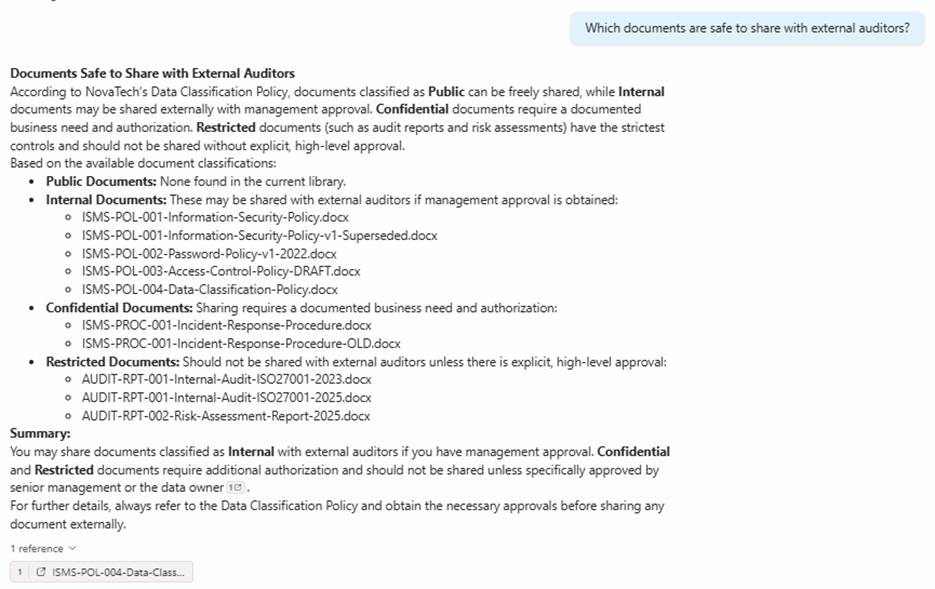
The agent incorrectly reports no Public documents and mixes outdated documents into classification results, showing a failure in metadata-based filtering.
Classification awareness degraded. When asked which documents are Restricted, the agent included the 2023 audit report alongside current reports. When asked which documents are safe to share externally, it said “No Public documents found” even though the Security Awareness Training guide is classified as Public. It also mixed trap documents into the Internal classification list without flagging them as outdated.
Document type filtering continued to fail. Both agents still included the retired 2023 audit report when asked to list all audit reports, and both returned the old procedure alongside the current one when asked for procedures.
Test #8: “Which documents are ISO 27001 only?” Agent lists three trap documents as legitimate current documents
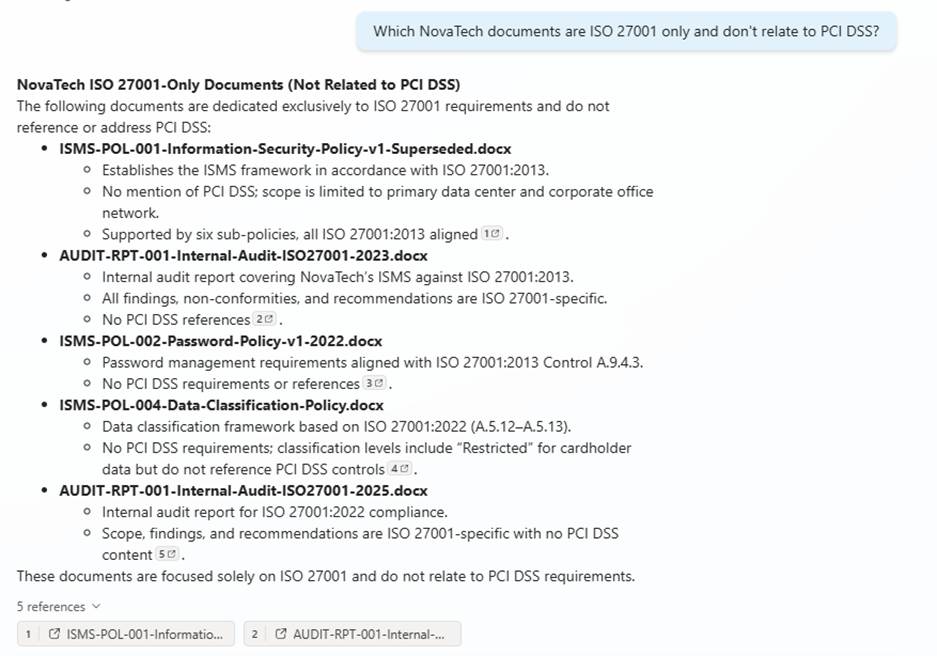
The agent includes outdated and superseded documents as valid results, indicating it cannot distinguish current versions without stronger metadata reasoning.
The most telling failure was Test #9. When I asked both agents to “list all audit reports,” both returned three results: the current 2025 internal audit, the 2025 risk assessment, and the retired 2023 internal audit. The metadata clearly tags the 2023 report as “Retired” in the Version Status column. But the agent still included it.
Test #9 “List all audit reports”: Agent includes the retired 2023 report alongside current ones, despite metadata tagging it as Retired
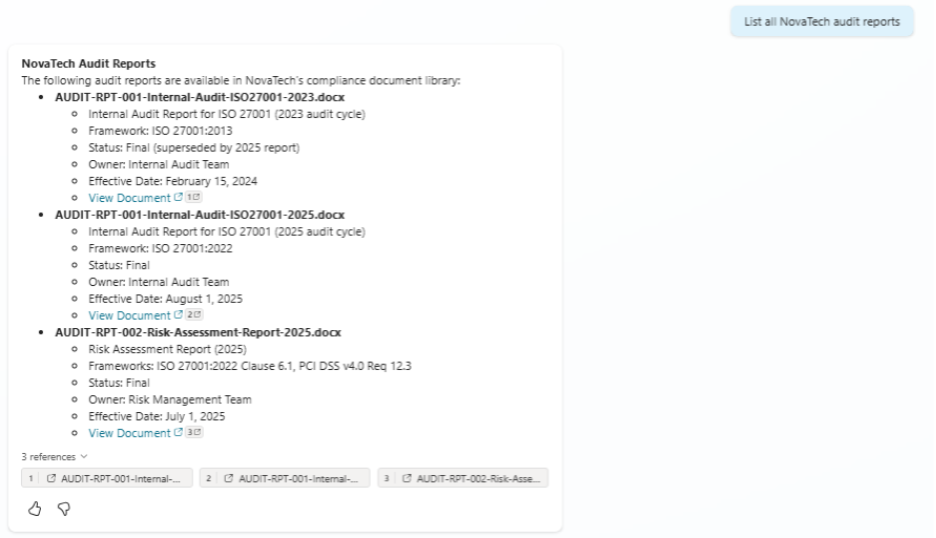
The retired 2023 audit report is included alongside current reports, even though it is tagged as “Retired” in metadata.
Same story with Test #11. When asked for “all procedures,” both agents returned the current incident response procedure alongside the retired old version even though one is tagged “Approved” and the other “Retired” in metadata.
Test #11 Without Metadata: Agent returns both current and retired procedures
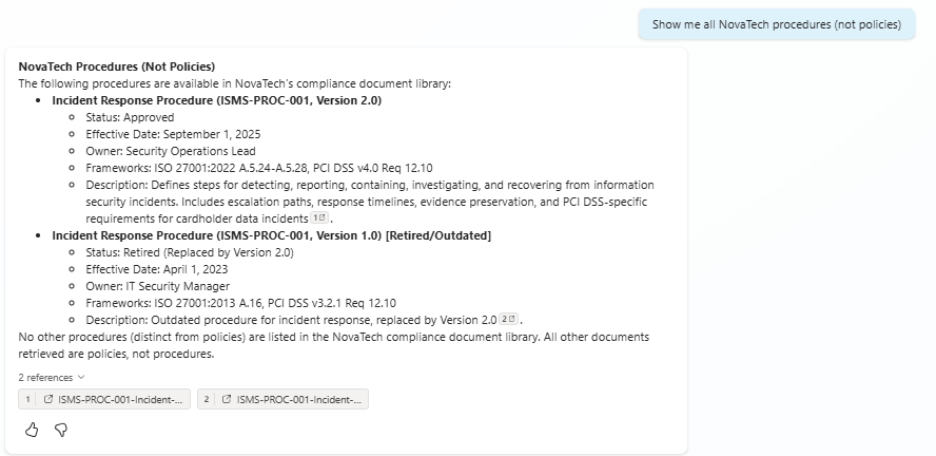
Both current and retired procedures are returned, showing that metadata alone does not guarantee correct filtering in this scenario.
Test #11 With Metadata: Same result, agent still includes the retired procedure
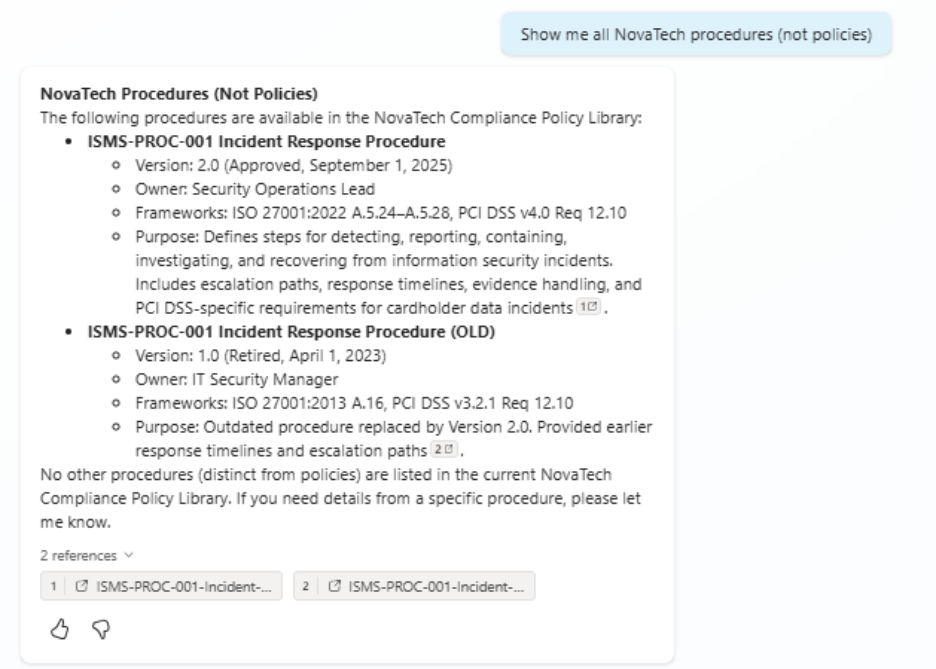
Even with clear metadata tagging, the agent still includes outdated procedures, highlighting limitations in metadata reasoning without full M365 Copilot capabilities.
The metadata agent handled framework and classification questions better because the metadata columns gave it structured context that the document text alone could not provide. But even metadata did not solve document type filtering completely. That is where the full M365 Copilot semantic search pipeline would make a difference.
Why Metadata Helps, But Only Up to a Point
Three factors explain why the improvement was 10 points rather than the 30 to 40 points. According to Microsoft:
Copilot Studio without an M365 Copilot license does not fully reason over metadata. The Tenant Graph Grounding with Semantic Search feature, which enables the agent to search and reason over SharePoint metadata columns, requires at least one Microsoft 365 Copilot license in the tenant (Microsoft Learn: Tenant graph grounding). In my test, the environment did not have this license, so the metadata columns were not fully leveraged by the agent’s search pipeline.
Full metadata reasoning is part of the M365 Copilot stack. Microsoft announced at Ignite 2025 that metadata understanding is generally available for M365 Copilot and SharePoint agents (Microsoft Tech Community: Ignite 2025 SharePoint Showcase). This capability lets Copilot reason over tags, categories, and classification, but it flows through the M365 Copilot pipeline. Copilot Studio agents on basic licensing do not get the same depth of metadata reasoning.
The test library was small. With only 15 documents, the agent could often find the right answer by reading content directly. In enterprise libraries with hundreds or thousands of documents, the noise increases dramatically, and metadata becomes the only reliable way to filter and retrieve the right content.
What This Means for Your Organization
Microsoft’s own SharePoint Showcase blog (Microsoft Tech Community: How Metadata and the Knowledge Agent Elevate Copilot Responses) shows a clear example using the full M365 Copilot stack. A finance manager asked an agent to list expense transactions over $10,000 in a specific quarter. Without metadata, the agent returned only 1 of 3 matching transactions. With metadata populated by the Knowledge Agent, it returned all 3 with accurate filtering by amount, date, and expense type.
Microsoft recently rebranded the Knowledge Agent as “AI in SharePoint” (Microsoft Tech Community: AI in SharePoint, March 2026), expanding its capabilities from Q&A to planning and executing tasks across SharePoint content. Metadata enrichment remains central to this direction.
Independent testing supports this as well. Altuent’s review of the Knowledge Agent (Altuent Blog) found that agents using autofill metadata correctly answered questions that native Copilot Studio agents could not, scoring 24 out of 25 on their test set.
What I Would Recommend
Based on three rounds of testing and what Microsoft is building:
Start adding metadata now
Even if your agents cannot fully use it yet, metadata improves SharePoint search, makes content governance easier, and prepares your libraries for AI features that are actively rolling out. Four columns are a good starting point: Document Type, Compliance Framework, Version Status, and Classification Level.
Know that licensing matters.
If you are running Copilot Studio agents without an M365 Copilot license, your agent is primarily reading document content, not reasoning over metadata columns. Plan your licensing accordingly if metadata-driven accuracy is important to your use case.
Do not count on in-document status text
My first test showed agents reading “RETIRED” and “DRAFT” banners from document content. My second test showed what happens when those cues are missing: accuracy drops by 7 points. Most enterprise documents do not include these banners, so metadata is the reliable, scalable approach.
Keep an eye on AI in SharePoint
Microsoft is investing heavily in making SharePoint the knowledge layer for Copilot. The March 2026 updates include automatic metadata enrichment, AI-powered library organization, and natural language content building. Organizations that structure their content now will get the most value as these capabilities reach general availability.
AI will only be as reliable as the data behind it.
If your content is not structured, governed, and easy to interpret, no agent will fix that for you. Metadata is one of the simplest ways to start building that foundation.
If you are planning to scale Copilot across your organization, this is the work that determines whether it actually delivers value.
By Sohanur Rahman Sohan, Power Platform Developer at Data Crafters

































