


Introduction
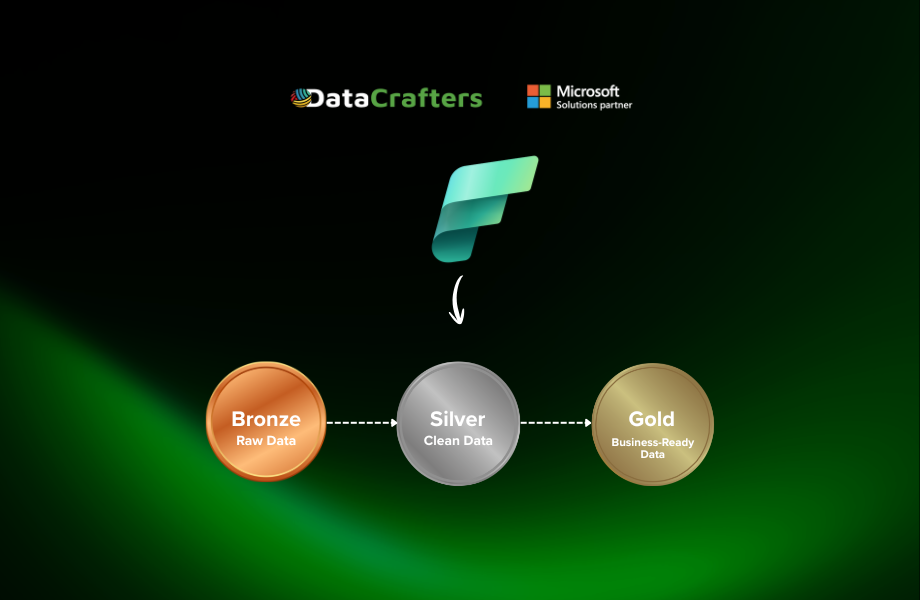
Modern data engineering demands solutions that balance performance, simplicity, and maintainability. This blog explores Materialized Lake Views (MLVs) in Microsoft Fabric-a transformative capability that redefines how data teams build and manage transformation pipelines. We’ll examine why MLVs matter for solving common data engineering challenges, how they compare to traditional views, and their role in enabling Direct Lake compatibility for Power BI. Through a hands-on walkthrough, you’ll learn to implement a complete medallion architecture using MLVs, from creating Bronze, Silver, and Gold layers to configuring intelligent refresh mechanisms. Finally, we’ll discuss the refresh strategies, practical limitations, and best practices to help you leverage MLVs effectively in your data platform.
What Are Materialized Lake Views?
Materialized Lake Views (MLVs) are Microsoft Fabric’s latest SQL-first capability for defining and managing data transformations directly within a Lakehouse. Unlike traditional views, which are evaluated at query time, MLVs persist their results physically in OneLake as Delta tables.
Conceptually, MLVs function as precomputed, transformation-aware tables. They store the output of SQL logic that may include complex joins, aggregations, and business rules, making the results immediately available for downstream analytics. Their “intelligence” lies in flexible refresh management: MLVs can be refreshed on demand or on a defined schedule, keeping data up to date without requiring full reprocessing of the entire dataset each time.
By combining declarative SQL definitions with physical materialization and efficient refresh strategies, MLVs enable high-performance, reusable analytics. They significantly simplify the design and maintenance of multi-stage data pipelines, including medallion architectures, while improving consistency, scalability, and query performance.
The Backend Engine: Apache Spark + Delta Lake
In Microsoft Fabric Lakehouse, Materialized Lake Views (MLVs) are materialized by the Spark engine. This enables MLVs to function like virtual tables from a user perspective while physically persist their results as Delta tables in OneLake, significantly improving query performance and user experience.
Fabric handles all backend processing including refresh logic, pipeline management based on dependencies between MLVs and their sources, handling of data quality rule violations, scheduling, and monitoring.
Why MLVs Matter?
- Solves Common Data Engineering Challenges: Materialized Lake Views solve common data engineering challenges like:
- Performance: Expensive transformations are precomputed and stored, eliminating the need to repeatedly execute complex queries.
- Consistency: All consumers access the same standardized, transformed data, reducing discrepancies across reports and teams.
- Efficiency: Refresh operations are triggered only when upstream source data changes, optimizing compute usage.
- Simplicity: Transformations are defined once using familiar SQL syntax, without building or maintaining custom pipelines.
- Replaces Complex ETL Orchestration: Before MLVs, building multi-stage data pipelines in Fabric-or comparable big data platforms-was a largely manual and time-intensive process. Engineers had to develop and manage multiple ETL jobs, implement custom data quality checks, and manually monitor each pipeline stage.
With MLVs, the same outcomes can now be achieved using just a few declarative SQL statements, replacing what previously required a complex combination of ETL jobs, orchestration logic, and observability tooling.
- Intelligent Refresh & Dependency Management: Materialized Lake Views support scheduled refreshes directly within the Lakehouse. The platform understands the dependencies between source tables and their downstream MLVs and uses their lineage information to orchestrate refreshes in the correct order.
In multi-layer architectures-such as Bronze, Silver, and Gold layers all defined as MLVs-Fabric ensures end-to-end consistency by automatically refreshing each layer sequentially. For example, when a Bronze table is updated, the Bronze-to-Silver MLV refreshes first, followed by the Silver-to-Gold MLV, guaranteeing that each layer is built on the latest, consistent data. Each MLV refreshes only when its source has new data; if there’s no change, it can skip running entirely to save time and resources.
- Built-in Data Quality: One of the key features of MLVs is the ability to incorporate data quality constraints directly into your pipeline definition. When creating an MLV, you can specify certain checks that the data must meet.
- Direct Lake Compatibility: A Materialized Lake View transforms SQL-defined logic into physically materialized Delta (Parquet) data stored in OneLake. From Power BI’s perspective, the MLV output is a physical table, allowing Direct Lake models to consume it directly without querying a SQL view or triggering fallback behavior.
Comparison between MLVs and Standard views
| Aspect | Materialized Lake Views (MLVs) | Standard Views |
| Execution model | Precomputed and materialized by the Spark engine | Executed on-the-fly at query time |
| Storage | Physically stored as Delta (Parquet) tables in OneLake | No physical storage; logical query definition only |
| Query performance | High and predictable due to precomputed results | Performance varies with query complexity and data volume |
| Refresh behavior | Scheduled, dependency-aware refresh managed by Fabric | No refresh concept; recomputed for every query |
| Dependency management | Automatic lineage tracking and ordered refresh across layers | No built-in dependency or lineage orchestration |
| Compute efficiency | Efficient-refreshes only when upstream data changes | Inefficient for heavy queries due to repeated execution |
| Direct Lake compatibility | Exposed as a physical table; avoids Direct Lake fallback | Can trigger fallback when used in Direct Lake models |
| Language support | Spark SQL only | Spark SQL (context-dependent) |
| DML support | Not supported (UPDATE, MERGE, DELETE) | Not applicable (read-only abstraction) |
| Schema evolution | Requires drop and recreate when logic changes | Can be altered by updating the view definition |
| Data freshness | Near-real-time, based on refresh cadence | Always reflects current source data |
| Operational complexity | Low-Fabric manages orchestration and monitoring | Low, but lacks automation for performance and dependencies |
| Typical use cases | Bronze–Silver–Gold pipelines, curated analytical layers, Direct Lake models | Lightweight transformations, reusable query logic, ad-hoc analysis |
Hands-On: Creating MLVs in Medallion Architecture
Prerequisites:
- Fabric Capacity
- Schema-enabled Lakehouse
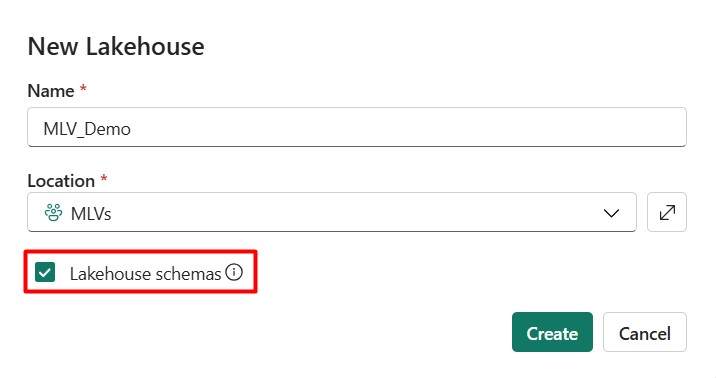
1. Create a schema enabled Lakehouse in your workspace.
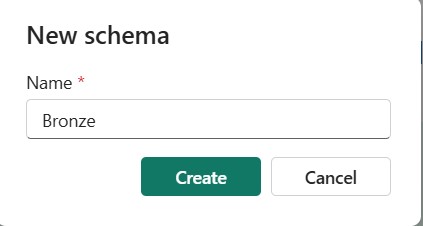
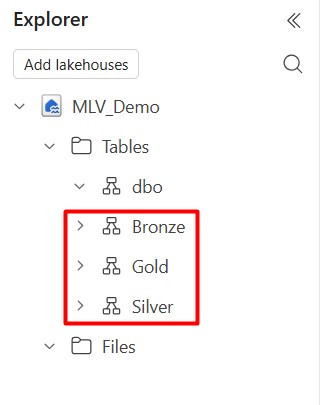
2. In your Lakehouse, create three schemas-Bronze, Silver, and Gold-under the Tables section in Lakehouse Explorer to implement the medallion architecture.
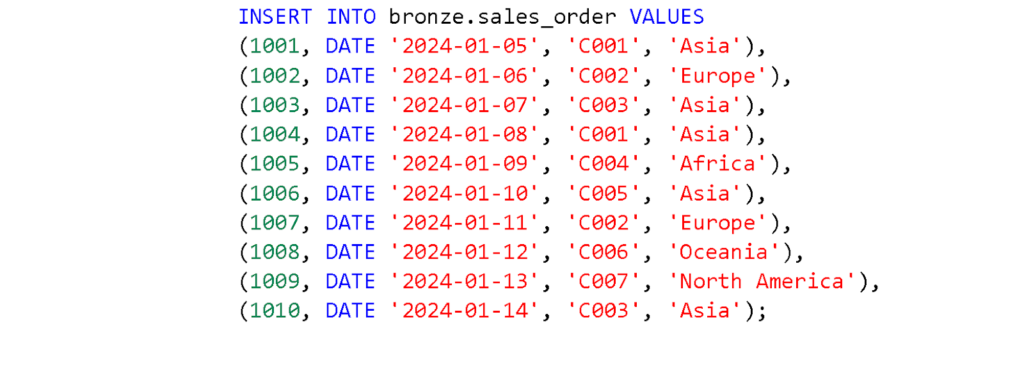
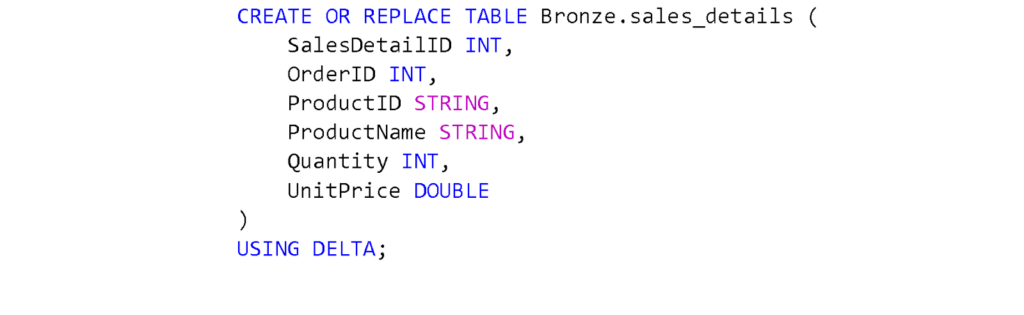
3. For demonstration purposes, create two sample tables in the Bronze layer using Spark SQL in a Fabric notebook:
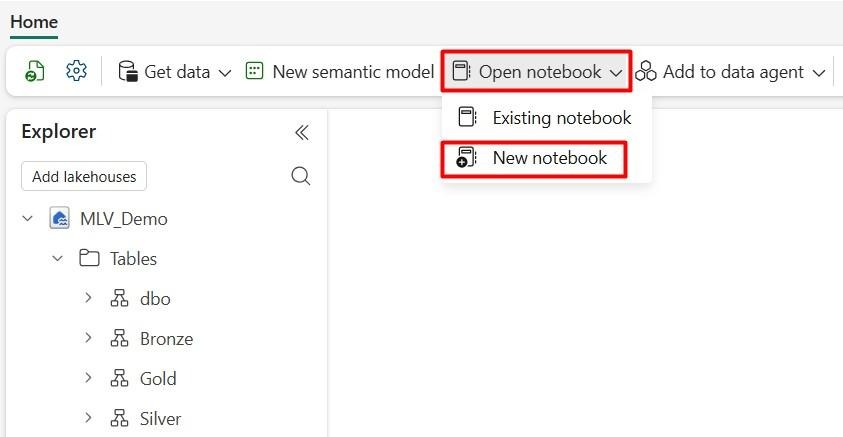
a. Open a new notebook.
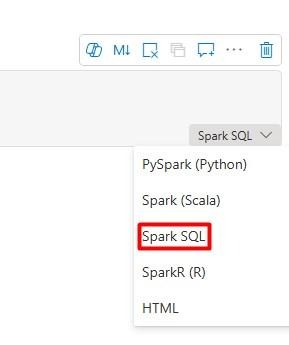
b. Select Spark SQL from the bottom-right corner of the code block.
c. Run the following queries one by one to create the tables.

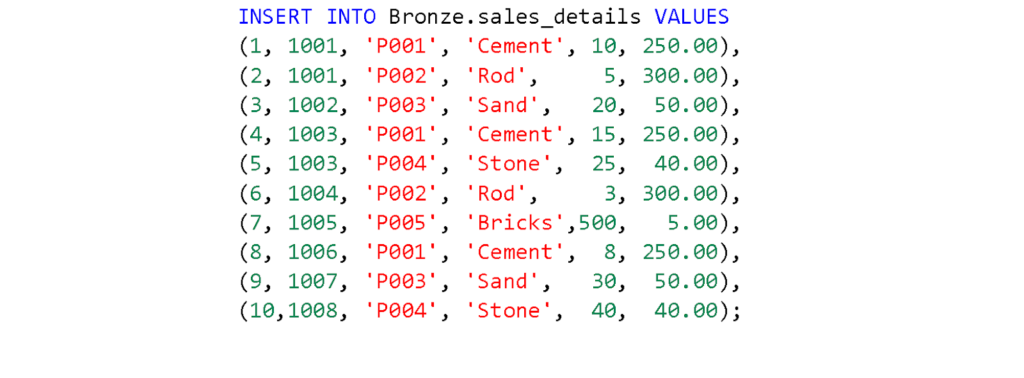
d. After running the queries, go to your Lakehouse to confirm that the tables have been created.
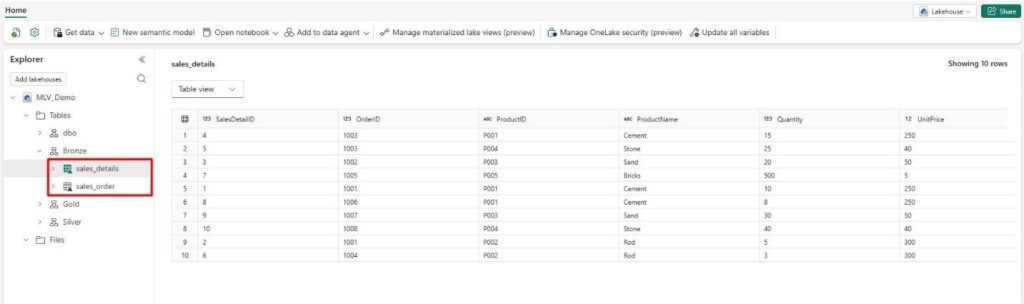
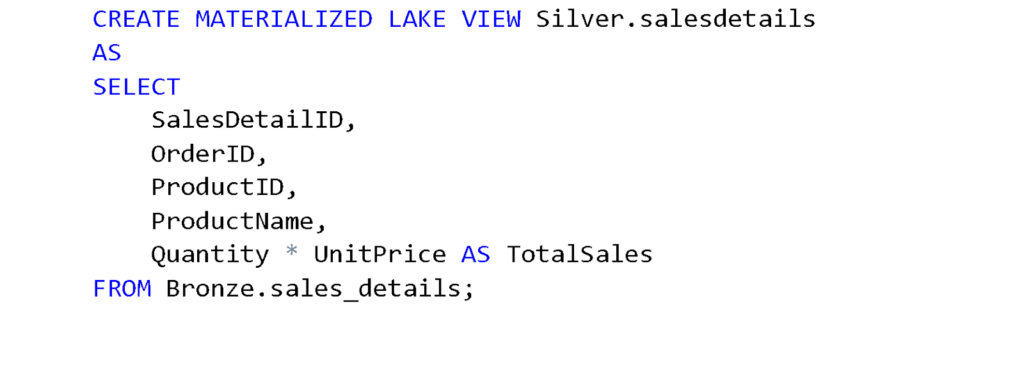
4. Create MLVs for the Silver and Gold layers using Spark SQL:
a. For the Silver layer, we will add a TotalSales column to the SalesDetails table by multiplying Quantity and UnitPrice. Run the following query to create the MLV in the Silver schema.
b. After running the query, you can see the detailed information in the Table view of the result.
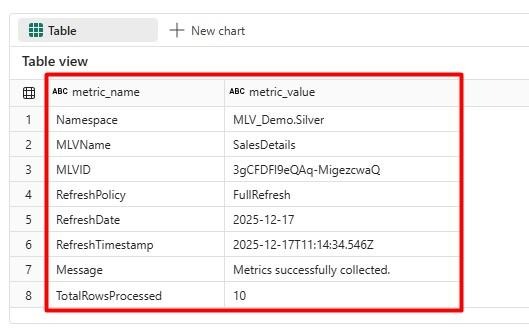
c. Similarly, create the MLV for SalesOrder by running the following query.

d. Create the final Sales MLV by joining SalesOrder and SalesDetails tables. Run the following query to create the Sales MLV in the Gold schema.
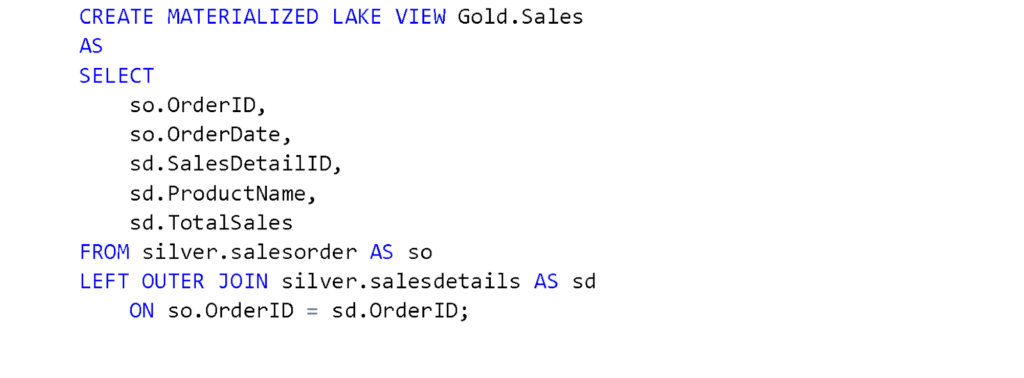
5. Go back to your Lakehouse. The MLVs have now been created. To View the lineage of the MLVs, select the ‘Manage Materialized Lake Views’ option from the top menu bar.
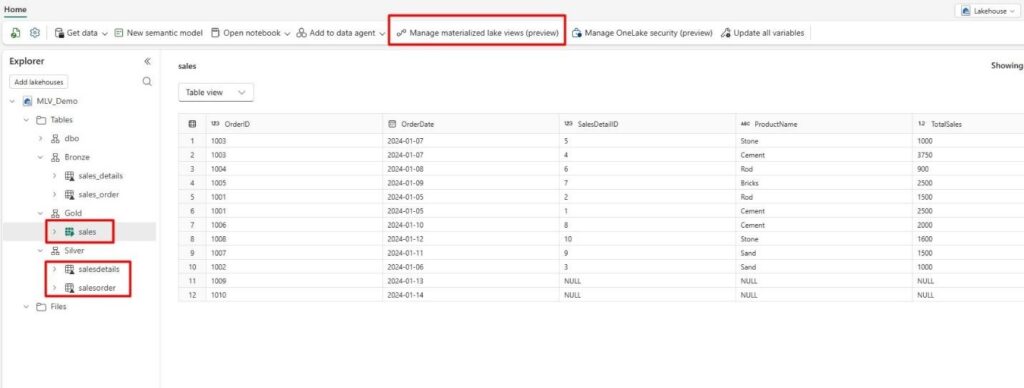
6. You will see the lineage view of the MLVs.
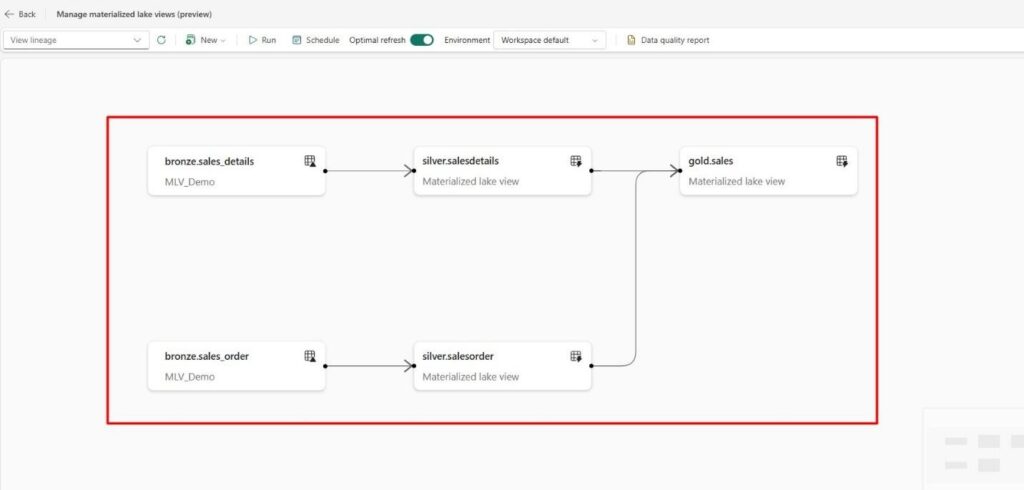
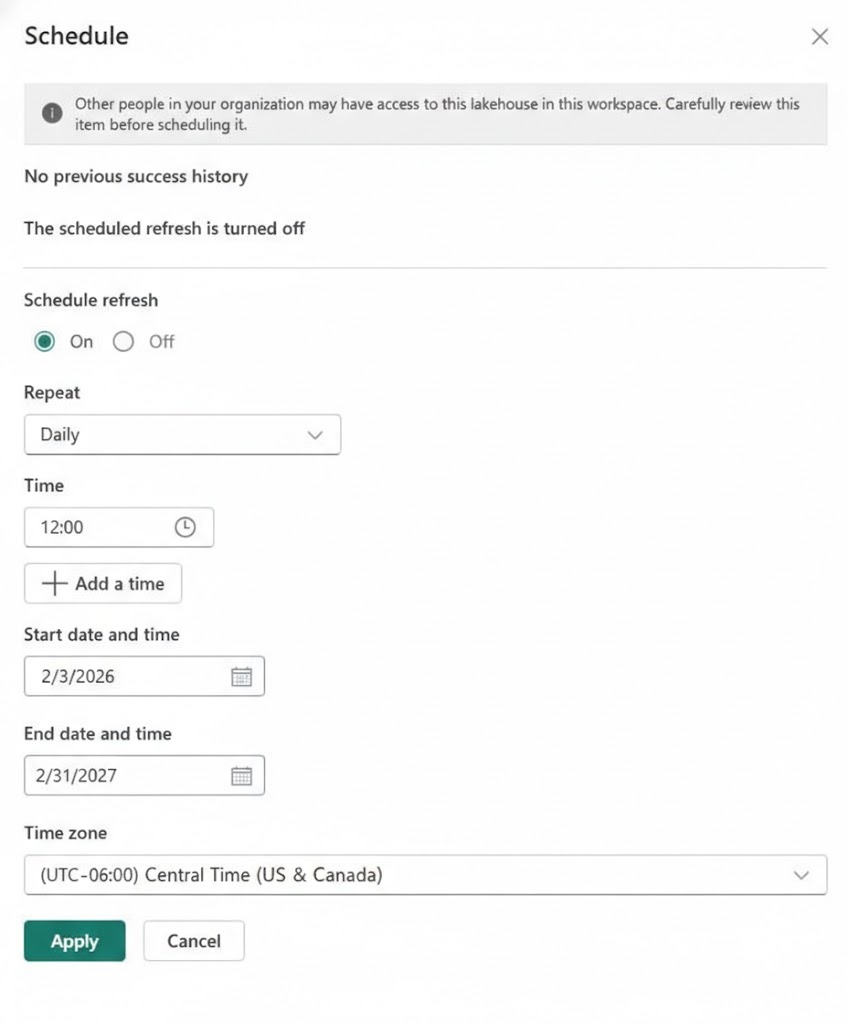
7. To run MLVs on demand, select the ‘Run’ button. You can also set a scheduled refresh by selecting the ‘Schedule’ button.
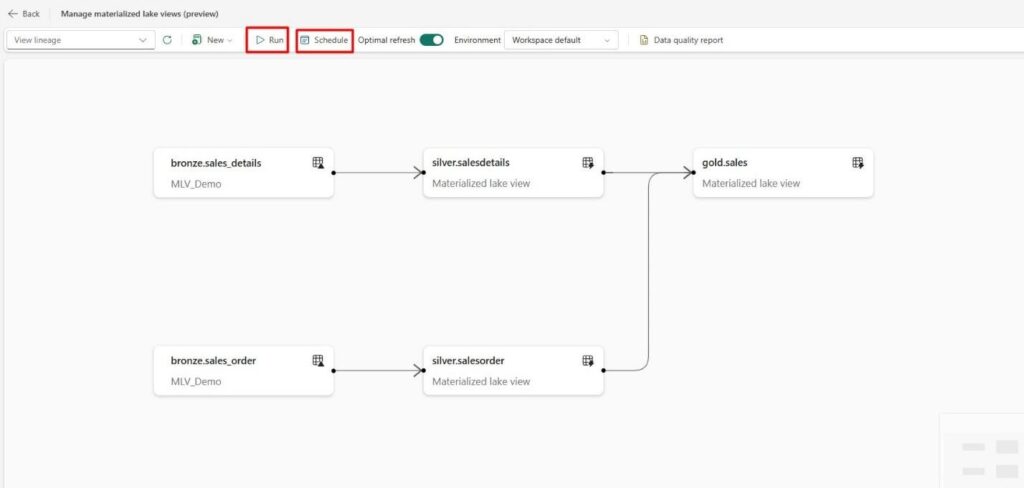
8. Fill in the Schedule Refresh properties and click the ‘Apply’ button.
9. You can also refresh the MLV using Spark SQL in the notebook. Run the following query to refresh it.
In that case, you need to refresh each MLV separately. Make sure to refresh dependent MLVs first. Then, you can use that Notebook in any data pipeline if needed.

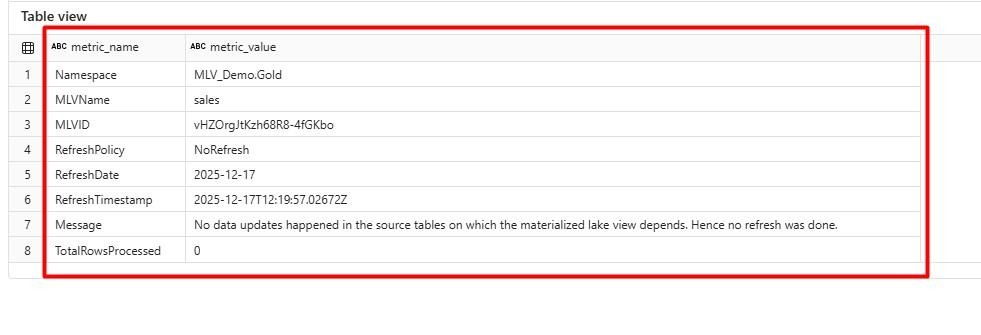
10. After refreshing, you will see a detailed summary of the refresh results.
By following these steps, you can implement a medallion architecture using MLVs in Microsoft Fabric.
Refresh Mechanism
- Scheduled refresh: Configure automatic refreshes directly on the MLV.
- On-demand refresh: Manually trigger refreshes as needed.
- Programmatic refresh: Use Spark SQL commands in a notebook and integrate that notebook into a pipeline for orchestrated refreshes.
Limitations
- No in-place DML: Materialized Lake Views do not support UPDATE, MERGE, or DELETE operations. An MLV represents the materialized result of a SELECT query that the service recomputes as needed.
- Restricted query constructs: Certain constructs are not supported in MLV definitions, including temporary views, user-defined functions (UDFs), and Delta time travel. When transformation logic changes, the MLV must be dropped and recreated.
- Limited language support: Declarative definitions using PySpark are not currently supported.
- SQL dialect constraints: T-SQL is not supported for defining MLVs in Fabric at this time.
Conclusion
Materialized Lake Views in Microsoft Fabric offer a powerful, SQL-first approach to building and managing data transformation pipelines. By combining physical materialization with intelligent refresh strategies and automatic dependency orchestration, MLVs simplify the implementation of medallion architectures and other multi-stage data flows. While they have certain limitations-such as no support for in-place DML operations and restricted query constructs-their benefits in terms of performance, consistency, and operational simplicity make them a compelling choice for data teams. As organizations continue to adopt Lakehouse architectures, MLVs provide an efficient pathway to transform raw data into curated, analytics-ready assets with minimal engineering overhead.

































