Introduction
When building Microsoft Fabric ingestion pipelines, one common question comes up very quickly:
Should we continue using the native SharePoint connector in Dataflow Gen2, or should we move files into Fabric through Lakehouse Shortcuts first?
At first glance, Lakehouse Shortcuts feel like the more modern option. For most storage types they let Fabric reference external data without physically copying it first, which is why teams often assume a shortcut will also be faster or cheaper. For SharePoint-hosted CSV and Excel files, that assumption is worth testing, and as we will see, it does not hold.
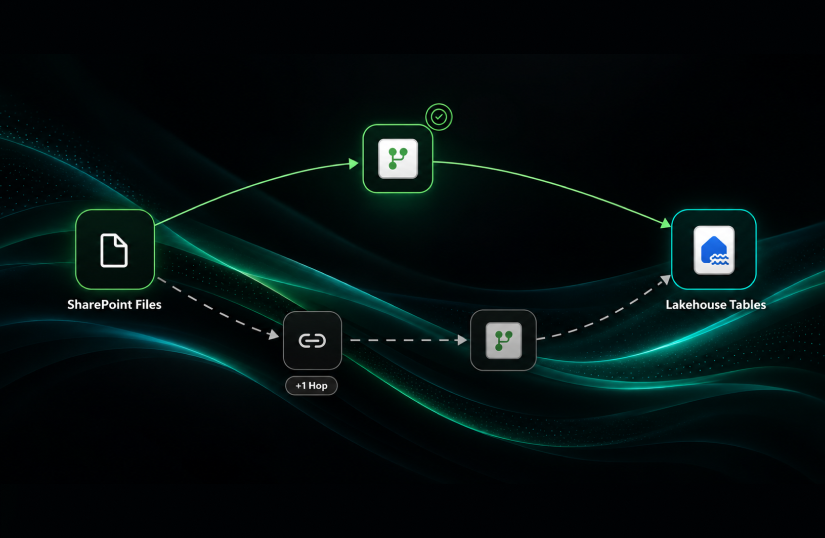
Should the pipeline look like this?
SharePoint → Dataflow Gen2 → Lakehouse Tables

Or should it look like this?
SharePoint → Lakehouse Files through Shortcut → Dataflow Gen2 → Lakehouse Tables

To answer this properly, we ran a controlled benchmark comparing both approaches across CSV and Excel ingestion scenarios. The goal was not to rely on assumptions, but to measure actual performance using refresh duration and Capacity Unit consumption.
The results were interesting. In this benchmark, the native SharePoint connector performed better than the Shortcut-based Dataflow Gen2 approach in almost every Dataflow scenario, and this post explains why: for a SharePoint source, a shortcut adds a hop without adding the one thing that makes shortcuts fast, which is caching.
Benchmark Objective
The purpose of this benchmark was to identify the most cost-efficient ingestion pattern for SharePoint-based files in Microsoft Fabric.
The benchmark focused on two practical questions:
- Which approach consumes fewer Capacity Units: native SharePoint connector or Lakehouse Shortcut?
- Which approach refreshes faster inside Dataflow Gen2?
The benchmark also included Lakehouse-native shortcut scenarios to understand whether bypassing Dataflow Gen2 changes the performance picture.
Architecture Patterns Tested
The benchmark compared three main ingestion patterns.
Pattern 1: Standard SharePoint Connector
In this approach, Dataflow Gen2 connects directly to SharePoint and loads the data into Lakehouse tables.
Flow:
SharePoint → Dataflow Gen2 → Lakehouse Tables
This is the traditional approach most Power Query users are already familiar with.
Pattern 2: SharePoint Folder Shortcut + Dataflow Gen2
In this approach, SharePoint files are first exposed inside the Lakehouse Files area through a shortcut. Then Dataflow Gen2 reads from the Lakehouse file location and loads the result into Lakehouse tables.
Flow:
SharePoint → Lakehouse Files Shortcut → Dataflow Gen2 → Lakehouse Tables
The expectation was that a shortcut might be reduced overhead by bringing the file access path closer to Fabric. As the results show, for SharePoint sources it does the opposite; the reason is explained in “Why the Shortcut Lost” below.
Pattern 3: Lakehouse Transform on Shortcut Processing
This is a fundamentally different mechanism which is a continuous Lakehouse sync, not a Dataflow Gen2 refresh. So it is not a like-for-like comparison. We treat it as a teaser under “What’s Next” rather than scoring it head-to-head against the Dataflow patterns here.
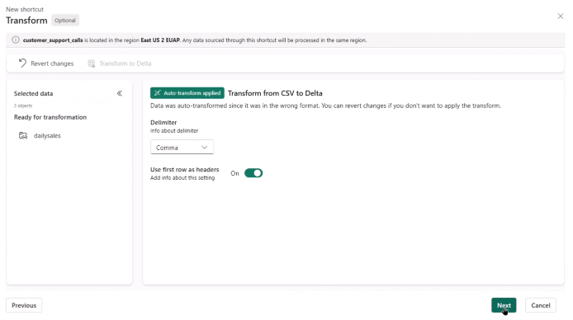
In the Transform-on-Shortcut process, the CSV file is ingested via a SharePoint shortcut and processed directly in the Lakehouse. Unlike a full Dataflow Gen2 pipeline, only essential transformations are applied during ingestion to optimize performance and reduce CU usage.
- Auto-transform applied: The system automatically applies minimal transformations to correct basic formatting issues, such as converting CSV to Delta and using the first row as headers.
- Delimiter adjustment: Ensures the CSV is parsed correctly without additional Power Query steps.
- Delta conversion: The source CSV is transformed into a Delta table in Lakehouse, enabling optimized storage and query performance.
- No complex transformations: Only lightweight, required transformations are performed. Complex business logic should be handled in downstream pipelines if needed.
Flow:
CSV File → SharePoint Shortcut → Lakehouse Transform Feature→ Lakehouse Table

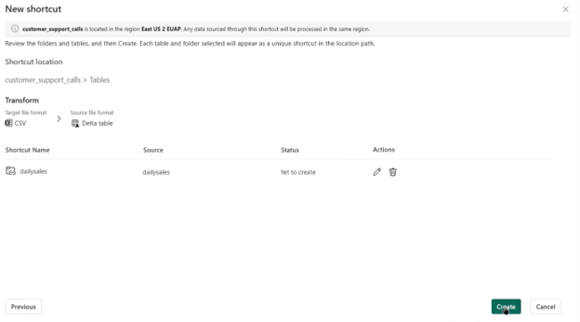
This pattern was tested separately because it is not exactly the same as a Dataflow Gen2 refresh. However, it is important because it shows what may happen when the architecture moves away from Power Query-based ingestion and toward Lakehouse-native processing.
Test Setup
We compared three ingestion patterns for SharePoint-hosted files, measuring Capacity Unit (CU) consumption and refresh duration, with successful completion as a pass/fail reliability check. Lower CU and lower duration are better.
All CU and refresh-duration figures reported for the Dataflow Gen2 scenarios are totals across the 10 runs, not per-run averages.
The three questions: which path uses fewer CU, which refreshes faster in Dataflow Gen2, and whether Partitioned Compute changes the answer.
The scenarios tested:
| Scenario | Source Pattern | File Type | Run Label |
| DF_SP_CSV | Standard SharePoint Connector | CSV | Partitioned |
| DF_SP_Excel | Standard SharePoint Connector | Excel | Partitioned |
| DF_Shortcut_CSV | Lakehouse Shortcut + Dataflow Gen2 | CSV | Partitioned |
| DF_Shortcut_Excel | Lakehouse Shortcut + Dataflow Gen2 | Excel | Partitioned |
| DF_SP_CSV_UnPart | Standard SharePoint Connector | CSV | Unpartitioned |
| DF_SP_Excel_UnPart | Standard SharePoint Connector | Excel | Unpartitioned |
| DF_Shortcut_CSV_UnPart | Lakehouse Shortcut + Dataflow Gen2 | CSV | Unpartitioned |
| DF_Shortcut_Excel_UnPart | Lakehouse Shortcut + Dataflow Gen2 | Excel | Unpartitioned |
| LH_Transform_On_Shortcut | Lakehouse-native shortcut transform | CSV | Lakehouse |
Environment and dataset used for every run:
- Capacity SKU: F2
- Runs per scenario: 10
- Staging: On
- Fast Copy: Off — not available for this test. The SharePoint folder connector does not support fast copy, and fast copy for file sources only engages above a 100 MB threshold, which this dataset is well below.
The datasets:
| Attributes | CSV scenario | Excel scenario |
| Files per run | 37 | 3 |
| Total size | 1.24 MB | 595 KB |
| Per file | ~34 KB (0.7 KB – 46 KB) | 129 KB / 233 KB / 234 KB |
| Rows | 49,946 in total, ~1,350 per file | 134 – 151 per workbook |
| Columns | 5 | 46 |
All CU figures in this post are CU-seconds, the CU (s) column in the Fabric Capacity Metrics App, not Capacity Units. For scale, an F2 provides 172,800 CU-seconds per day, so 897 CU (s) is roughly half a percent of one day of capacity.
Benchmark Results
To make the comparison easier to understand, we split the analysis into four visuals: two for Excel and two for CSV. Each visual compares Direct SharePoint against SharePoint Shortcut across Partitioned and Unpartitioned execution modes.
The four Dataflow Gen2 scenarios are summarized in the table below and shown in the charts that follow. The headline is consistent across every configuration: the native SharePoint connector uses less CU and refreshes faster than the shortcut path.
| File type | Path | Compute | Total CU (10 runs) | Total Duration (s, 10 runs) |
| Excel | Direct SharePoint | Partitioned | 897 | 137 |
| Excel | Direct SharePoint | Unpartitioned | 960 | 143 |
| Excel | SharePoint Shortcut | Partitioned | 1,279 | 173 |
| Excel | SharePoint Shortcut | Unpartitioned | 1,111 | 156 |
| CSV | Direct SharePoint | Partitioned | 1,252 | 165 |
| CSV | Direct SharePoint | Unpartitioned | 1,144 | 154 |
| CSV | SharePoint Shortcut | Partitioned | 1,736 | 212 |
| CSV | SharePoint Shortcut | Unpartitioned | 1,613 | 191 |
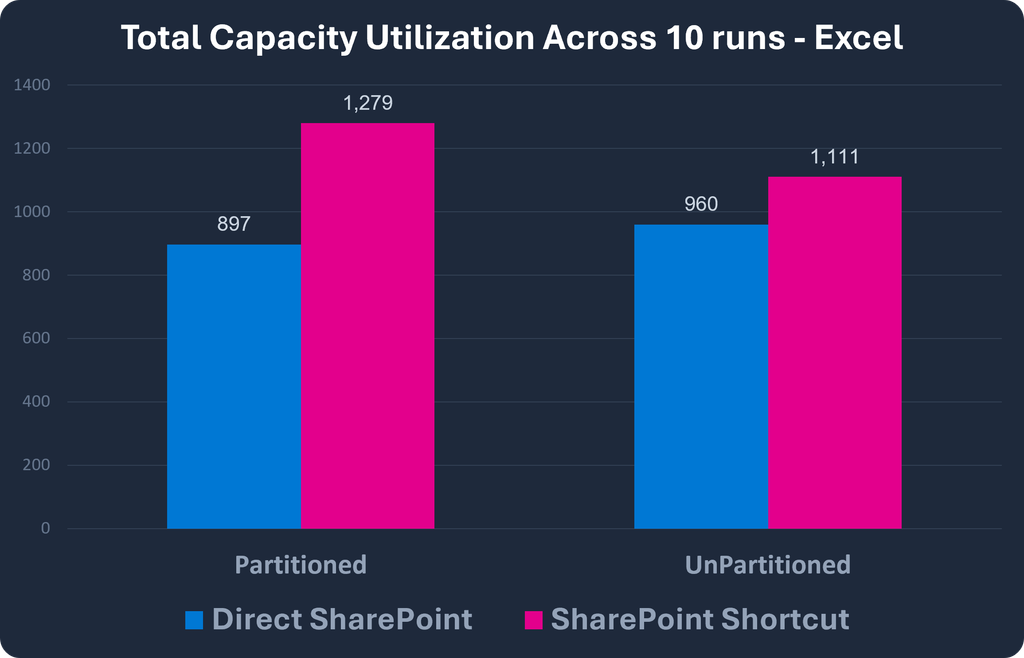
1. CU for 10 Runs – Direct vs Shortcut (Excel) (totals across 10 runs)
Visual Explanation
This chart compares Capacity Unit (CU) consumption for Excel ingestion over 10 runs.
A few things stand out immediately:
- In both execution modes, Direct SharePoint consumes less CU than SharePoint Shortcut.
- For Direct SharePoint, the Partitioned mode performs better than Unpartitioned:
- 897 CU vs 960 CU
- For SharePoint Shortcut, Unpartitioned performs better than Partitioned:
- 1,111 CU vs 1,279 CU
This means the shortcut approach remains more expensive in both cases, even though its unpartitioned version improves somewhat.
Key Takeaway
For Excel workloads, Direct SharePoint is more CU-efficient than SharePoint Shortcut in both modes, and the best-performing setup is Direct SharePoint with Partitioned execution.
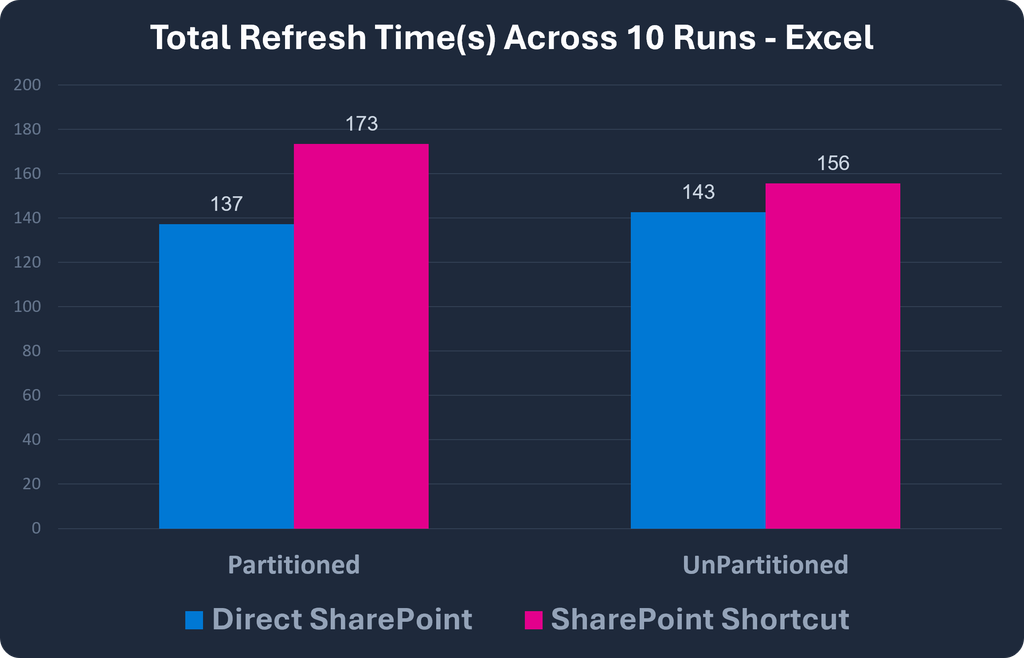
2. Refresh Time for 10 Runs – Direct vs Shortcut (Excel)
Visual Explanation
This chart compares refresh duration for Excel ingestion over 10 runs.
The pattern is consistent with the CU chart:
- Direct SharePoint is faster than SharePoint Shortcut in both modes.
- For Direct SharePoint, Partitioned is slightly faster than Unpartitioned:
- 137 sec vs 143 sec
- For SharePoint Shortcut, Unpartitioned is faster than Partitioned:
- 156 sec vs 173 sec
So, while unpartitioning helps the shortcut path, it still does not outperform the direct SharePoint approach.
Key Takeaway
For Excel refresh performance, Direct SharePoint again leads in both modes, and Direct SharePoint with Partitioned execution delivers the fastest result overall.
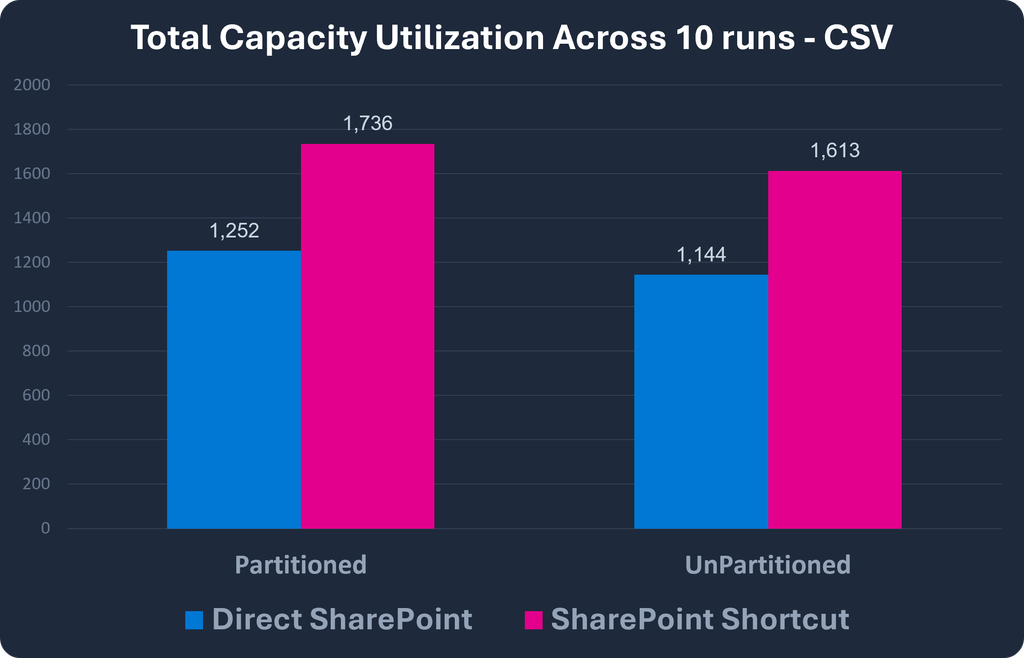
3. CU for 10 Runs – Direct vs Shortcut (CSV)
Visual Explanation
This chart shows CU consumption for CSV ingestion over 10 runs.
Again, the direct path performs better:
- Direct SharePoint uses less CU than SharePoint Shortcut in both modes.
- For both approaches, Unpartitioned performs better than Partitioned:
- Direct SharePoint: 1,144 vs 1,252
- SharePoint Shortcut: 1,613 vs 1,736
This is an important difference from the Excel case. For CSV, unpartitioned processing appears to reduce CU consumption more effectively.
Key Takeaway
For CSV workloads, Direct SharePoint remains the more CU-efficient option, and the best-performing setup is Direct SharePoint with Unpartitioned execution.
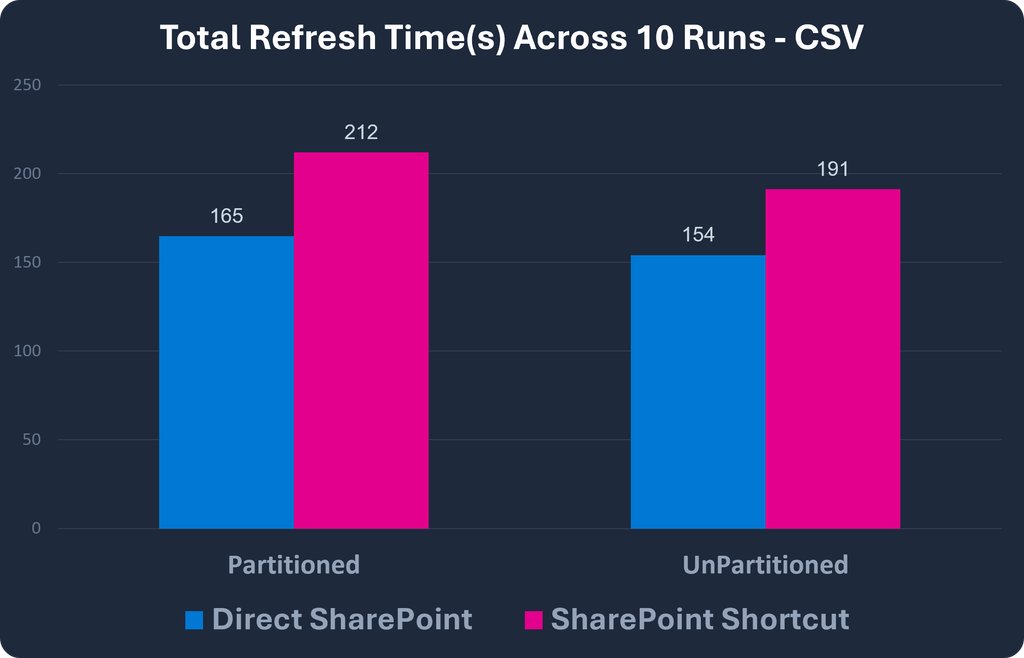
4. Refresh Time for 10 Runs – Direct vs Shortcut (CSV)
Visual Explanation
This chart compares refresh duration for CSV ingestion over 10 runs.
The same trend continues:
- Direct SharePoint is faster than SharePoint Shortcut in both modes.
- For both approaches, Unpartitioned is faster than Partitioned:
- Direct SharePoint: 154 sec vs 165 sec
- SharePoint Shortcut: 191 sec vs 212 sec
This suggests that for CSV-based workloads, unpartitioned execution is the better choice regardless of the ingestion path but the direct SharePoint path still remains clearly ahead.
Key Takeaway
For CSV refresh time, Direct SharePoint outperforms SharePoint Shortcut in both modes, and Direct SharePoint with Unpartitioned execution is the fastest overall configuration.
Why the Shortcut Lost
So why did adding a shortcut make things slower and more expensive, when shortcuts are supposed to bring data closer to Fabric? The answer is caching, and SharePoint shortcuts do not get it.
Per Microsoft’s documentation, OneLake shortcut caching is supported only for Google Cloud Storage, Amazon S3, S3-compatible, and on-premises-gateway shortcuts. It is not supported for SharePoint or OneDrive. So a SharePoint shortcut does not stage or cache the file closer to the compute. Instead, it adds a hop of Dataflow Gen2 reads through OneLake, which is called the Microsoft Graph API, which in turn reads from SharePoint. Every refresh pays that extra indirection, and it inherits SharePoint’s request throttling (HTTP 429) on top.
The useful corollary is knowing when a shortcut would win. For Amazon S3, S3-compatible, and Google Cloud Storage sources, caching does apply, so a shortcut can genuinely reduce repeated cross-cloud read cost.
What’s Next
Two threads from this benchmark deserve their own follow-up rather than a rushed treatment here.
First, Lakehouse shortcut transformations. In early testing they processed the same CSV in seconds for a fraction of the CU, but this is a continuous sync — Fabric Spark polls the source roughly every two minutes and appends or overwrites only new or changed files — not a triggered Dataflow refresh. The fair comparison is therefore CU per day of ownership, not CU per run, and we will measure it that way in part 2.
Second, partitioned compute. Because the SharePoint and Lakehouse connectors do not support it, we will re-run that axis properly using the ADLS Gen2 connector against the Lakehouse Files node. Together, those two make a natural part 2.
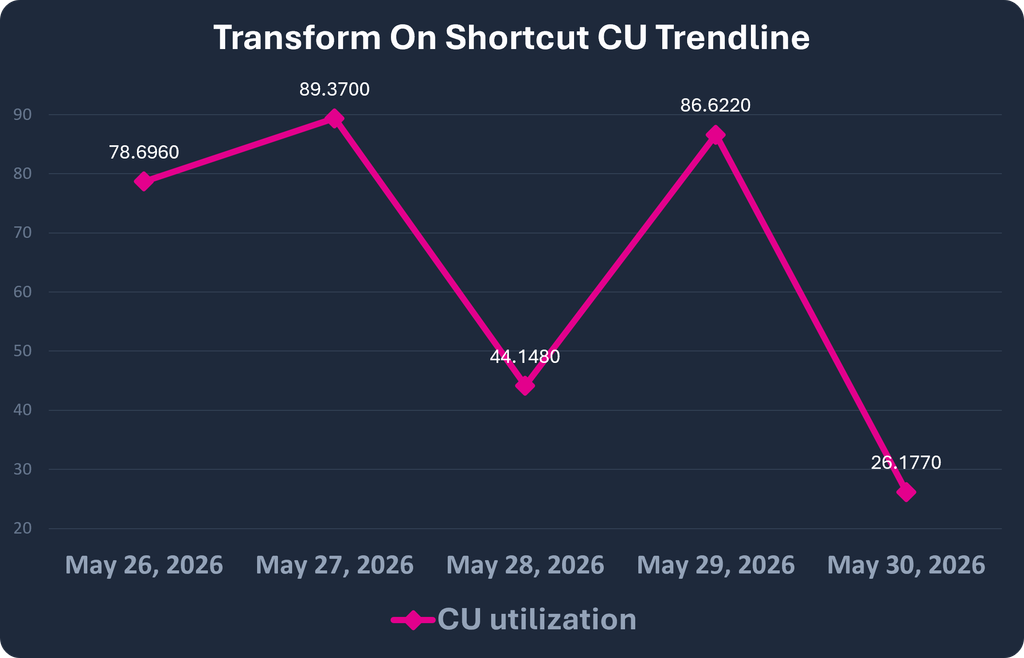
Early shortcut-transformation trend (five days), shown for context only:
1. CU Trendline of Transform-on-Shortcut
Visual Explanation
This line chart shows CU utilization for the Transform-on-Shortcut process over five consecutive days.
- CU utilization fluctuates over time, reflecting varying workloads or file sizes.
- Peaks occur on May 27 (89.37 CU) and May 29 (86.62 CU), indicating higher processing load on those days.
- Lowest CU usage occurs on May 30 (26.18 CU), demonstrating that the process can be extremely efficient under lighter workloads.
Key Takeaway
Over the five days, CU consumption stayed within a 26 – 89 CU (s) band with no upward drift, which is the behavior we would expect from an incremental append. What that costs per day of ownership, and how it compares with a triggered Dataflow refresh, is what part 2 measures.
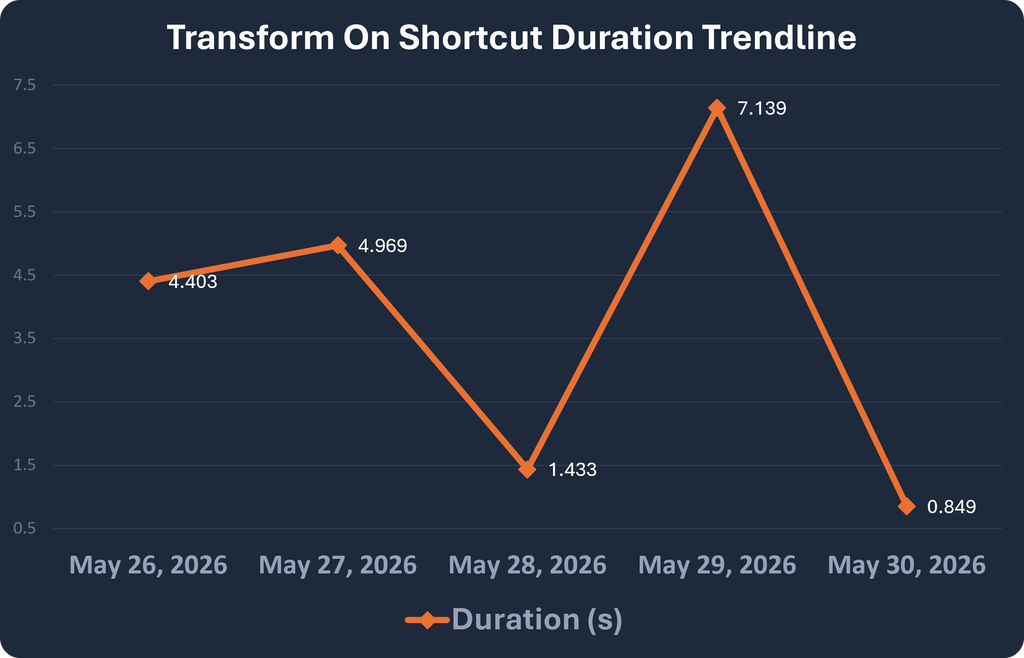
2. Duration Trendline of Transform-on-Shortcut
Visual Explanation
This line chart shows duration (seconds) for the Transform-on-Shortcut process over the same five days.
- Refresh duration remains extremely low, with most runs completing under 5 seconds.
- Peak duration occurs on May 29 (7.14 sec), possibly due to larger data size or temporary processing variations.
- Lowest duration occurs on May 30 (0.85 sec), showing near-instant processing capability.
Key Takeaway
Each sync completed in under 8 seconds, most under 5. Note that this is the time to process one polling interval’s worth of changed files, not the time to process the full dataset, so it is not comparable with the Dataflow Gen2 refresh durations above.
When to Use What
Scoped to SharePoint file ingestion in Microsoft Fabric:
| If you are… | Use | Why |
| Ingesting SharePoint CSV/Excel through Dataflow Gen2 | The native Direct SharePoint connector | Fewer CU and faster refresh in every test here; a shortcut only adds a hop. |
| Tempted to add a SharePoint/OneDrive shortcut for speed | Don’t, for performance reasons | No shortcut caching for these source types, so no performance benefit. |
| Centralizing file access or reusing files across Fabric items | A shortcut is still fine | Shortcuts have real organisational value; just don’t assume they are faster or cheaper for Dataflow Gen2. |
Key Findings
Finding 1: Direct SharePoint outperformed the shortcut path in every configuration
Across both file types and across both metrics:
- lower CU consumption
- lower refresh duration
The shortcut path cost between 16% and 43% more CU (s), and took 9% to 29% longer, in all four tested configurations. Because both sides of each pair were measured over the same window, those ratios hold regardless of the exact refresh count.
Introducing a shortcut before Dataflow Gen2 did not improve performance in this benchmark. It added overhead.
Finding 2: The reason is caching, and SharePoint shortcuts do not get it
OneLake shortcut caching is supported by Google Cloud Storage, Amazon S3, S3-compatible and on-premises-gateway shortcuts. It is not supported by SharePoint or OneDrive. A SharePoint shortcut therefore does not stage or cache the file closer to the compute — it adds an indirection, where Dataflow Gen2 reads through OneLake, which calls the Microsoft Graph API, which in turn reads from SharePoint. Every refresh pays that extra hop and inherits SharePoint’s request throttling (HTTP 429) on top.
The rule is not “shortcuts are slow”. It is that shortcuts are a performance feature only where caching is supported, and SharePoint is not one of those places. For Amazon S3, S3-compatible and Google Cloud Storage sources, where caching does apply, the same design choice would likely go the other way. ADLS Gen2 does not get shortcut caching either, but it does not need it: the data already lives in Azure, so an ADLS Gen2 shortcut is about zero-copy access, not a caching win.
Finding 3: Partitioned Compute could not be tested on these connectors
Per Microsoft’s documentation: “Only connectors for Azure Data Lake Storage Gen2, Folder, and Azure Blob Storage emit the correct script to use partitioned compute. The connectors for SharePoint and Fabric Lakehouse do not support it today.”
The partitioned-versus-unpartitioned differences shown in the charts above are therefore execution variance between two identically executing runs, not the effect of that setting, so we are not drawing a workload-specific rule from them. To test this axis fairly we will re-run it using the ADLS Gen2 connector against the Lakehouse Files node — which is also the connection method Microsoft recommends for Lakehouse files — and report the result in part 2.
Finding 4: Shortcuts still have architectural value, just not performance value here
SharePoint Shortcuts remain genuinely useful for:
- centralizing file access,
- improving reuse across Fabric items, and
- supporting Lakehouse-native designs.
What this benchmark shows is that those are governance and organisation benefits, not performance ones. When Dataflow Gen2 is performing the transformations, the shortcut path measurably increases CU consumption and refresh duration. Choose it for the architecture if you want it — just do not assume it is faster or cheaper for Dataflow Gen2 ingestion, and base the decision on measured workload performance rather than assumption.
Conclusion
This benchmark challenged one of the common assumptions around Fabric ingestion design.
Lakehouse Shortcuts are powerful, but when Dataflow Gen2 remains the transformation engine, they do not automatically reduce refresh time or Capacity Unit consumption.
In this test, the native SharePoint connector was the better option for Dataflow Gen2 ingestion across both CSV and Excel scenarios. It delivered lower CU consumption and faster refresh durations in both Partitioned and Unpartitioned configurations.
At the same time, the Lakehouse-native shortcut results showed that there may be major performance benefits when transformation work is moved closer to the Lakehouse layer.
The final lesson is simple:
Do not choose an ingestion pattern based on architecture preference alone. Measure it.
In Microsoft Fabric, performance and cost depend not only on where the data comes from, but also on where the transformation happens, how the engine evaluates the query, and how much work is pushed into each layer.
For capacity-conscious teams, this kind of benchmark can turn architectural decisions from guesswork into measurable engineering decisions.
References
- Use partitioned compute in Dataflow Gen2 (Preview)
- OneLake shortcuts caching
- Create a OneDrive or SharePoint shortcut (limitations)
- Transform files into Delta tables (shortcut transformations)
- Dataflow Gen2 pricing for Data Factory in Microsoft Fabric
- Microsoft Fabric decision guide: choose a dataflow strategy