The automation war is here, and your choice of platform could make or break your digital transformation.
Enterprise automation has entered a new era. With AI agents now capable of handling complex business logic, organizations face a critical decision: build on open-source flexibility or leverage deeply integrated enterprise ecosystems?
We put this to the test by building employee reimbursement workflows on both N8N and Microsoft Copilot Studio, and the results reveal a clear winner for Microsoft-powered organizations.
The Challenger: N8N’s Travel Reimbursement Agent
N8N has earned its reputation as the “Swiss Army knife” of automation. With 400+ integrations and LangChain-powered AI capabilities, it’s a compelling option for technical teams seeking maximum flexibility.
To explore N8N’s capabilities, we examined a popular community template, travel reimbursement workflow that accepts receipt uploads via chat, processes them through OCR, stores parsed data in Supabase, and uses an AI agent to extract expense details and calculate totals.
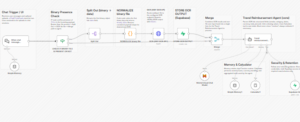
The workflow structure includes a chat trigger for file uploads, binary normalization for processing receipts, OCR integration via HTTP requests, Supabase storage for session data, and a Mistral-powered AI agent for intelligent extraction.
What works well: N8N delivers remarkable flexibility. The visual workflow builder makes complex logic accessible, and the self-hosting option gives complete data control. For teams comfortable managing infrastructure, it’s powerful.
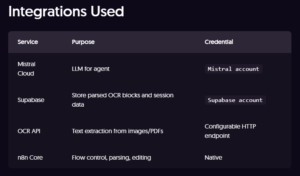
The reality check: Even with a ready-made template, this workflow requires configuring multiple external services (Mistral, Supabase, OCR API), managing credentials across platforms, and significant technical expertise to deploy and maintain. There’s no native connection to where employees actually work: Microsoft Teams, Outlook, or SharePoint.
Integrations Used:
The Contender: Copilot Studio’s Medical Reimbursement Agent
Now let’s see what happens when automation lives inside your existing Microsoft ecosystem.
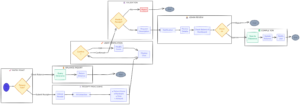
We built a medical reimbursement agent in Microsoft Copilot Studio that handles complete employee experience: answering policy questions via chat, checking real-time medical balance, submitting reimbursement requests, and automatically notifying admins through Teams for approval backed by a Power Apps admin dashboard.
Medical Reimbursement Agent Workflow:
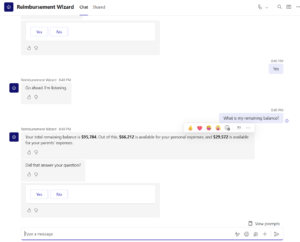
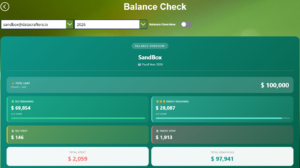
Real-Time Balance Checking
Connected directly to your HR data through Dataverse, employees can check their remaining medical allowance instantly. No separate logins, no external databases.
Seamless Submission & Approval Flow
When employees submit a reimbursement request, the agent validates the information, stores it securely, and immediately triggers a Teams notification to the designated admin, complete with approval actions.
- Receipt Upload → User attaches a medical receipt
- Data Extraction → Agent extracts patient name, merchant name, date, and amount
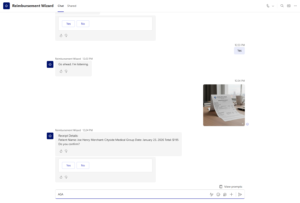
- User Verification → Details shown in chat for user to confirm/edit
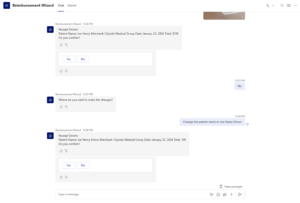
- Receipt Validation → Agent checks if it’s a valid medical receipt
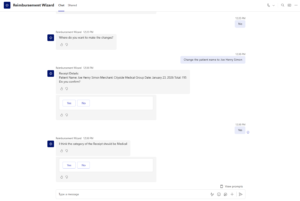
- Determine the type of Medical Expense:

- Description Request → If valid, prompts user for a description
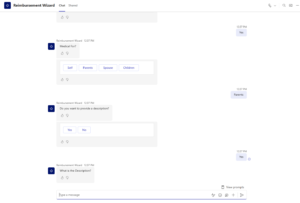
- Admin Notification → Sends all details to admin for review
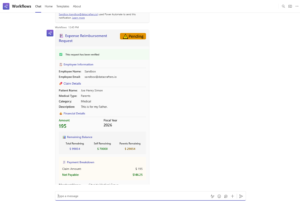
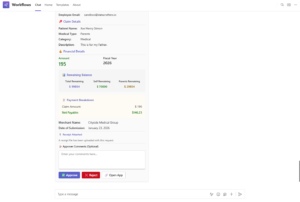
- Admin Approval → Admin checks balance from the card + Power App dashboard, then approves
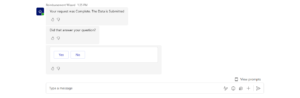
- Registration → Approved claim is saved to Dataverse table
Admin Dashboard: Complete Visibility
The Power Apps backend gives administrators a comprehensive dashboard to review pending requests, track approval history, and manage the entire reimbursement lifecycle.
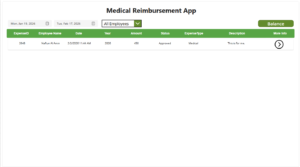
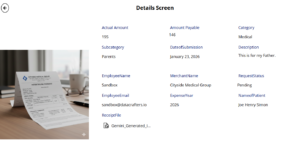
Balance Inquiry in Power Apps: Yearly View:
The Verdict: Why Copilot Studio Wins for Office Management
After testing both solutions, the advantages of Copilot Studio for enterprise office automation are undeniable:
| Capability | N8N | Copilot Studio |
| Teams Integration | Requires setup | Native, one-click |
| Authentication | Manual OAuth config | Automatic SSO |
| Admin Notifications | Custom webhooks | Built-in adaptive cards |
| Governance & Compliance | Self-managed | Enterprise-grade, inherited |
| Maintenance Burden | High (self-hosted) | Minimal (managed) |
| Time to Production | Days/Weeks | Hours |
When Copilot Studio Is the Clear Choice
- You’re a Microsoft shop. If your organization runs on Microsoft 365, Teams, and SharePoint, Copilot Studio eliminates integration friction entirely. Your agents inherit existing security policies, permissions, and compliance controls automatically.
- You need speed-to-value. Our medical reimbursement agent went from concept to prototype under a week. Deploying a similar N8N workflow, even from a template, takes significantly longer due to external service configuration and infrastructure setup.
- Governance matters. With GPT-5 now generally available in Copilot Studio and human-in-the-loop controls for sensitive approvals, enterprises get AI power with accountability built in.
- Your users live in Teams. Employees don’t need to learn new tools. They interact with the agent exactly where they already collaborate.
- Integration with Power Apps: It is possible to have an internal app and have it integrated with the copilot agent.
When N8N Still Makes Sense
N8N remains valuable for organizations with diverse, non-Microsoft tech stacks, teams requiring complete infrastructure control, or scenarios demanding highly custom integrations unavailable through Power Platform connectors.
Conclusion: Designing Office Automation That Fits How People Work
For office management workflows: reimbursements, approvals, HR requests, IT support, Copilot Studio delivers enterprise-ready AI automation without the infrastructure tax. You get GPT-5 intelligence, native Microsoft integration, and governance controls that satisfy IT and compliance teams.
Long-term value from workplace automation depends on how easily it becomes part of everyday operations.
Ready to transform your office workflows? Start with the platform that meets your employees where they are.
Resource Links
Microsoft Copilot Studio: https://www.microsoft.com/en-us/microsoft-copilot/microsoft-copilot-studio
Power Apps: https://www.microsoft.com/en-us/power-platform/products/power-apps
Power Automate: https://www.microsoft.com/en-us/power-platform/products/power-automate
N8N: https://n8n.io/
N8N Workflow Templates: Automate travel expense extraction with OCR, Mistral AI and Supabase | n8n workflow template