Executive Summary: Why Automation Matters
Enterprise analytics deployments in Microsoft Fabric typically involve multiple independent processes: infrastructure provisioning, data transformations, semantic models, and reporting assets. Managing these manually creates friction. Inconsistent environments require rework. Deployment errors compound across layers. Onboarding new analytics projects becomes weeks of manual configuration instead of hours.
This framework addresses that directly. It automates the complete deployment lifecycle from infrastructure provisioning through semantic model refresh, eliminating manual steps and establishing a version-controlled, repeatable deployment pattern. The framework integrates Microsoft Fabric REST APIs, Python orchestration, dbt transformations, and unified CLI execution into a single orchestrated workflow.
What this delivers: Analytics projects that deploy consistently, are reproducible across environments, and require minimal manual intervention. Infrastructure and code are version-controlled. Deployment time shrinks from days to hours.
The framework delivers faster time-to-insight for business users, reduced operational burden on engineering teams, and standardized deployment patterns that scale across the organization. Infrastructure and environments become version-controlled, reproducible, and governed from day one.
Why Traditional Fabric Deployments Become Difficult
As analytics environments grow, deployment complexity increases significantly. Each environment requires manual configuration. Infrastructure decisions hardcode values instead of parameterizing them. Transformation and reporting workflows remain disconnected. Reproducing deployments across dev, test, and production requires replicating manual steps. This operational burden compounds as teams scale.
Common challenges include:
• Manual workspace and infrastructure provisioning
• Environment-specific hardcoded configurations
• Fragmented deployment pipelines
• Disconnected transformation and reporting workflows
• Limited deployment reproducibility
• Inconsistent governance across environments
A standardized deployment framework is the answer.
What This Framework Solves: Mapping Problems to Solutions
| Challenge | What Changes |
| Manual workspace and infrastructure setup | Automated provisioning using Fabric REST APIs |
| Hardcoded environment configurations | Dynamic runtime configuration generation |
| Fragile deployment workflows | Unified orchestration pipeline |
| Disconnected transformation and reporting layers | Fully integrated end-to-end deployment |
| Inconsistent environments | Standardized and repeatable deployments |
| Difficulty reproducing deployments | Version-controlled infrastructure and code |
Core Technology Stack
| Component | Role |
| Python Orchestration Layer | Coordinates the complete deployment lifecycle |
| Microsoft Fabric REST APIs | Creates and manages Fabric resources dynamically |
| DBT | Handles modular SQL transformations |
| CLI | Unified deployment entry point |
| Power BI / Fabric APIs | Deploys semantic models and reports |
| Git-Based Version Control | Enables source control and CI/CD readiness |
How the Framework Works: Six Deployment Stages
This framework automates the complete Microsoft Fabric analytics deployment lifecycle:
1. Configuration Generation
Generate environment-specific deployment configurations dynamically through a centralized UI-driven process.
2. Infrastructure Provisioning
Provision and configure Microsoft Fabric workspaces, capacities, lakehouses, warehouses, and supporting resources using Fabric REST APIs.
3. Module Deployment
Deploy notebooks, semantic models, reports, and other analytics assets into the target environment.
4. Sample Data Ingestion
Execute notebook-driven ingestion workflows to load sample source data into the Bronze layer for the current version. The framework can be extended in the future to support configurable source system integrations and actual production data ingestion.
5. dbt Transformations
Execute dbt models to transform, standardize, and optimize data across Silver and Gold layers.
6. Semantic Model & Reporting
Publish semantic models, deploy reports, and refresh datasets once data processing is completed.
Architecture Overview: Orchestrated Deployment Pipeline
The following architecture represents the interaction between orchestration, infrastructure provisioning, transformation execution, and reporting deployment within the framework.
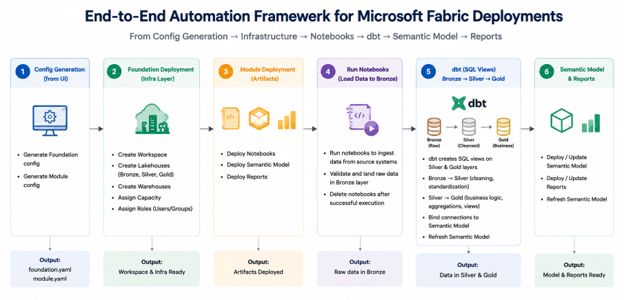
The framework is designed as a unified deployment ecosystem that automates the complete Microsoft Fabric analytics lifecycle, from environment provisioning to semantic model refresh and reporting deployment.
The architecture integrates multiple components into a single orchestrated workflow:
- Python orchestration layer to coordinate deployment execution
- Microsoft Fabric REST APIs for dynamic infrastructure provisioning
- Notebook execution pipelines for sample ingestion and transformation workflows, extendable for configurable production integrations.
- dbt transformations for Silver and Gold layer processing
- Semantic model deployment for analytics consumption
- Automated report deployment and refresh workflows for Power BI reporting
The deployment flow begins with configuration generation, followed by infrastructure provisioning, module deployment, notebook execution, data transformation, semantic model refresh, and report publishing. This approach ensures scalable, repeatable, and governed deployments across Microsoft Fabric environments.
End-to-End Deployment Flow
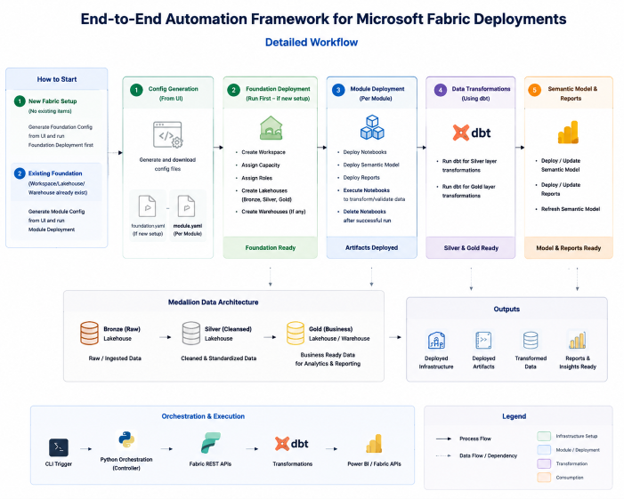
This deployment flow illustrates the complete lifecycle from configuration generation to report availability.
Step 1: Configuration Generation
Users define Foundation and Module configuration through a centralized UI. Configuration values are captured as code, eliminating manual setup steps and environment-specific spreadsheets. Foundation configuration includes workspace names, capacity settings, and security assignments. Module configuration specifies which notebooks, semantic models, and reports deploy into each environment.
Step 2: Infrastructure Provisioning
The orchestration layer reads configuration values and provisions Fabric infrastructure automatically:
- Workspaces
- Capacities
- Lakehouses
- Warehouses
- Supporting Fabric resources
All provisioning uses Microsoft Fabric REST APIs. Infrastructure that traditionally takes hours of manual configuration is complete in minutes. Resources are ready for the next deployment stage immediately.
Step 3: Module Deployment
The framework deploys:
- Notebooks
- Semantic models
- Reports
Notebook execution handles ingestion and validation workflows automatically.
Step 4: Data Transformation
dbt executes transformation pipelines for:
- Silver layer standardization
- Gold layer business modeling
- Data cleansing and schema alignment
- Business rule implementation and metric generation
Transformation workflows are orchestrated through automated notebook execution pipelines to ensure consistent and scalable processing across layers. The framework is designed to support future expansion for configurable enterprise transformation workflows.
Step 5: Semantic Model & Report Publishing
Semantic models and reports are deployed into the target workspace.
Step 6: Semantic Model Refresh
The framework refreshes semantic models after processing completes to expose updated analytics data.
Outcomes and Benefits: Operational, Engineering, and Business Impact
The framework significantly reduces deployment complexity while improving scalability, governance, and operational efficiency.
Operational Benefits
- Reduced manual setup effort
- Faster onboarding
- Fewer deployment errors
- Consistent deployment standards
- Improved governance and visibility
Engineering Benefits
- Version-controlled deployments
- Reproducible environments
- Scalable deployment architecture
- Unified orchestration workflows
- Improved lineage and monitoring capabilities
Business Impact
- Faster analytics delivery
- Improved deployment reliability
- Reduced operational overhead
- Standardized enterprise analytics environments
Why Automation Matters: Modern Analytics Deployments
Manual analytics deployments become bottlenecks as organizations scale. Each new project requires re-configuring infrastructure, re-uploading artifacts, re-scheduling refreshes. Over time, this manual coordination consumes engineering resources and delays analytics delivery.
This framework demonstrates how enterprise analytics deployments can evolve from fragmented manual processes into scalable, software-driven pipelines. By integrating Microsoft Fabric REST APIs, Python orchestration, dbt transformations, semantic model deployment, and unified CLI execution, the framework establishes a repeatable, version-controlled analytics engineering foundation.
The result is a modern deployment approach that improves scalability, consistency, and maintainability. Analytics teams focus on building analytics capabilities instead of managing deployments. Organizations scale analytics across divisions without proportionally increasing operational burden.
Building Enterprise Analytics Deployments at Scale
The framework outlined in this article reflects how mature analytics organizations operate: infrastructure as code, version-controlled deployments, and automated orchestration across layers. Whether you are deploying a single Microsoft Fabric environment or scaling across multiple business units, these principles reduce operational burden and improve reliability.
Data Crafters works with organizations to design and implement enterprise-grade analytics platforms on Microsoft Fabric. We have built this automation pattern in production environments serving financial analytics, operational intelligence, and data governance at scale. If you are evaluating Microsoft Fabric, building deployment automation, or scaling analytics infrastructure across your organization, we can help.