dbt Jobs or dbt Core on Fabric?
Which One to Choose, and Why
We ran the same dbt project three ways on Microsoft Fabric (dbt Jobs, a Fabric notebook, and an Azure DevOps pipeline) across 1M to 100M rows. Here is what was fastest, what was cheapest, and how to decide which one fits your team. This version reflects dbt Jobs’ new Fabric Lakehouse support.
If you are bringing dbt to Microsoft Fabric, you hit a fork in the road almost immediately: do you use the new managed dbt Jobs, or do you run dbt Core yourself? And if it is dbt Core: do you run it inside a Fabric notebook, or from an Azure DevOps pipeline?
We kept meeting that question on client work, so we stopped guessing and measured it. This post is the short version of what we found and, more importantly, how to choose.
One thing has shifted since we ran the numbers. dbt Jobs used to be Warehouse-only, which meant a Lakehouse target settled the question for you: you dropped to dbt Core whether you wanted to or not. dbt Jobs now supports the Fabric Lakehouse adapter too, so the target no longer picks the runner. The choice is back to being about how you want to run and operate dbt.
The headline, up front: for most teams, dbt Jobs is the fastest and cheapest way to run dbt on Fabric, and the simplest to operate, so make it your default, and that now holds whichever engine you build into. Reach for dbt Core (a notebook first, Azure DevOps second) when you need control it cannot give you. The rest of this post explains why, and exactly when the other options win.
A 30-second refresher on dbt
dbt (data build tool) is the transformation layer of the modern data stack: the “T” in ELT. You write SELECT statements; dbt turns each into a table or view, works out the build order, and runs tests, generates docs, and version-controls everything in Git. Crucially, it pushes the SQL down to your platform (here, Fabric) and lets the warehouse do the work. That last detail is the whole reason there is a choice to make: on Fabric, that SQL can run in more than one place.
The three ways to run dbt on Fabric
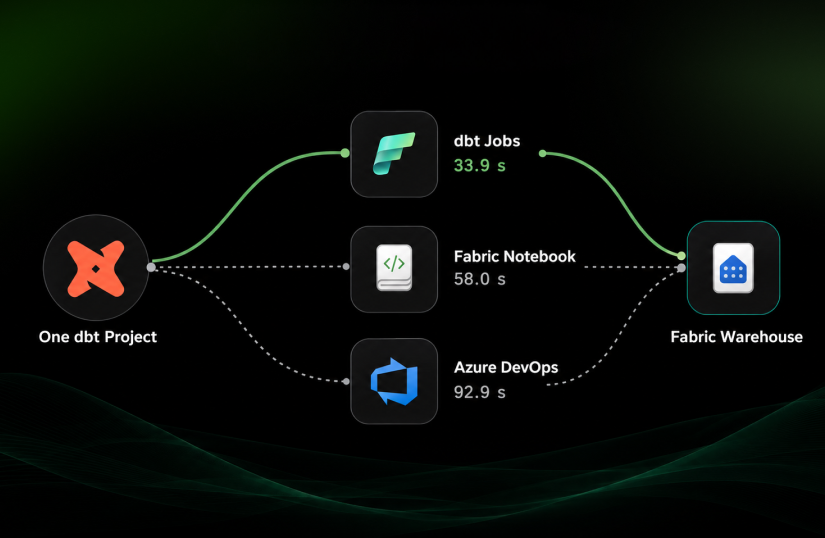
All three run the same dbt project. In our head-to-head all three targeted the same Fabric Warehouse, so the only thing that changes is where dbt itself runs.
1. dbt Jobs (managed, Fabric-native). Fabric’s built-in dbt runtime. No install, no infrastructure. It authenticates with the workspace identity and runs your project on demand or on a schedule. It can target a Fabric Warehouse or, as of the recent update, a Fabric Lakehouse. The “easy button.”
2. dbt Core in a Fabric notebook. You run dbt Core yourself inside a Fabric notebook on Spark compute. You keep dbt Core’s full control (pin any dbt version, add any package) while staying inside Fabric.
3. dbt Core on an Azure DevOps pipeline. You run dbt Core on a hosted ADO agent. Maximum control and true external CI/CD, at the cost of the most setup. Because the compute is off-platform, it uses no Fabric capacity.
Read the head-to-head below as Warehouse-only by design, not by limitation. When we ran it, dbt Jobs could not build into a Lakehouse at all; holding every path to the same Warehouse is also the cleanest way to isolate the execution environment.
What changed: dbt Jobs now builds into the Lakehouse too
The Fabric-managed dbt job runtime now ships the Lakehouse adapter (dbt-fabricspark) alongside the Warehouse one (dbt-fabric), so a dbt job can build Delta tables straight into a Lakehouse over Spark: same no-install setup, same workspace-identity auth, same built-in scheduling and run history. At the time of writing it is runtime V1.0 on dbt Core 1.11, and the Lakehouse support is in preview.
Two things follow. First, wanting a Lakehouse is no longer a reason to leave dbt Jobs and hand-roll dbt Core in a notebook, which, before this, was the most common reason teams we worked with ended up there. Second, the orchestration comparison below still stands. It was built to isolate the execution environment by holding the engine constant, and that logic does not change because a second engine became available.
How we tested
We used one dbt project (10 models and 6 tests, on the dbt-fabric adapter) and ran a full dbt build on each of the three paths, at 1 million, 10 million, and 100 million rows. The metric is dbt’s own elapsed build time; lower is faster. Everything except the execution environment was held constant, so any difference is the environment itself.
The results
| Path | 1M rows | 10M rows | 100M rows |
| dbt Jobs | 33.9 s | 81.8 s | 198.3 s |
| dbt Core — Fabric notebook | 58.0 s | 99.1 s | 224.1 s |
| dbt Core — ADO pipeline | 92.9 s | 128.6 s | 268.4 s |
Two things stand out.
dbt Jobs was fastest at every scale. Not close, either: at 1M rows it finished in about a third of the ADO pipeline’s time.
But the gap narrows as data grows: from 2.7× faster than ADO at 1M, to 1.6× at 10M, to just 1.4× at 100M. The reason is important: at small data, most of the elapsed time is fixed overhead (spinning up, installing, orchestrating), and the lean managed runtime wins easily. As the data grows, the real work becomes the Warehouse compute building the tables, and that is the same Warehouse for all three paths. So they converge. The practical takeaway: the bigger your data, the less your choice of execution path affects raw build time.
And correctness? All three paths built all 10 models and passed all 6 tests. This is a question of speed, cost, and operability, not of getting the right answer.
The cost side: capacity units
Speed is only half the decision; on Fabric you also pay in capacity units (CU). It helps to separate two kinds of compute.
Transformation compute (the CU that actually builds the tables) is dominated by the engine, and it is essentially the same regardless of which path orchestrates it: in our tests every path built into the same Warehouse. Point a job at a Lakehouse instead and this line moves, because you have changed engines; see the engine note below.
Orchestration compute (the CU spent running dbt itself) is where the paths differ, and it is small enough to measure in CU-seconds:
| Orchestration runtime | CU (seconds, approx.) |
| dbt Jobs (managed runtime) | ~3,000 |
| Fabric notebook (Warehouse path) | ~20,000 |
| Azure DevOps pipeline | 0 (external agents, off-platform) |
So dbt Jobs used roughly 6× less orchestration capacity than the notebook to run the same build. The ADO pipeline consumes no Fabric CU at all, but you pay for it elsewhere, in external agent minutes.
Put speed and cost together and the pattern is consistent: among the Fabric-hosted ways to run dbt, dbt Jobs is both the fastest and the lightest on capacity.
The engine question (Warehouse vs Lakehouse/Spark)
We also tried building the models into a Lakehouse via dbt Core’s Spark adapter, at 100M rows. It was noticeably slower (roughly 2.3× to 3.6×) than the Warehouse paths (about 616 s locally and 715 s in a Fabric notebook).
We are deliberately treating this as a secondary, directional finding rather than a verdict. We ran Spark untuned: a single default session (effectively single-node) and dbt’s default concurrency of one thread. A fair rematch would use a proper single-node pool and sweep a few Spark and concurrency settings. For this relational, set-based workload the Warehouse (T-SQL, MPP) looks like the better default, but we would want a tuned Spark run before saying so with confidence. What has changed is that this is now a live decision. It used to be settled for you: pick dbt Jobs and you got the Warehouse. With both adapters in the managed runtime, the engine is yours to choose, which makes it worth benchmarking on your own workload rather than taking our directional number for it.
Which one to choose, and why
Here’s the orchestration decision, distilled. It now reads the same whether you’re landing in a Warehouse or a Lakehouse:
| If you… | Choose | Why |
| Want the simplest, fastest, lowest-CU path and are standardising on Fabric | dbt Jobs | No install or infra, workspace-identity auth, best speed and CU, built-in scheduling, and it can be added as an activity in a Fabric data pipeline. Targets a Warehouse or a Lakehouse. |
| Need dbt Core’s control (specific dbt/package version, custom macros) but want to stay inside Fabric: interactive runs, ad-hoc scaling tests, chaining into pipelines | dbt Core – Fabric notebook | Full dbt Core flexibility while remaining native to Fabric; lighter to set up than ADO. Our recommended dbt Core option. |
| Need dbt embedded in an existing external CI/CD process with PR-gated builds, or must keep orchestration compute off Fabric capacity | dbt Core – ADO pipeline | The most control and true code-review-gated deployment, at the price of the most setup effort. |
Now that the Lakehouse gap is closed, the one thing dbt Jobs still cannot do is PR-gated CI: building only the changed models into a temporary schema and running tests as a merge gate. If that workflow is core to how your team ships, that alone can justify dbt Core on ADO. dbt Jobs does support version control and environment promotion via workspace Git; it just does not run per-PR builds. (Note, too, that the dbt job item type is not yet covered by the fabric-cicd deployment library, so workspace Git integration is the automated deployment path.)
The “why” behind the default comes down to results: dbt Jobs wins on speed, cost, and operability, and you only give that up when you specifically need control it does not offer.
A few gotchas we hit along the way
If you go down this road, save yourself some time:
- Fabric Warehouse is case-sensitive by default (Latin1_General_100_BIN2_UTF8). Column names, schema names, and test references must match your models’ output casing exactly, our single most common source of failing tests. You can set a workspace to case-insensitive collation instead, but it’s fixed at warehouse creation and makes your data comparisons case-insensitive too, so treat it as a deliberate choice, not a quick fix.
- Schemas get prefixed by default. dbt’s generate_schema_name produces <target>_<your schema>, so schema=’Sales’ can land as dbo_Sales. Override the macro if you want the exact name. (And yes, macros run in dbt Jobs too; they’re part of the project.)
- dbt Jobs uses its UI adapter settings, not profiles.yml, but the profile: key must still exist in dbt_project.yml.
- A Lakehouse target means the Spark adapter, not T-SQL. Switching a dbt job from Warehouse to Lakehouse is more than a dropdown. You move from dbt-fabric to dbt-fabricspark, with Spark SQL semantics, different materialization defaults (view rather than table) and Delta, Parquet or CSV as the table formats. Budget time to revisit model-level configs rather than assuming a lift and shift.
- dbt Jobs has no build caching in preview. Every run compiles the project fresh from source, and artifacts from earlier runs aren’t reused. Worth knowing before you design a workflow that assumes them.
The bottom line
For running dbt on Fabric, start with dbt Jobs, it was the fastest and lowest-CU option at every scale we tested, and it’s the least to operate. That default now covers Lakehouse-first architectures as well, not just the Warehouse. Move to dbt Core in a notebook when you need version or package control while staying in Fabric, and to dbt Core on Azure DevOps when you need PR-gated CI/CD or off-platform compute. Choose the runner by the control you actually need and the engine by your workload, not by habit, and no longer by whichever combination the platform happens to allow.
Written by the team at DataCrafters. We build analytics on Microsoft Fabric: dbt, Power BI, and CI/CD. Questions, or want the benchmark project to try yourself? Visit datacrafters.io.