It is 4:47 PM on a Friday.
Your transaction model just finished building. Green checkmarks all the way down, no errors in the logs. In a few minutes, this data goes live on the customer-facing balance dashboard, the one place people go to answer one simple question: how much money do I have right now? You have run this pipeline a hundred times before. You already have one hand on your jacket.
But before you close the laptop, you pull up the dashboard for one last look. Just to be sure.
One number stops you cold.
Ahmed Hassan’s account balance reads $0.00.
You know this account is not empty. He opened it with $1,200 and has been depositing ever since. If this ships, Ahmed logs in tomorrow morning, sees zero, and assumes the worst: his money is gone. He calls support. Support escalates. Someone from compliance gets pulled in to explain to a very unhappy customer why their bank “lost” their money. And that is the best case: the one where somebody catches it before he transfers rent money assuming he is broke, or before this shows up in a regulator’s sample audit.
None of that happened because your pipeline broke. It ran clean. No error was thrown. As far as the system is concerned, everything worked perfectly, and that is exactly what makes this dangerous. A crashed job gets noticed. A wrong number that loads successfully does not.
So which is it: is the balance actually zero, or did something just quietly slip through?
You have not pushed the fix yet. You do not even know what is broken. But one question is already nagging at you: if something is this wrong, why did nothing tell you?
When “It Loaded Fine” Does Not Mean “It Is Correct”
Here is the uncomfortable part: nothing told you this was wrong.
The pipeline ran to completion. Every table loaded. No exceptions, no red text in the logs, no failed job to explain in standup. By every signal your tooling gives you, this was a successful run. “It loaded fine” and “it is correct” feel like the same statement. They are not, and the gap between them is exactly where Ahmed’s balance went missing.
The usual fallback is a human scrolling through the data, eyeballing a few rows, and calling it good. That works on a hundred rows. It falls apart on a hundred thousand: nobody is manually checking that every account balance still adds up after every load. So the bad row does not get caught by a person either. It rides along until it lands somewhere a customer can see it.
And this is financial data. A bug in a marketing dashboard is an awkward Slack message. A bug in an account balance is a customer’s trust, and once it loads into production, it is already live.
How dbt Fits Into the Data Quality Pipeline
If “it ran” cannot confirm correctness, and a human cannot check every row, what fills the gap?
This is where dbt earns its place in the pipeline. dbt (short for “data build tool”) is what data teams use to turn raw, messy tables into clean, reliable ones, using plain SQL instead of one-off scripts. dbt Core is the free, open-source, command-line version: the one you install yourself and run locally from your own laptop rather than through a hosted platform.
Transforming data is dbt’s core job. Testing is part of it, not the whole thing. You could use dbt for years and never write a single test. You cannot skip the transformation part, because that is what it is actually built to do. The other half, for anyone who cares about what flows through those transformations, is a single command, dbt test, that sits on top of the same models it just built. Instead of hoping the data underneath is right, you write down what “right” actually means, as rules, and dbt checks every single row against them, every single time you run it. Not on a dashboard, not in production, not after Ahmed has already opened the app. Locally, on your machine, against a dev schema, before anything touches the real warehouse.
This is called shifting left: catching the problem as early as possible, ideally on your laptop, before the warehouse, before the dashboard, before Ahmed ever sees it. Think of it as a quality gate. The data does not get to move forward just because it loaded. It has to prove it is clean first.
What a dbt Test Actually Is: Built-In, Custom Generic, and Singular
Before we go further, it is worth being precise about what “a test” actually is in dbt, because under the hood, every single one boils down to the same idea: a query that should return zero rows. dbt runs it after your models build. If it comes back empty, the rule held and the test passes. If it returns even one row, that row is a failure, and dbt tells you exactly which one.
That is the whole mechanism. Everything else is just how that query gets written and reused. In practice, dbt gives you three flavors:
1. Built-in tests: ship with dbt Core, ready to use with no code at all. You just name them in a YAML file against a column: unique, not_null, accepted_values, relationships. They cover the structural checks every dataset needs: no duplicate IDs, no missing keys, no orphaned references, no rogue values outside an allowed list.
2. Custom generic tests: same idea as built-in tests (declared in YAML, reusable across any column or model), but you write the underlying logic as a macro. Useful when a rule is specific to your business but still applies in more than one place, for example, “this currency code must be real ISO 4217,” a check no built-in test knows how to do.
3. Singular tests: a one-off SQL file for a rule that is specific to one exact situation and does not need to be reused elsewhere. No YAML, no macro, just a .sql file in the tests/ folder that returns the rows that should not exist. This is where a check like “a customer’s balance must match the sum of their transactions” lives.
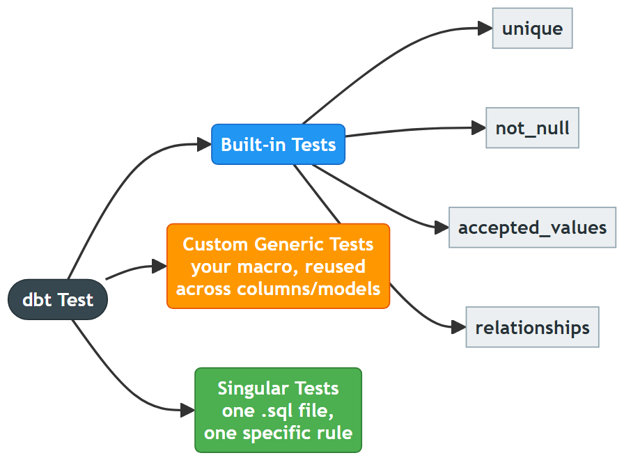
Built-in tests are the fastest net to throw over your data. Custom generic and singular tests are where you start encoding what “correct” actually means for your business, which, as we are about to see, is exactly where Ahmed’s account was hiding.
Environment Setup: dbt Core, dbt-fabric Adapter, and Entra ID Authentication
That warehouse we keep mentioning (the one feeding Ahmed’s dashboard) has a name: it is a Microsoft Fabric Warehouse. And before dbt can run a single check against it, it needs a way to actually talk to it. Getting there is less mysterious than it sounds.
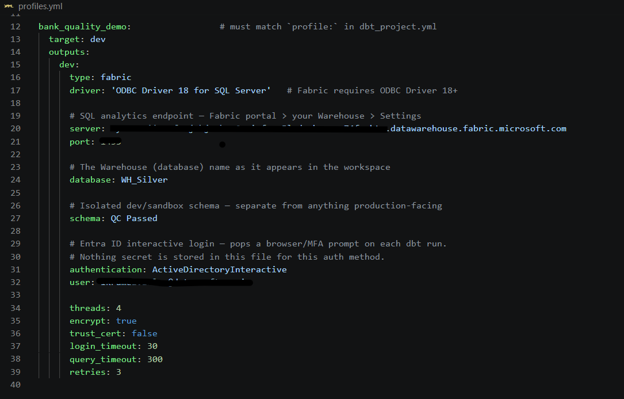
On the laptop, it comes down to three pieces: Python, dbt-core (the engine that runs models and tests), and dbt-fabric, an adapter that teaches dbt-core how to speak specifically to a Microsoft Fabric Warehouse. Underneath that adapter sits the ODBC Driver for SQL Server, the same protocol layer Fabric’s SQL endpoint understands, plus a small library that handles login. One version detail worth checking before anything else: it has to be ODBC Driver 18 or newer, since Fabric only supports version 18 and up for ODBC connections.
That login is the part worth pausing on. No password, no secret key sits in a config file anywhere. Every time dbt connects, it pops open a familiar Microsoft sign-in window (the same Entra ID login used for everything else at work) and authenticates as you. If there is nothing to steal, there is nothing to leak.

The last piece is a small connection file called profiles.yml that tells dbt exactly where to point all of this: the Warehouse’s SQL endpoint, which Fabric Warehouse, and which schema inside it. True to the no-secrets setup above, it holds nothing but addresses and names, since the login itself always happens through that Entra ID prompt. And that schema is deliberately an isolated sandbox, separate from anything a real report or dashboard reads from, so every test in this story runs safely off to the side, with zero chance of touching production data by accident.
The Data Behind the Dashboard: Raw Tables in the Bronze Layer
To dig into what happened to Ahmed’s account, you need to see how the bank’s own records are laid out: three tables, customers, accounts, and transactions, the same kind of data any retail bank keeps on file.
All of it lands first in a Raw Lakehouse: the bronze layer, untouched and unvalidated, exactly as it arrived. Nothing in this zone is allowed anywhere near a dashboard yet.
dbt’s job is to sit between here and production (WH_Silver): check every row, and only let what passes move on to the Fabric Warehouse’s QC Passed schema, the silver layer, the one place downstream reports are actually allowed to read from.
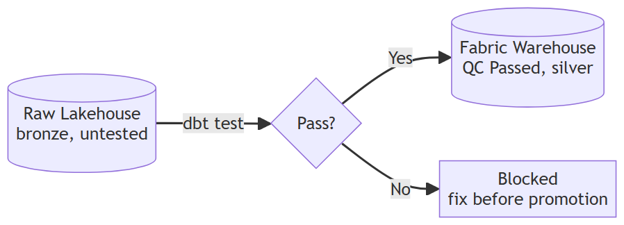
The raw data is not clean. It never is. Some problems are loud: the kind of structural issue any basic check should catch on sight. Others are quieter: a transaction that looks perfectly fine sitting on its own, but does not add up once you check it against the rest of the story. Somewhere in that second group is whatever happened to Ahmed’s account. We will get there, but let us start with the loud ones first.
Built-In dbt Tests: Catching Structural Problems in Raw Data
You point dbt at the raw tables and run the built-in tests: unique, not_null, relationships, accepted_values, declared with a few lines of YAML and zero custom code. Every row gets checked against every rule, in under a minute.
version: 2

sources:
  - name: raw
    description: Raw, untested bank data landed in the LH_Bronze Lakehouse (bronze/landing zone) before dbt validates it.
    database: LH_Bronze
    schema: raw
    tables:
      - name: customers
        columns:
          - name: customer_id
            tests:
              - unique
              - not_null

      - name: accounts
        columns:
          - name: account_id
            tests:
              - unique
              - not_null
          - name: customer_id
            tests:
              - not_null

      - name: transactions
        columns:
          - name: transaction_id
            tests:
              - unique
              - not_null
          - name: account_id
            tests:
              - not_null
              - relationships:
                  to: source('raw', 'accounts')
                  field: account_id
          - name: transaction_type
            tests:
              - accepted_values:
                  values: ['deposit', 'withdrawal', 'transfer', 'fee', 'interest']
Run this command to fire the built-in tests:
dbt test --select source:raw.accounts
dbt test --select source:raw.transactions
Running dbt test --select source:raw.accounts gives this result:
1 of 4 START test source_not_null_raw_accounts_account_id ...................... [RUN]
2 of 4 START test source_not_null_raw_accounts_customer_id ..................... [RUN]
3 of 4 START test source_relationships_raw_transactions_account_id__account_id__source_raw_accounts_  [RUN]
4 of 4 START test source_unique_raw_accounts_account_id ........................ [RUN]

1 of 4 PASS source_not_null_raw_accounts_account_id ............................ [PASS in 39.27s]
4 of 4 PASS source_unique_raw_accounts_account_id .............................. [PASS in 39.24s]
3 of 4 FAIL 1 source_relationships_raw_transactions_account_id__account_id__source_raw_accounts_  [FAIL 1 in 39.26s]
2 of 4 FAIL 2 source_not_null_raw_accounts_customer_id ......................... [FAIL 2 in 39.32s]

Done. PASS=2 WARN=0 ERROR=2 SKIP=0 NO-OP=0 TOTAL=4
Running dbt test --select source:raw.transactions gives this result:
1 of 5 START test source_accepted_values_raw_transactions_transaction_type__deposit__withdrawal__transfer__fee__interest  [RUN]
2 of 5 START test source_not_null_raw_transactions_account_id .................. [RUN]
3 of 5 START test source_not_null_raw_transactions_transaction_id .............. [RUN]
4 of 5 START test source_relationships_raw_transactions_account_id__account_id__source_raw_accounts_  [RUN]
5 of 5 START test source_unique_raw_transactions_transaction_id ................ [RUN]

3 of 5 PASS source_not_null_raw_transactions_transaction_id .................... [PASS in 19.81s]
2 of 5 PASS source_not_null_raw_transactions_account_id ........................ [PASS in 19.82s]
1 of 5 FAIL 1 source_accepted_values_raw_transactions_transaction_type__deposit__withdrawal__transfer__fee__interest  [FAIL 1 in 19.81s]
4 of 5 FAIL 1 source_relationships_raw_transactions_account_id__account_id__source_raw_accounts_  [FAIL 1 in 19.79s]
5 of 5 FAIL 1 source_unique_raw_transactions_transaction_id .................... [FAIL 1 in 0.38s]

Done. PASS=2 WARN=0 ERROR=3 SKIP=0 NO-OP=0 TOTAL=5
Four separate rules, four separate failures, each one a real problem sitting in the raw data:
| Test | Failing rows | What it actually found |
unique on transaction_id | 1 | A transaction ID that shows up twice, the same event recorded as if it happened twice |
not_null on accounts.customer_id | 2 | Two accounts with no customer attached to them at all |
relationships: transactions → accounts | 1 | A transaction pointing at an account that doesn’t exist anywhere in the accounts table |
accepted_values on transaction_type | 1 | A transaction type outside the five the business recognizes: a typo, sitting undetected |
Every one of those is a real, ship-stopping problem, and dbt found all four using only a few lines of YAML declared once in _sources.yml. That is the case for built-in tests: cheap, fast, and they catch a surprising amount of what actually goes wrong with data.
Notice what is not on this list: nothing here says a word about Ahmed’s account. Every one of his numbers is technically valid: a real customer, a real account, real transaction types, no duplicates. Built-in tests have no way to know that his balance does not add up, because “does not add up” is not a structural rule. It is a business rule. That is where we are headed next.
Custom dbt Tests: Business Rules That Built-In Tests Cannot Reach
Built-in tests are done. Four real problems caught, zero mention of Ahmed. So you write the rule dbt could never have known on its own: a customer’s balance has to equal what they started with, plus everything that has happened to their account since. No YAML checkbox for that. It is a singular test: one SQL file, one specific business rule.
with valid_txns as (
    select
        t.account_id,
        sum(t.amount) as valid_txn_sum
    from {{ source('raw', 'transactions') }} t
    inner join {{ source('raw', 'accounts') }} a
        on t.account_id = a.account_id
    where t.transaction_date >= a.account_open_date
    group by t.account_id
),

expected as (
    select
        a.account_id,
        a.opening_balance,
        coalesce(v.valid_txn_sum, 0) as valid_txn_sum,
        a.opening_balance + coalesce(v.valid_txn_sum, 0) as expected_balance,
        a.current_balance
    from {{ source('raw', 'accounts') }} a
    left join valid_txns v
        on a.account_id = v.account_id
)

select *
from expected
where abs(expected_balance - current_balance) > 0.01
Run this command to fire the reconciliation test:
dbt test --select reconciliation_checkRunning dbt test --select reconciliation_check gives this result:
1 of 1 START test reconciliation_check ......................................... [RUN]
1 of 1 FAIL 1 reconciliation_check ............................................. [FAIL 1 in 22.64s]
dbt test only tells you that it failed. To see exactly which row broke the rule, run:
dbt show --select reconciliation_check --limit 5One failure. You pull up the actual row:
Previewing node 'reconciliation_check':
| account_id | opening_balance | valid_txn_sum | expected_balance | current_balance |
| ---------- | ---------------- | -------------- | ----------------- | ---------------- |
|       2008 |            1,200 |            550 |              1,750 |                0 |
There it is. Account 2008: Ahmed’s account. It should show $1,750. It shows $0. The reconciliation test doesn’t know why. It only knows the math doesn’t work. That’s still more than any built-in test could tell you: something in account 2008’s history isn’t what it claims to be.
So you reach for the second custom test: the one built specifically to catch a transaction that couldn’t have happened when the data says it did.
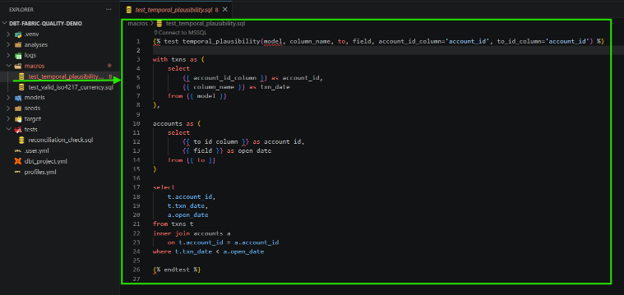
The rule is simple: a transaction can’t happen before its own account exists.
select
    t.account_id,
    t.transaction_date,
    a.account_open_date
from {{ source('raw', 'transactions') }} t
inner join {{ source('raw', 'accounts') }} a
    on t.account_id = a.account_id
where t.transaction_date < a.account_open_date
Run this command to fire it:
dbt test --select test_name:temporal_plausibilityWhich gives this result:
1 of 1 START test source_temporal_plausibility_raw_transactions_transaction_date__account_open_date__source_raw_accounts_  [RUN]
1 of 1 FAIL 1 source_temporal_plausibility_raw_transactions_transaction_date__account_open_date__source_raw_accounts_  [FAIL 1 in 0.41s]
Same as before, dbt test only confirms that it failed. To see the actual row, run:
dbt show --select test_name:temporal_plausibility --limit 5
Previewing node 'source_temporal_plausibility_raw_transactions_transaction_date__account_open_date__source_raw_accounts_':
| account_id | txn_date   | open_date  |
| ---------- | ---------- | ---------- |
|       2008 | 2021-08-01 | 2021-09-15 |
And there’s your answer. A transaction dated August 1st, 2021, sitting on an account that wasn’t opened until September 15th, 2021: six weeks before the account existed. Whatever that transaction really is (a bad backfill, a migration error, a fat-fingered date), it’s not valid, and it’s quietly throwing off everything downstream of it.
The reconciliation test told you something was wrong. The temporal test told you why. Between the two, you now know exactly what to fix before any of this reaches Ahmed’s dashboard. Neither answer was sitting in a built-in test.
(One more custom test fired in this run too: valid_iso4217_currency caught a transaction using a currency code that isn’t real ISO 4217, a different account entirely. Not part of Ahmed’s story, but the same lesson: some rules only your business knows, and no generic test ships with them built in.)
Seven Problems, One Pipeline: Full Results
Step back for a second and count what actually got found: seven separate problems, sitting quietly in data that “loaded fine.” Ahmed’s missing balance was one of them. Not one was visible from the outside: no error, no crash, no warning in a log file. The only reason any of this surfaced is that someone wrote down what “correct” means and let dbt check it, row by row, before the data went anywhere near production.
| Issue Found | Root Cause | Caught By |
Duplicate transaction_id (t3014) | The same transaction accidentally recorded twice | unique (built-in) |
Null customer_id (accounts 2011, 2012) | Accounts created without ever linking them to a customer record | not_null (built-in) |
Orphaned account_id (t3015 → 9999) | A transaction referencing an account that doesn’t exist | relationships (built-in) |
Invalid transaction_type (t3011 “depsoit”) | A typo at data entry, never validated against the allowed list | accepted_values (built-in) |
Invalid currency code (t3013 “USB”) | A non-standard currency code entered instead of a real ISO 4217 code | valid_iso4217_currency (custom generic) |
Balance mismatch (account 2008) | Proved something was wrong; didn’t yet say what | reconciliation_check (custom singular) |
Backdated transaction (t3018) | A transaction dated six weeks before the account was opened, the actual cause of the mismatch above | temporal_plausibility (custom generic) |
Four of those, dbt catches for free: no code, just a few lines of YAML. The last three needed someone to sit down and encode what “correct” actually means for a bank account. And notice how the last two connect: the reconciliation test proved something was wrong with Ahmed’s account without saying what. The temporal test, which knows nothing about balances, only about dates, is what actually pointed at the cause. Neither test alone tells the full story. Together, they turn “something is off” into “here is the exact row, here is exactly why.”
That is the real value of testing locally, before anything ships: you get enough evidence to know precisely what to fix, while it is still sitting on a laptop and not yet Ahmed’s problem.
Shift Left: Catching Data Quality Issues Before Production
Go back to that Friday afternoon: green checkmarks, no errors, one hand on your jacket. That part never changes: a clean run will never be proof the data is right. What changes is what happens before you get there. Built-in tests catch the obvious for free. The moment “correct” depends on your business (a balance that has to reconcile, a date that has to make sense), you need a test that knows that, written once, run forever.
Production monitoring still matters. dbt testing is what happens earlier: on a laptop, before a single row reaches a dashboard. Ahmed’s balance never actually shipped. That is the whole point. If there is one thing worth trying this week: write down one rule about your data that only you would know is wrong, and let dbt check it every time, before you do.
Data Crafters works with data engineering and analytics teams to build production-grade data quality pipelines on Microsoft Fabric. If you are designing dbt testing strategies, building medallion architectures, or scaling data validation across your warehouse, we can help you build the foundation.