What if every vendor email about invoice status was answered automatically, accurately, and instantly, with minimum human touch?
| ⏱ 8 min read • Finance Automation • AI Agents |

It starts with a simple question.
“Hi, can you tell me the status of invoice INV-2025060?”
A vendor sends this email. Seems harmless enough. But multiply this by 50, 100, or 500 emails a week, and you have a finance team drowning in repetitive inquiries instead of focusing on strategic work.
For every single inquiry, someone has to:
- Open the email
- Log into the accounting system
- Search for the invoice
- Verify the sender is authorized to see it
- Write a professional response
- Send the reply
That’s 10-15 minutes per inquiry. For routine questions. Every single time.
Now imagine a world where that email arrives, and within 60 seconds, the vendor receives a professional, accurate response, with no human intervention whatsoever.
That’s not a future scenario. That’s what autonomous AI agents can do today.
The Hidden Cost of Manual Vendor Invoice Status Inquiries
Let’s talk numbers.
According to industry research, the reality of manual accounts payable processes is sobering:

But here’s what those numbers don’t capture: the opportunity cost.
Every minute your AP team spends answering “What’s the status of my invoice?” is a minute they’re not spending on:
- Negotiating early payment discounts
- Identifying cash flow optimization opportunities
- Building stronger vendor relationships
- Analyzing spending patterns
| “88% of respondents believe that improving invoice management and supplier payments would free up their finance team to focus on more strategic initiatives.” |
— DocuClipper, Accounts Payable Statistics 2025
The financial impact of these repetitive processes is measurable. The strategic impact is even greater.
Designing an Autonomous Invoice Status Agent in Microsoft Fabric
To address this inefficiency, we designed an autonomous invoice status agent built on Microsoft Copilot Studio, Fabric, and Power Automate.
Not another dashboard. Not another report. An intelligent agent that actually does the work, from receiving the vendor email to sending the reply.
The Invoice Status Responder is an end-to-end autonomous workflow built on Microsoft’s Power Platform and Fabric. Here’s what it does:
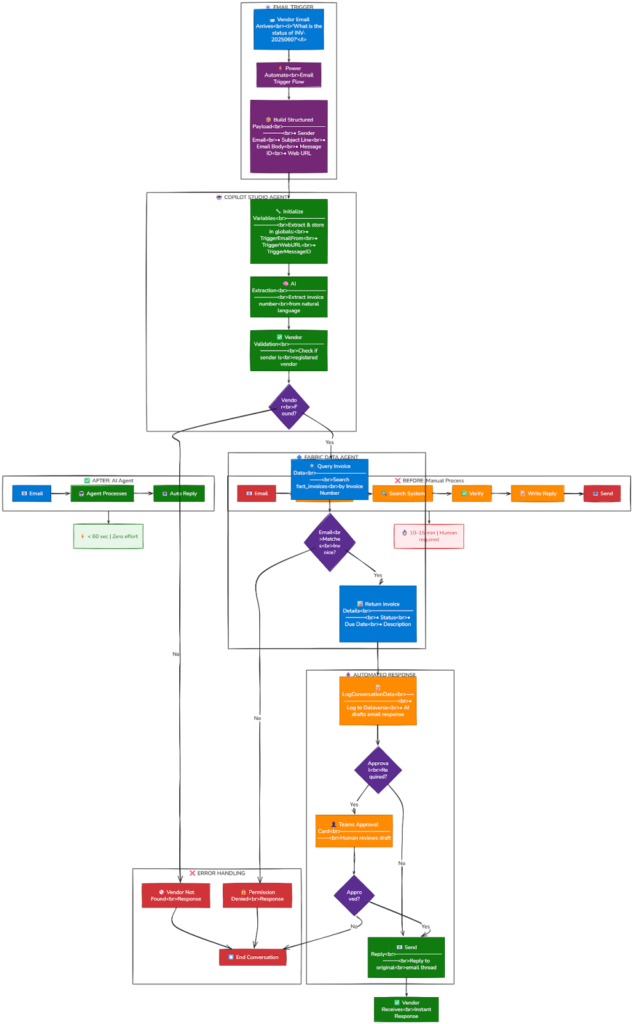
How the AI Agent Automates Vendor Invoice Status Requests: Six-Step Workflow
Step 1: Email Arrives → Agent Activates
A vendor sends an email asking about their invoice. The moment it lands in the monitored inbox, a Power Automate flow captures it and sends the details to the Copilot Studio agent. No human sees it. No ticket is created. The agent is already working.
Step 2: AI Extracts the Invoice Number
The agent uses natural language processing to understand the email and extract the invoice number, whether it’s written as “INV-2025060”, “invoice #2025060”, or buried in a paragraph of text. The AI model resolves variations in invoice formatting that traditional rule-based systems typically struggle with.
Step 3: Vendor Identity Verified
Security matters. The agent validates that the sender’s email address is a registered vendor in your system. If they’re not? The request is declined. No data leakage. No unauthorized access..
Step 4: Real-Time Data Query
Here’s where it gets powerful. The agent connects to a Microsoft Fabric Data Agent, which queries your actual invoice data in real-time. But there’s a critical security layer: the Fabric agent verifies that the requester’s email matches the email on file for that invoice. Vendors can only access invoices associated with their registered identity.
Step 5: Professional Response Drafted
The agent drafts a professional, context-aware email response. Not a robotic template, an intelligent response that includes the invoice status, due date (if pending), and appropriate next steps. It sounds human because it was designed to.
Step 6: Reply Sent Automatically
The response is sent directly to the vendor, as a reply to their original email thread. The entire conversation is logged in Dataverse for audit trails and compliance. From the vendor’s perspective, they received a fast, professional response from your finance team.
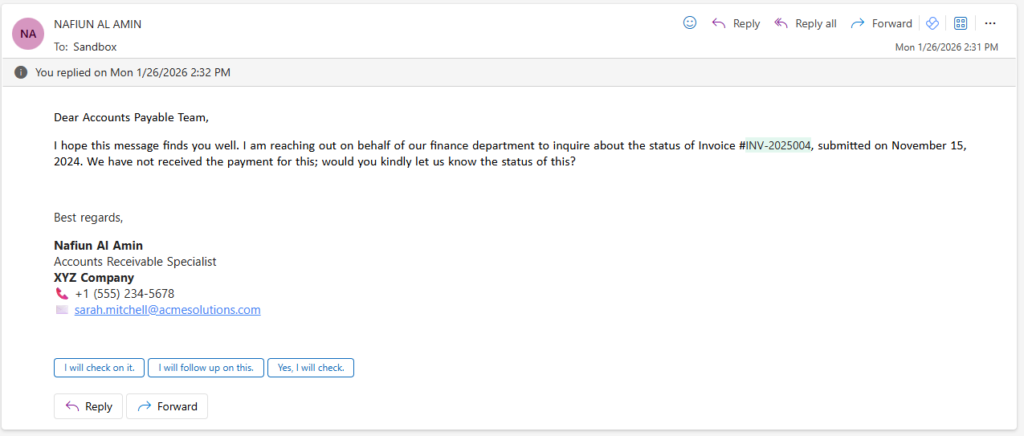
Example Mail Received:
Example Mail Response Generated:
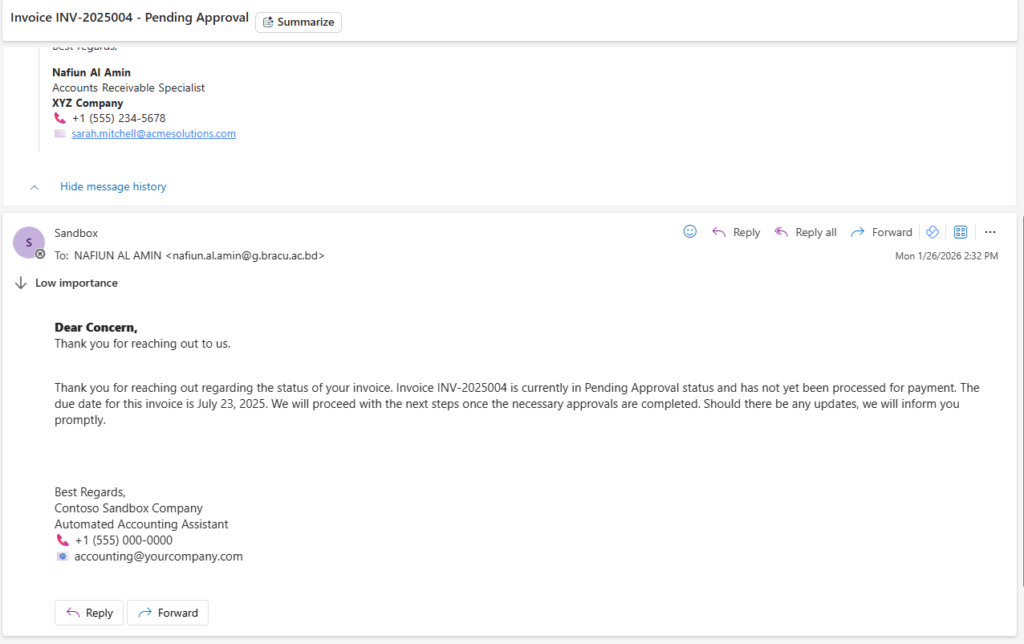
| Total time from email received to reply sent: Under 60 seconds. |
Governance and Human Oversight in AI-Powered Accounts Payable Automation
We hear this question a lot. And it’s the right question to ask.
Automation does not eliminate governance. The Invoice Status Responder includes an optional human-in-the-loop approval gate. Before any email is sent, an Adaptive Card can appear in Microsoft Teams asking an administrator to review and approve the response. The card will also have the option to navigate to the original mail if the admin wants to reverify.
Adaptive Card: |
This gives you the best of both worlds:
- Speed: The agent does 95% of the work instantly
- Control: A human can review before sending
- Audit Trail: Every interaction is logged in Dataverse
- Flexibility: Turn approval on or off based on your risk tolerance
As your team gains confidence in the agent’s accuracy, you can dial down the oversight. Start with 100% approval, move to exception-only review, and eventually achieve full autonomy for routine inquiries.
Business Impact of AI Agents in Accounts Payable: Before and After Automation
Let’s quantify what this means for a real finance operation.
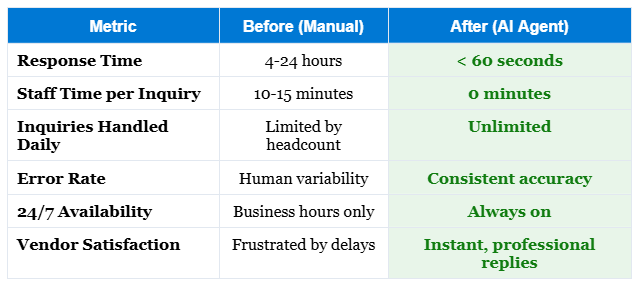
ROI of Automating Vendor Invoice Status Inquiries
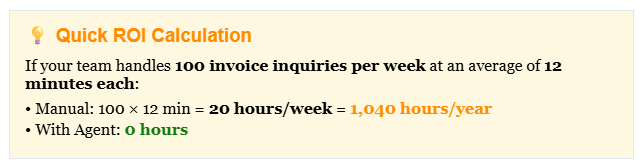
At scale, this reclaimed capacity can be redirected toward cash optimization, vendor negotiations, and working capital improvements.
Microsoft Fabric and Power Platform Architecture for AI Invoice Automation
For the technically curious, here’s what powers the Invoice Status Responder:
| Component | Role |
| Microsoft Copilot Studio | The brain orchestrates the entire workflow, manages conversation logic, and coordinates between components |
| Microsoft Fabric | The data layer houses your invoice data in a Lakehouse with a Data Agent that answers queries and enforces security rules |
| Power Automate | The connective tissue triggers the agent on incoming emails, logs data to Dataverse, and sends replies |
| Dataverse | The audit trail stores every interaction for compliance, reporting, and continuous improvement |
| Microsoft Teams | The human interface displays approval cards for human-in-the-loop review when needed |
The architectural advantage of this stack lies in its native integration within the Microsoft ecosystem. It’s entirely within the Microsoft ecosystem. If you’re already using Microsoft 365, Power Platform, and Fabric, you have the foundation. This reduces integration complexity, security exposure, and vendor management overhead.

Scaling AI Agents in Finance Beyond Invoice Status Inquiries
The Invoice Status Responder isn’t just a point solution. It’s a pattern, a template for autonomous finance operations.
Once you’ve built this capability, the same architecture can handle:
- Payment status inquiries: “When will I receive payment for invoice X?”
- Purchase order tracking: “What’s the status of PO-12345?”
- Remittance advice requests: “Can you send me the remittance for payment received on [date]?”
- Tax document requests: “I need a copy of my W-9/1099.”
- Account statement generation: “Please send me a statement of account for Q4.”
Each of these follows the same model: email trigger → AI extraction → data query → security validation → automated response. Build once, replicate infinitely.
| This model shifts repetitive, rules-based communication to automation while allowing finance professionals to focus on activities that require judgment, negotiation, and analysis. |
Is AI-Based Vendor Communication Automation Right for Your Finance Team?
The Invoice Status Responder is ideal for organizations that:
- Process a significant volume of vendor inquiries (50+ per week)
- Already use Microsoft 365 and Power Platform
- Have invoice data accessible in a structured format
- Want to improve vendor relationships through faster response times
- Are looking to redeploy AP staff to higher-value activities
The implementation typically takes 2-3 weeks depending on the complexity of your data environment and approval requirements.
The Future of Accounts Payable Automation with AI Agents
We’re at an inflection point.
For decades, “automation” in finance meant moving from paper to spreadsheets, then from spreadsheets to ERP systems. Important progress, but fundamentally still tools that display information.
AI agents represent something different: intelligence that acts.
The Invoice Status Responder is just one example. But it demonstrates a profound shift: from finance teams that react to inquiries to finance operations that autonomously resolve them.
The vendors get instant answers. The finance team gets time back. The organization gets efficiency gains that compound over years.
This represents a structural shift in how finance operations can be designed.
And it’s available today.
If you are evaluating where AI agents could create measurable impact in your finance function, vendor communication is often one of the most practical entry points.
We work with finance leaders to identify where structured AI can create operational clarity while preserving governance and control.
• • •
References
[1] DocuClipper. (2025). 59 Accounts Payable Statistics For 2025.
https://www.docuclipper.com/blog/accounts-payable-statistics/
[2] Ardent Partners. (2024). State of ePayables 2024 Report. Average cost to process an invoice: $12.88; Best-in-Class: $2.78.
https://ramp.com/blog/accounts-payable-metrics
[3] Aberdeen Group. Invoice Processing Survey. Average cost of manual invoice processing: $15; average processing time: 14.6 days.
https://www.ascendsoftware.com/blog/the-most-shocking-accounts-payable-stats
[4] Institute of Finance and Management (IOFM). Accounts Payable Survey. 39% of invoices contain errors; up to 84% of AP staffer time spent on manual tasks.
https://payouts.com/accounts-payable-automation-cut-costs-by-80-in-2024/
[5] Bottomline Technologies. (2025). The Hidden and Not-So-Hidden Costs of Manual Accounts Payable. Average 17.4 days to process an invoice without automation.
https://www.bottomline.com/resources/blog/hidden-and-not-so-hidden-costs-of-manual-accounts-payable
[6] ResolvePay. (2025). 13 Statistics That Quantify Cost per Invoice in Manual vs Automated Flows. Manual processing: 15-30 minutes per invoice; automation reduces labor by 70-80%.
https://resolvepay.com/blog/13-statistics-that-quantify-cost-per-invoice-in-manual-vs-automated-flows
[7] Skynova. Invoicing Statistics. 57% of invoice data entered manually; 49% of businesses require 2-3 approvers.
https://www.skynova.com/blog/invoicing-statistics
[8] ACARP. (2024). Accounts Payable Automation Trends 2024. 52% of AP teams spend over 10 hours/week processing invoices; 60% manually key data.
https://acarp-edu.org/accounts-payable-automation-trends-2024/
[9] DocuClipper. (2025). How Many Invoices Can Be Processed In A Day. Manual processing averages 14.2 days; automated processing: 2.84 days.
https://www.docuclipper.com/blog/how-many-invoices-can-be-processed-in-a-day/
[10] Forrester Research. (2024). Customer Time Value Study. 77% of customers say valuing their time is the most important factor in good service.
https://www.nicereply.com/blog/slas-service-level-agreements/